Welcome to our community

Be a part of something great, join today!

  • Hey all, just changed over the backend after 15 years I figured time to give it a bit of an update, its probably gonna be a bit weird for most of you and i am sure there is a few bugs to work out but it should kinda work the same as before... hopefully :)

Terrible Glitching on Scarlet

Louis Maddalena

Well-known member
Joined
Nov 19, 2008
Messages
1,914
Reaction score
0
Points
0
Location
New Jersey
Hey Guys,

Had an issue with a scarlet on a rental today, I had to bring a back up body to the location so the shoot was only out of a camera for a little while, but now I am still down a camera. I am going to file a support ticket with RED tomorrow but its 2am here and I want to go to bed but first I wanted to check to see if anybody has seen this issue before. I have attached and image.

What I can tell you is this:
1) The glitch is actually over what is seen in the sensor. (it a lens cap is on that is what it looks like in image, otherwise its over what ever a a lens is projecting on the sensor)
2) I have been told it recorded that way. I have not been able to check this myself, I told them I would not format the cards to the morning giving them the night to back up their drives.
3) After turning off the camera initially, the problem would go away... now the problem is full time.
4) its not the monitor or the cable, I used the same monitor and cable on the back up body.
5) This is while the camera is on AC and on Redvolt power.

Edit: The picture is upside down. I apologize for this, but I am way to tired to flip it. the glitch is the same so I don't think it matters. Sorry about this.
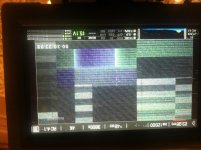
 

Attachments

  • photo.jpg
    photo.jpg
    96.4 KB · Views: 0
I just want to ask the production why they set the ISO 12800.
 
Same, But this does happen to me as well, I usually get rid of it by just re-starting the camera. I've come to grips with the fact that RED gear is Beta, including software. I've used release versions, and betas and they both generally have problems with glitches. I find being patient and taking your time in menu helps. But if I contacted RED everytime i've had issues like this I'd have millions of support tickets by now...

I'd file a ticket and go from there, even though i've seen stuff like that
 
The ISO was set at 800, but when the glitch started it changed... I would have not sent a support ticket in but its not going away.
 
Please heed this comment only as a possible direction of operator investigation if the camera is still in your hands and pay little heed to it in any event. There are better, smarter, more competent people posting here. In meantime, a few thoughts :-


Uncommanded jumps to high gain (ISO) setting - Why? ---

Touch screen mapping. Has the screen display itself moved out of alignment with the touch points. If the zones are a bit close and the screen is stabbed at in haste, incorrect commands might be going in.

Are the touch screen connectors secure? If they are glitchy during movements of the screen when being poked at, then mutilated signals might be going in and the system dealing with them the best way it can.

Have there been attempts made to "set blacks", "black calibration" I think you guys call it "black shade" whilst the camera is set to this very high video gain state? Did the process stall or was it operator-halted by hard shutdown to save time?

Have there been operator errors like "black shade" with the lens uncovered aborted by hard shutdowns to save time?


An attempt to "set black" with the lens inadventently uncapped gives my SI2K camera a big headache and the whole operating system slows right down. Trying to "set black" over a longer "shutter open" period than the camera was intended to function at, will also cause this to happen. It takes a reboot to set it right. My wild guess is that too much memory and swap space on the system drive gets used up during these abuses.

Whilst the EPIC/SCARLETT are unrelated to the SI2K except perhaps via one of the original RED code writers, I wonder if the system's resources are being similarly overwhelmed by the amount of data needing to be handled during a "black shade" operation at such a high gain state and whether an error has become written into user settings that restores this error when the uncommanded high ISO setting occurs again.


Maybe a system restore and several "black shade" operations at normal ISO setting may help it along.


If this speculation sends you down a dead-end, please accept my apologies in advance.


It seems most likely you need to have the camera examined back at RED.
 
Last edited:
We experienced a similar problem & we tried quiet a few solutions like; re-install firmware to black calibration, et al.

Eventually we found an acceptable solution to this problem: Secure Format the SSD that was used when this glitch appeared... No more glitches like these after that, at least for a few weeks... & when it reappears, we do another Secure Format & we're back in action!

I'd suggest you to please try this... and i'm positive, it'll solve your problem for a couple weeks!

But if the screen looks like this just on boot up & without a SSD in the camera, then i guess RED Support team would be your best bet.

All d Best ~
 
Back
Top