Welcome to our community

Be a part of something great, join today!

  • Hey all, just changed over the backend after 15 years I figured time to give it a bit of an update, its probably gonna be a bit weird for most of you and i am sure there is a few bugs to work out but it should kinda work the same as before... hopefully :)

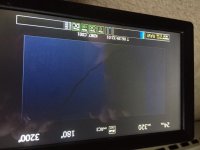
Strange Yellowish Cast over part of RED PRO LCD 7' image?

Mike Krumlauf

Well-known member
Joined
Mar 1, 2008
Messages
395
Reaction score
23
Points
18
Age
35
Location
Denver, CO
Website
www.youtube.com
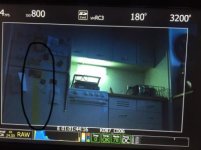
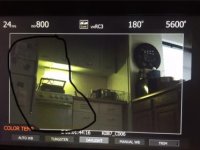
Came across a strange problem that started happening (or at least i started noticing it) yesterday during an event i was filming. There is a strange yellow cast over part of the LCD image. I shot some test footage and hooked the RED ONE into an HDMI tv and the footage nor the HDMI signal was showing this problem which leads me to believe it's the monitor. So the big question is, what is it, how could it have happened, and how can i fix this?

Thanks Guys :)
 

Attachments

  • Screen Shot 2015-06-15 at 11.55.23 AM.jpg
    Screen Shot 2015-06-15 at 11.55.23 AM.jpg
    15.6 KB · Views: 1
  • Screen Shot 2015-06-15 at 11.55.44 AM.jpg
    Screen Shot 2015-06-15 at 11.55.44 AM.jpg
    14.9 KB · Views: 1
On the top of the LCD, one of the round buttons expands the image to fill the screen. Does the yellow cast expand with it, or stay the same size.

If it stays the same size, then it's a problem with the LCD screen. Either live with it, get Red to repair it if it's under warranty or doesn't cost too much (unlikely), or get a competent local electronic engineer to have a look at it for loose connections inside.

If it expands with the picture, then it's likely either the cable or the connector on the LCD or on the camera body - closely inspect both the cable ends and the LCD/camera body sockets for broken pins stuck in the sockets or bent/broken/missing pins in the cable ends. If nothing there, try another cable. Again it may still be a loose connection inside, this time close to the socket.
 
Here is what happens when i enlarge it as you asked eric. it seems to change in size.
 

Attachments

  • IMG_2266.jpg
    IMG_2266.jpg
    92.2 KB · Views: 0
  • IMG_2267.jpg
    IMG_2267.jpg
    76 KB · Views: 0
Try changing or wiggling the cable after checking for pin damage.

Also try flipping the image in the Menu - does the yellow swap sides with the image or stay in the same place?
 
eric,

where in the menu system would i go to flip the image? wiggling the cable did not work, and none of the pins look damaged and the ports on the monitor and red look fine.
 
System>Setup>Program>Video>FLIP H
 
thanks, it stays in the same place when you flip it.
 
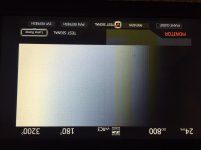
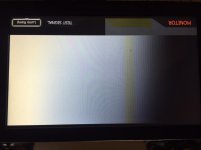
it gets worse the darker the image is. i got a full thick rectangle of yellow here.
 

Attachments

  • IMG_2268.jpg
    IMG_2268.jpg
    93.1 KB · Views: 0
Unfortunately I think it all points to the LCD panel itself being faulty, rather than the signal going to it.

A drop, or hard knock, or excessive pressure on the screen itself might cause it. Or just bad luck that a fault has developed.

As I said above - Either live with it, get Red to repair it if it's under warranty or get a repair quote & hope it doesn't cost too much, or get a competent local electronic engineer to have a look at it for loose connections inside.
 
Mike,

First step is to change the LCD cable, just get another from a friend or from a rental and see if cleared the issue, if not second step is to change the monitor to test the signal going out from your R1.

Regards!
 
hey guys, i was able to actually trade out the monitor for another one with the owner i bought from at no additional fee. Ironically the problem cleared itself up right before i did the trade, very strange.
 
hey guys, i was able to actually trade out the monitor for another one with the owner i bought from at no additional fee. Ironically the problem cleared itself up right before i did the trade, very strange.

Probably a loose connection inside then.
 
Back
Top