Welcome to our community

Be a part of something great, join today!

  • Hey all, just changed over the backend after 15 years I figured time to give it a bit of an update, its probably gonna be a bit weird for most of you and i am sure there is a few bugs to work out but it should kinda work the same as before... hopefully :)

Strange vertical lines in Dragon Carbon

JanneJansson

Well-known member
Joined
Aug 14, 2008
Messages
1,070
Reaction score
0
Points
0
Location
Sweden
Website
www.sfe.se
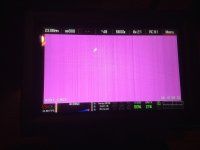
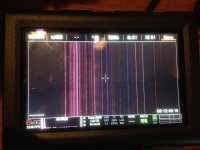
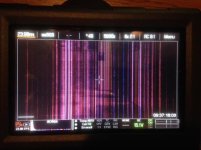
Hi, today we got some really strange red-purple vertical lines all over the picture. Going out tomorrow again and I feel the panic! I have filed a support ticket also, but just want to know if someone can solve this. The camera is brand new just run 16h and noticed small line during first blackshade alson but it went away. Now the entire image is full of lines and they will not go away. Tried resetting, blackshade and also new firmware. After about 10min all camera locks up and nothing works and fans kick in to turbo speed.

Here is link to log file.
102-A69-4C7_log.txt

lines.jpg


This is how they look recorded:
lines6k.jpg
 
I'm sure you tried a new cable and monitor as well as the HDMI out, without anything attached or in the side module. Also, take off the side handle or Switchblade, if that is on camera. Finally, try another side module, you have access to another CF camera-Mini or 1.8", each time holding power on button down for 30 seconds on cold boot. That is the Mg++ mount also, correct?

Thank you very much

Fury
 
I'm sure you tried a new cable and monitor as well as the HDMI out, without anything attached or in the side module. Also, take off the side handle or Switchblade, if that is on camera. Finally, try another side module, you have access to another CF camera-Mini or 1.8", each time holding power on button down for 30 seconds on cold boot. That is the Mg++ mount also, correct?

Thank you very much

Fury


Hi Nick. Yes tried with just HDMI to tv and nothing connected. Same banding. I don't have no other side module, but tried re-attaching it. It's the mini-mag version. Yes this is the Mg mount and I also tried a Canon and see if it change anything. I'm pretty out of ideas. The banding sometimes changes from a lot to just one line, and that one line is always in the same place.
 
Going back to RED, I'm afraid. What is your serial #, BTW?

Thank you very much

Fury
 
Janne,
attach module +1 and power with vmount.
It's the same?
Just an idea ... but I think bE dead !!
 
Yes. Same. The lines are moving very beautifully, almost like the matrix. If I was not so sad I would think it was cool.
 
well I think it's under warranty!
You need to shoot tomorrow?
 
you should roll on it a bit, looks kind of like space odyssey! best of luck with getting it serviced
 
One of my Epic Dragons also started doing this yesterday! Working with support now. I have a feeling that it will need to go back in for repair. Why does this always happen at the worst possible time. Here's hoping that my other Epic Dragon doesn't start doing this!
 

Attachments

  • Pic01.jpg
    Pic01.jpg
    95 KB · Views: 0
  • Pic02.jpg
    Pic02.jpg
    92.6 KB · Views: 0
Here is what I have done so far.

1. Performed a force reset. This removed some of the lines.

2. Updated the firmware to v5.2.28. This removed even more of the lines.

3. Performed black calibration 4 times. This removed all of the lines and the camera seemed to be working fine...... Until......

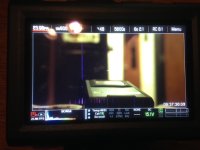
4. Powered down and up the camera to see if it was really fixed. When the camera powered back on, I now have some weird vertical banding in the video with a few small vertical lines that are visible in lower light.

5. The camera seems to get better and better as it is left on and warms up. I really think it is a issue with one of the boards or power components. Almost like years ago when a capacitor would start having issues causing weird voltage irregularities.

We will see what support has to say. My support ticket has been sent to engineering to look at my log file. I will attach a few photos showing what the lines looked like through my above troubleshooting process.
 

Attachments

  • 01BeforeFirmwareIrisClosed.jpg
    01BeforeFirmwareIrisClosed.jpg
    38.7 KB · Views: 0
  • 02BeforeFirmwareIrisOpen.jpg
    02BeforeFirmwareIrisOpen.jpg
    76 KB · Views: 0
  • 03AfterFirmwareIrisClosed.jpg
    03AfterFirmwareIrisClosed.jpg
    31.4 KB · Views: 0
  • 04AfterFirmwareIsisClosed.jpg
    04AfterFirmwareIsisClosed.jpg
    91.5 KB · Views: 0
  • 05AfterFirmwareIsisOpen.jpg
    05AfterFirmwareIsisOpen.jpg
    53.5 KB · Views: 0
had the same with Epic X. it dissapeard and came back on a month later and didnt go away. send it back for repairs. its a board thing...
 
Uros,

Thanks for your post! I had a feeling it was a board thing... Here's hoping I can get a quick turn around on the repair!
 
I sent the log in to the tech team and I got a RMA, so camera is going back to red for repair.
This is a quality issue and red need to fix it.
 
Just an update. I have received awesome suport. Turnaround time at red UK was same day. Thank you tech-team and Alan Piper.
 
Back
Top