Roger Alexander
Well-known member
- Joined
- Nov 23, 2015
- Messages
- 74
- Reaction score
- 0
- Points
- 0
I've read the forums, watched tutorials etc. but I still dont have a 100% firm understanding on some black shading issues and questions I have regarding the process. Some of the video tutorials out there are for DSMC1 bodies and don't detail the new processes for DSMC2 and autoblackshading. So I'm confused. I will list my concerns below. Sorry if my questions are annoying, I just have never grasped a firm understanding of what's happening in the process and what to do in certain situations; and I think it's affecting some of my images. I want to make sure I have a thorough understanding in laymans terms, so please don't reply with "read the handbook", I've looked at it and still have questions. If you know the answer to a question please put the # before your reply! Thanks so much!
1. From what I understand, you should black shade when you are shooting in extreme hot or cold conditions and when the temperature changes about 30 degrees F from the previous temperature. But the Raven does auto-blackshade when you turn the camera on right? So shouldn't it automatically create a new profile based on the temperature and settings that the camera is turned on at?
2. What exactly is the camera doing in the auto-blackshade process. Conceptually I know it's removing pattern noise from the image, but like, in terms of file creation and settings. I'm not sure if I'm wording this right. Does one profile cover a variety of situations?
3. Do you have to create a new black shade profile for each temperature you might operate at indefinitely? If so, how do you get the camera to the desired temperature to calibrate to? Or does the camera raise the temperatures itself?
4. If you have to make a new profile for different temperatures, when you are in the field and your camera reaches one of those "next level" temperatures, do you have to manually go into the settings and choose the profile you created for that temperature? Or will the camera automatically choose the right profile based on the temperature?
5. While shooting, is there an indicator that will tell you that the current blackshade profile is not appropriate for your current shooting conditions? and that your image has unnecessary noise? I know your T/E are supposed to be green at all times for temperature and exposure. Is THIS your indicator for that; telling you that you have inappropriate blackshading settings?
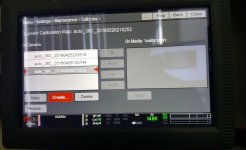
6. (See attached picture 1) When looking in the menu, on the left side I see "In camera" and the right side I see "on media/calibration". I assume this means the blackshade profiles I created in the camera (manual and auto) show on the left and then if there was any profiles I saved on an ssd card that is inserted, it would show on the right. Is this correct? Then in the middle you have different arrows that you would use if you wanted to save and transfer profiles from in camera over to your ssd and vice versa. Is this correct or is there a different function of it?
7. When you do an autoblackshade, does it run through all the possible temperatures itself and makes the best settings for each temperature?
8. Let's say you are in the field and your T is no longer green, it's now yellow or red. What steps do you take to get it back to green? I assume put it in a cooler place and turn the fans on high before recording again? IS there something else. What about when your E is no longer green, what are the steps you take to get it back to green before continuing to shoot
9. (see attached picture 1) When going into the blackshade menu, I see 3 profiles already there, how do I know which profile to apply? They all seem similar, I assume the 38c means "apply this profile when the temp is 38 degress celsius". Why's there 3 profiles for 38c then? Or is this not the right logic?
10. What I assume is that the most recent blackshade is at the top. Once the most recent auto blackshade is created and applied, is there any reason I would need to keep the previous profiles? or can I delete them with no problem?
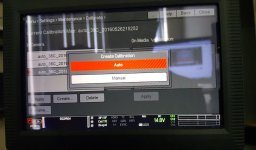
11. (see attached picture 2) When clicking create profile, I get the option for auto vs manual. For what situation would I ever need to choose manual blackshade? What can I get from a manual black shade that I would not get from choosing auto-blackshade?
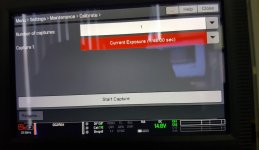
12. (see attached picture 3) When going to manual blackshade, it tells you to choose the exposure/shutter speed you want to shade for. This makes me assume you have to create a new black shade profile for the different shutter speeds and fps that you plan to use? Is that correct? When you click auto blackshade, does it create one profile for all the shutter speeds, or does it create a profile for the current shutter speed you have the camera set to? If it's only the current shutter speed, do I need to auto blacksahde for all of the shutter speeds that I plan to use?
1. From what I understand, you should black shade when you are shooting in extreme hot or cold conditions and when the temperature changes about 30 degrees F from the previous temperature. But the Raven does auto-blackshade when you turn the camera on right? So shouldn't it automatically create a new profile based on the temperature and settings that the camera is turned on at?
2. What exactly is the camera doing in the auto-blackshade process. Conceptually I know it's removing pattern noise from the image, but like, in terms of file creation and settings. I'm not sure if I'm wording this right. Does one profile cover a variety of situations?
3. Do you have to create a new black shade profile for each temperature you might operate at indefinitely? If so, how do you get the camera to the desired temperature to calibrate to? Or does the camera raise the temperatures itself?
4. If you have to make a new profile for different temperatures, when you are in the field and your camera reaches one of those "next level" temperatures, do you have to manually go into the settings and choose the profile you created for that temperature? Or will the camera automatically choose the right profile based on the temperature?
5. While shooting, is there an indicator that will tell you that the current blackshade profile is not appropriate for your current shooting conditions? and that your image has unnecessary noise? I know your T/E are supposed to be green at all times for temperature and exposure. Is THIS your indicator for that; telling you that you have inappropriate blackshading settings?
6. (See attached picture 1) When looking in the menu, on the left side I see "In camera" and the right side I see "on media/calibration". I assume this means the blackshade profiles I created in the camera (manual and auto) show on the left and then if there was any profiles I saved on an ssd card that is inserted, it would show on the right. Is this correct? Then in the middle you have different arrows that you would use if you wanted to save and transfer profiles from in camera over to your ssd and vice versa. Is this correct or is there a different function of it?
7. When you do an autoblackshade, does it run through all the possible temperatures itself and makes the best settings for each temperature?
8. Let's say you are in the field and your T is no longer green, it's now yellow or red. What steps do you take to get it back to green? I assume put it in a cooler place and turn the fans on high before recording again? IS there something else. What about when your E is no longer green, what are the steps you take to get it back to green before continuing to shoot
9. (see attached picture 1) When going into the blackshade menu, I see 3 profiles already there, how do I know which profile to apply? They all seem similar, I assume the 38c means "apply this profile when the temp is 38 degress celsius". Why's there 3 profiles for 38c then? Or is this not the right logic?
10. What I assume is that the most recent blackshade is at the top. Once the most recent auto blackshade is created and applied, is there any reason I would need to keep the previous profiles? or can I delete them with no problem?
11. (see attached picture 2) When clicking create profile, I get the option for auto vs manual. For what situation would I ever need to choose manual blackshade? What can I get from a manual black shade that I would not get from choosing auto-blackshade?
12. (see attached picture 3) When going to manual blackshade, it tells you to choose the exposure/shutter speed you want to shade for. This makes me assume you have to create a new black shade profile for the different shutter speeds and fps that you plan to use? Is that correct? When you click auto blackshade, does it create one profile for all the shutter speeds, or does it create a profile for the current shutter speed you have the camera set to? If it's only the current shutter speed, do I need to auto blacksahde for all of the shutter speeds that I plan to use?