Welcome to our community

Be a part of something great, join today!

  • Hey all, just changed over the backend after 15 years I figured time to give it a bit of an update, its probably gonna be a bit weird for most of you and i am sure there is a few bugs to work out but it should kinda work the same as before... hopefully :)

stereo 3d stabilization ?

Felix Desjardins Audette

Active member
Joined
May 23, 2012
Messages
28
Reaction score
0
Points
0
hey guys, got another question for you, have you ever had any stabilization to do with your 3d footage ? if so, what program have you used, i've heard it was a pain !!

thanks
felix
 
Aaron, I haven't tried this so, can you tell us the reasons why not, wouldn't stabilizing one view in AE and copying and pasting the same correction to the other work?
 
The reason would be, because sometimes the warp stabilizer sometimes gives unexpected results particularly when subspace warp is selected as the method of stabilization.
 
hey guys, got another question for you, have you ever had any stabilization to do with your 3d footage ? if so, what program have you used, i've heard it was a pain !!

I used Adobe Warp Stabilizer for one of my shots. It does not support stereoscopic, so I had to stabilize the left and right eye shots on their own. After that I used Ocula v3 to align the right eye to the left. The end result worked well.

Can you copy and paste the correction? I don't recall seeing that as an option. In my case I did not have Adobe crop and scale. I dealt with that later after I had aligned things using Ocula.
 
we have never been able to get it to work right. As each camera is slightly different the warp seems to cause additional disparity problems.

if you already have your footage as side by side you might be able to have some success smoothing out a bump.

it's great for smoothing out footage for youtube but even in 2D it will get flagged in QC for a feature.
 
Ive been very successful in flame. Might want to try the demo of smoke on mac.
Sam
 
thanx for the answers guys,
yes as I thought it would be hard to stabilize a s3d shot...

Stacey, what is ocula v3, only works with nuke ??
id like to be able to do a work around in aftereffect if possible...

id like to stabilize aerial shots !

ive seen Syntheyes seems to be able to stabilize s3d shots.. but im a bit confuse with this program...
http://www.ssontech.com/content/BasicStereo.mp4
 
Felix, unless your compositing objects into your stereoscopic footage you don't need a 3D tracker that supports stereoscopic footage. I think the issue your having relates to you trying to stabilize a stereoscopic shot. It's much easier to simply stabilize the left eye, stabilize the right eye as Stacey suggested.

Aaron, I can only think of one reason that a 2D shot would get flagged in QC using the warp stabilizer and that is you're using subspace as the method of stabilization, which will actually warp sections of the frame to make it appear stable as opposed to applying x,y position and rotation to the entire frame.
 
Last edited:
Stacey, what is ocula v3, only works with nuke ??

Yes, it requires Nuke. It really helps match one eye to another with the basic rotation, size, and vertical shift. It does an ok job on color matching.

I only used the position and roation with crop / resize disabled with Warp.
 
Felix,

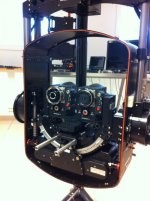
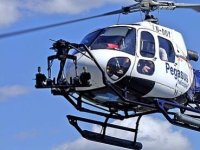
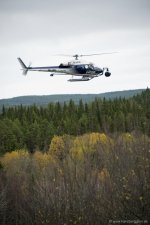
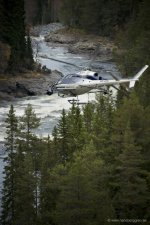
We do it this way.
In camera stabilization.
We use the Stab C gyro even on our ground shots.
Always 100% rock steady.
 

Attachments

  • 3d_stabc_epic.jpg
    3d_stabc_epic.jpg
    87.1 KB · Views: 0
  • 3d_stabc_red_wide.jpg
    3d_stabc_red_wide.jpg
    22.2 KB · Views: 0
  • StabC_forest.jpg
    StabC_forest.jpg
    92.9 KB · Views: 0
  • StabC_river.jpg
    StabC_river.jpg
    97.6 KB · Views: 0
Resolve has, in my opinion, far an away the best tracking tool out there. I'm using it to stabilize a 3D shot right now actually.
 
I've had pretty good success in Nuke and in Flame. Stabilize L_eye, apply data to R. easy as that.
There has been instances where one of the cameras might exhibit a slightly different amount of bump than the other, those type of corrections have to be treated differently. I found a common location between the eyes to stabilize, stabilized both plates indepentantly and then performed an Ocula to take it home.
*Note - The variation in that example wasn't huge and could be corrected without too much difficulty.
 
hey guys thanx a lot for your help, finaly did some aerial with the rig, ! and I did some nice stab with after effect.
went pretty well and im happy with the result...
I just did a warp stabilization on each eyes, then precompose them and then applied the 3d glasses...
worked very well !
cheers
 
Just FYI. Warp Stabilization is fairly new, but you can still stabilize the old way by selecting Track Motion from the Animation menu, then select the Track Type as Stabilize. I would do this before trying any kind of warping. Just my 2 cents.

Phil
 
Back
Top