Welcome to our community

Be a part of something great, join today!

  • Hey all, just changed over the backend after 15 years I figured time to give it a bit of an update, its probably gonna be a bit weird for most of you and i am sure there is a few bugs to work out but it should kinda work the same as before... hopefully :)

Stay Cool

Kenn, do you know of any limitation that will prevent the relative shutter from following the frame rate all the way down to a 1 second. In other words is it possible to achieve a 1 second frame rate with (something approaching) a 1 second exposure time?

Please forgive if I have in any way hijacked David's very generous thread on what looks to be another completely splendid Mullen/Polish Brother effort.
 
To get 1/8 sec shutter -
Set shutter mode to relative.
While at 24fps, set your shutter speed to 1/24.
Go to Varispeed and set framerate to 8fps.

The shutter will follow the framerate relative to the 1/24 you were on at 24fps.

I believe Conrad and tried that method, Varispeed, when we discovered the 1/24th limitation -- as we dropped to lower and lower frame rates, the shutter angle / shutter speed kept compensating to limit us to 1/24th of a second. It started when I tried to shoot at 18 fps with a 360 degree shutter -- the camera automatically changed the shutter angle to keep the exposure at 1/24th.
 
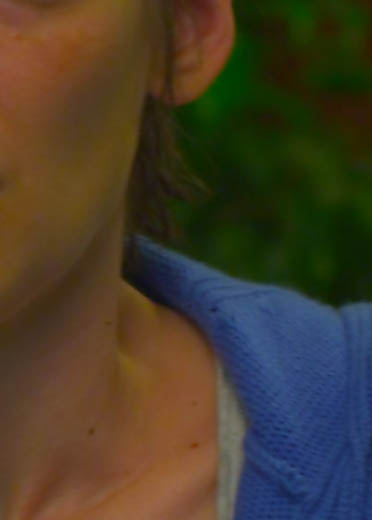
...Though the boosted color does cause some odd artifacts to appear now & then on the monitors and in the TIFF's, like some faint yellow blotches in skintones...

Hi David,

We thought we noticed a similar artifact in skin tones on some shots recently. Can you elaborate on this?

We were using tungsten lighting and it seemed that possibly the tone difference was brought out more by slightly uneven makeup.

And then perhaps how the color space dealt with the changes in the different hues.

thanks,
 
It was under tungsten lighting -- some of the make-up went a little yellow-ish when the chroma was boosted in camera. It disappears as you lower the chroma again and it can be timed out. Here is a sample of the effect in the 4K TIFF's I got (cropped and converted to JPEG):

REDskin1.jpg
 
What is the Kelvin/tint set to?

Because it's tungsten, it looks like the absence of blue is pushing towards yellow when saturation is increased.
 
I believe that particular shot was at 3700k, with 0 tint. There are a few specific scenes we used the tint, and this was not one of them.

We have had other instances shot under 3200k/0 tint with the same result. However in most cases, changing the colorspace and working with less saturation seemed to remedy the issue. This makes me wonder about the exact methodology of processing the colors in build 16 and in RedAlert.

For example in the prom scene we had illegal rec709 colors (purple, yellow, red) that were showing up on the monitoring. The only adjustment we had was the before mentioned saturation boost to 1.5. To me, that means that the rec709 space is applied, then color is adjusted (in this case, increasing saturation) producing colors that are outside of rec709 space.

As for the long shutter issue - its worth noting that we did the tests on a beta build 16. Ill triple check tomorrow on our build 3.2.5 cameras.
 
How does the same shot look with redspace or cameraRGB for the colorspace?
The rec709 output is not my favorite as it really pushes the colorspace to hard.
 
We actually went back to that exact frame and exported a bunch of different versions, at different kelvins, different color spaces, different output LUTs and different saturations - 84 different versions (at 4k tiffs mind you). Ill let David comment on which one was the best.

The nice thing about doing all this is of course that all of this is non-destructive. We can go back and re-do whatever to see how different settings affect the final image. I have a feeling that we will be doing more of this as the production rolls on.
 
On a non technical note, isn't the tattoo artist the actor that plays Sawyer on "Lost"?
 
Here is a shot we had where we noticed some skin tone variances. This was under tungsten lighting (initially I had thought it was fluorescent).

We shot this on build 15. It seems as in your image, the make up shifted slightly yellow, and the difference in hue can be diminished by adjusting saturation, timing, or color space.

Res: 4K, Color Temp: 3200, Tint: 11, ColorSpace: REC709

REDCINE cropped and output to TIFF, then scaled and converted to low res JPEG.

971_1217884149.jpg
 
Shutter Speed

Shutter Speed

do you know of any limitation that will prevent the relative shutter from following the frame rate all the way down to a 1 second.

Shouldn't be ...try this

Set Shutter DISPLAY = 1/sec format

Set TIME BASE = 23.98 fps and SHUTTER to 1/24 fps

Set shutter MODE = RELATIVE

Enable VARISPEED and set FRAME RATE to 18 fps

Camera will show 1/18 sec ( which is 360 degrees at 18 fps ) etc
 
What if you set saturation to 1 in Red Alert and change saturation in another program? (e.g. FCP)

There are different saturation algorithms out there... one possibility is that the saturation algorithm is causing shifts in hue. Which would happen if you do saturation via a color matrix on the linear light components... I think Graeme said that this is what Redcine does.
FCP has a decent saturation algorithm; the only quibble is that when increasing saturation, highly saturated colors will be slightly brighter and may appear neon.

EDIT: Well I should have read all of this thread...
We have had other instances shot under 3200k/0 tint with the same result. However in most cases, changing the colorspace and working with less saturation seemed to remedy the issue. This makes me wonder about the exact methodology of processing the colors in build 16 and in RedAlert.

Anyways, regarding the exact methodology... it is (almost certainly) a color matrix on the values before they get converted to gamma-corrected values. If you do things this way, you can keep luminance the same but you get the hue shifting / green crap. In FCP (and probably Da Vinci) and other programs that do a Y'CbCr based saturation, the result is the same as applying a color matrix AFTER the values have been converted to gamma-corrected values. No hue shifting, but shifts in luminance.

Now there's a way to get the best of both worlds (this is what I do for my Photoshop plug-ins)... get to it Graeme! ;)
 
I've noticed the same "Jaundicing" of make up on actors when the Saturation gets dialed up even in RedSpace.
 
On a non technical note, isn't the tattoo artist the actor that plays Sawyer on "Lost"?
Exactly. This movie looks like a lot of fun- love that John Hughes era... :tongue:

Noah
 
WEEK THREE

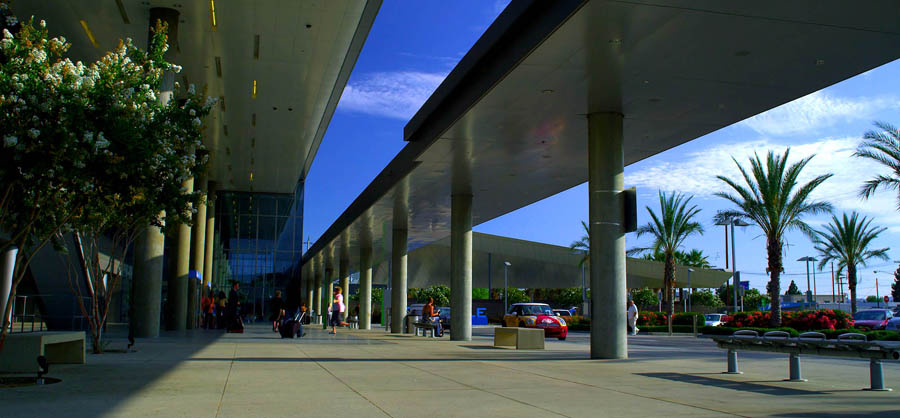
We spent Monday at the Van Nuys Flyaway station doubling for an airport – I was worried about how we were going to do the scene where the main character gets picked at the curb in front of the airport, with all the restrictions these days, but this modern station doubled quite well for an airport.

We also did a lot of driving around Van Nuys using a camera car and a tow rig to shoot some dialogue inside a tiny Mini Cooper. We had to switch to our 8G CF cards and rent a few more in order to avoid the RED drives on a bumpy road – I was happy to find that switching cards in the cameras when they got full was quite fast compared to switching drives, just a few seconds to reformat the card.

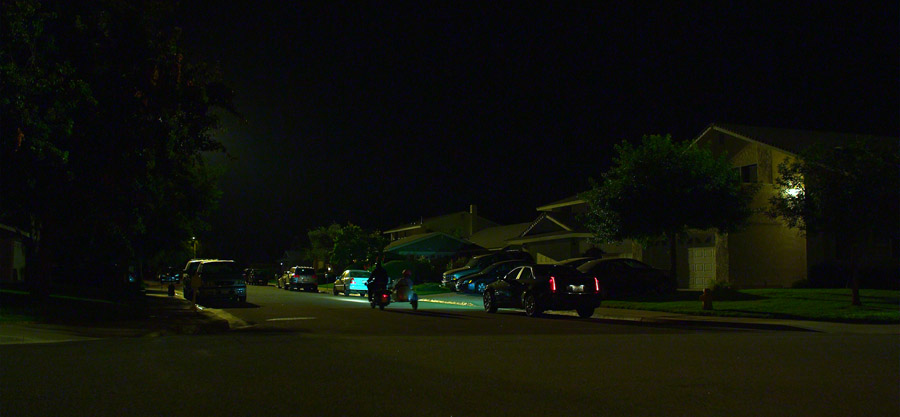
Tuesday was spent running around Santa Clarita getting some drive-bys in shopping areas and suburban house areas, plus a quick scene at a convenience store. Then we moved to a house to shoot the final scene of the movie, figuring it would look better to shoot when the sun was low. Trouble is, as we have been discovering, here in California in August, the sun drops like a rock. When you get a nice low backlight, you may have two takes of a dialogue scene before the sun is gone. Anyway, my point is that now we have a few more angles on that scene to shoot when we’re back at that house. After the sun was gone, we did a few driving scenes right next to the house. To match the look of the sodium streetlamps, I used 12-lights with ½ CTO on condors but turned off some of the bulbs to not overpower the real streetlamps, then I rated the RED camera at 640 ASA / 270 degree shutter and used some Zeiss Master Primes that we picked up just for that night to shoot at T/1.3 or halfway between T/1.3 and T/2.0. There was some noise in the image at 640 ASA but it allowed us to create a fairly natural night look.

We spent all of Wednesday at a SuperCuts hair salon in a shopping mall. Being wall to wall mirrors, I was limited on where I could light. I ended up replacing the overhead fluorescents with daylight tubes for the day scenes and then augmenting that look by hanging an HMI Joker Chimera ball over the main workstation. The shop had fluorescent panel lights next to each mirror but they turned out to be 3’ tubes, which we were not carrying replacements for. I decided to add some needed color in the shop by letting them be Cool Whites and augmenting that color by putting some Cyan 30 gel on the white panel covers. Since I had an HMI Chinaball over one workstation, I added to the overall level to the opposite side of the room by bouncing an HMI Joker Source-4 off of the ceiling. Basically I was unable to key from eyelevel because of the mirrors on both sides of the room, so I tried to make the overhead key very soft. For the night scenes, I turned off half the overhead daylight tubes, but left then daylight, then I hung a tungsten Chinese Lantern over the main workstation and switched the camera from 5600K to 3700K.

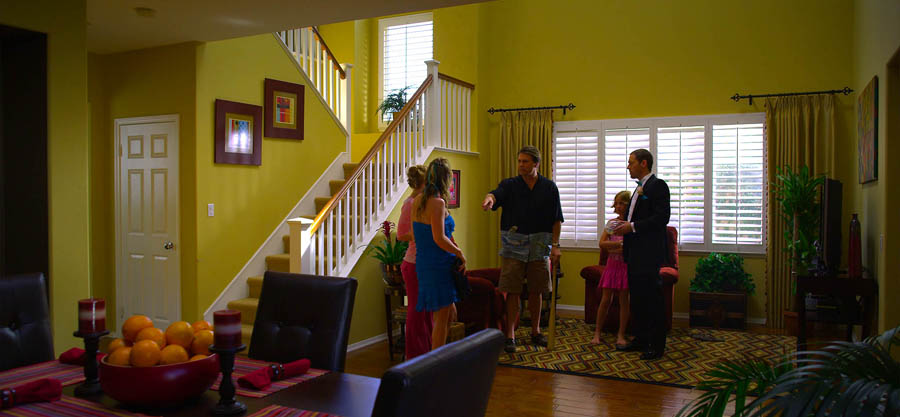
We were in another suburban subdivision on Thursday shooting a scene inside a tract home, and then moved several blocks uphill to a bigger house to shoot a house party. I had a diffused 18K HMI coming through a window in the tract home for the daytime scene plus some soft fill from bouncing an HMI Source-4, but most of the real illumination came from the natural daylight in there.

The house party scene was tough because we planned a Steadicam shot that moved through parked cars in front of the house, through the living room, and then out into the big backyard. I lit the street with an overhead coop light gelled half-orange for a streetlamp look, used a few small tungstens to uplight the house, just used real fixtures inside the house for the interior, then light the backyard mainly with a tungsten light balloon, plus some practical fixtures, and HMI hydroPAR’s in the swimming pool. I set the camera to 500 ASA with a 270 degree shutter at 3700K.

I often set the camera to 3700K in 3200K lighting for a slight warming effect. It’s all just metadata only anyway.

Friday was a full night of shooting, so we wrapped after sunrise on Saturday (shooting a small daytime scene at the end of our day.) We shot in a couple of backyards of these mini-mansions as the characters flee from the house party when the police arrive, hopping fences. Except for Tuesday night, all of this night work was done with our Zeiss Ultra Primes, usually at T/2.8 or a T/2.0-2.8 split.

I only have a few innocuous wide shots to post:

900%20Stay%20Cool%2065.jpg


900%20Stay%20Cool%2084.jpg


900%20Stay%20Cool%2077.jpg
 
Back
Top