Welcome to our community

Be a part of something great, join today!

  • Hey all, just changed over the backend after 15 years I figured time to give it a bit of an update, its probably gonna be a bit weird for most of you and i am sure there is a few bugs to work out but it should kinda work the same as before... hopefully :)

SSD startup disk Mac Pro

Probably Intel X25-M 160GB

Read this:

While it usually takes years to become a recognized manufacturer or actor in a field (and only few days to destroy its reputation), Intel quickly demonstrates its skills and competence to release high-end SDDs on this emerging market. Today, and despite announcements from other manufacturers, the 80 GB Intel X25-M SSD remains the best in its class (see our previous tests, here and there). Its only problem is to have a limited storage space of 80 GB, while competitors offer 128 or 256 GB. While Intel released a model offering 160 GB, TC Magazine announced that the founder will still double storage space by the end of the year to reach 320 GB. Competitors should then offer SSDs with 512 GB. It seems that manufacturers will double capacity of their SDD models every six months, and if prices decrease accordingly, SSDs might capture the market of storage space unit in notebooks within 3 years.

-michael
 
I am using Gskill Falcon SSD's with 180mb write and 230mb read speeds on average for a single drive. They are quite cost effective compared to intel's and actually have quicker write speeds from what I hear.

The OCZ drives are the same.
 
OCZ, Crucial and Corsair have been really good here lately, their reliability has increased a lot over the past year.
 
For those who wait for more:)

I'm sorry but a 256 is barely enough to put into my Laptop. Makes more sense for my Phantom shoots to have a SSD i.e. Explosion/High-G environements...


http://www.tomshardware.com/news/500GB-SSD-CeBIT,7197.html

I'll wait for a enterprise level 500GB or greater before I put 1 for my boot disk.
Alot easier/cheaper to recover a HDD drive then a SSD at times.

goodluck,
 
Agree with Dane on this. I can't run an SSD in my notebooks -- a 256GB would be pretty full, actually not big enough most of the time. And 500GB 7200rpm HDDs are super cheap.
 
OCZ, Crucial and Corsair have been really good here lately, their reliability has increased a lot over the past year.

What do you mean by their reliability has increased ? I always thought SSD and flash were 'ironclad' and very reliable, no? Part of me says get the X25, the other part wants the bigger drives that are less talked about
 
Agree with Dane on this. I can't run an SSD in my notebooks -- a 256GB would be pretty full, actually not big enough most of the time. And 500GB 7200rpm HDDs are super cheap.

Running a small SSD in a laptop actually works really well. The idea is to *not* completely replace your harddrive with an SSD, but rather put the stuff that would most benefit from the performance boost on the SSD. In other words, you only put the main operating system files on the SSD (applications, swapfile etc), and keep your data/home directory on a standard bigass harddrive. I do this on my Macbook Pro by replacing the Superdrive (which I *never* use anymore) with a 7200 RPM 500GB harddrive where my home folder lives, and then putting the OS on an 80GB SSD. A full Snow Leopard install, in addition to all the extra crap I've installed myself, only requires about 27GB of space on my system drive, so the small size of the 80GB SSD is not a big deal.

This "hybrid" approach is obviously not as ideal as running everything off a single SSD, but unless pimpin' does in fact come easy to you, it's just not economically sensible to do it with the current state of SSD prices. But the performance differences in everyday use (booting, application launching, swapping, etc) are significant enough to still make it worth it.

And you definitely want to get an Intel X25 SSD. The MLC versions of the X25 drives have become quite affordable (NewEgg was selling the 80GB X25 for $214 this week). They aren't nearly as fast as SLC SSDs (which are insanely expensive), but MLCs will still blow the pants off of any single-unit mechanical harddrive you can put in your notebook.
 
What do you mean by their reliability has increased ? I always thought SSD and flash were 'ironclad' and very reliable, no? Part of me says get the X25, the other part wants the bigger drives that are less talked about

Most SSDs, even ones from major name manufacturers, have had a high failure rate over the past couple years. I've burned up several OCZ, Corsair, Crucial and Intel SSD units testing various RAID applications and other configurations. Lots of DOA units right off the line. MLC-based SSDs have a relatively short lifespan compared to SLC-based. SLC on the other hand are more expensive, have smaller capacities, and slower performance.

Currently most enterprise and military grade SSD units are all SLC tech, as are the SSD's inside the RED RAM.

FLASH memory in the form of CF card, SSD, etc.. is not bullet-proof. It is very reliable. Typically, if you have a bad SSD, you will know it as soon as you plug it in. A good SSD will operate normally, within its limitations, for a long time if you don't abuse it. ...I tend to abuse mine. I do a lot of testing of FLASH / SSD configurations for a client of mine.

Running a small SSD in a laptop actually works really well. The idea is to *not* completely replace your harddrive with an SSD, but rather put the stuff that would most benefit from the performance boost on the SSD. In other words, you only put the main operating system files on the SSD (applications, swapfile etc), and keep your data/home directory on a standard bigass harddrive.

Yep. Fine and dandy if that works for you. That's how I was running (but with a 320GB HDD) before I upgraded to my new MBP a few weeks ago. If I just install all my apps and OS, I'm pushing 260+GB. :) I'll go SSD in my notebooks as soon as I can get 500GB ones for less than $650 (current price point for good 256GB units). I'm thinking 2nd quarter 2010 this should be reality.
 
Last edited:
anyone know if using an SSD drive helps the audio waveforms load faster in final cut ?


ZF,

When you can push 200 MB/s from a single drive, everything loads faster...

:-)

Torrey
-----------------------------------------------
Torrey Loomis
President & CEO - Silverado Systems, Inc.
(916) 760-0032 • FAX (916) 404-5258
torrey@silverado.cc
http://www.Silverado.cc

Silverado Twitter at http://www.twitter.com/silveradosys
StudioBuilder blog at http://silveradosys.blogspot.com
 
Anyone know why these can't be used in the 2009 Mac Pros? And if there's an alternative? RAID0 SSDs sounds almost irresistibly fast...
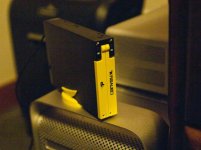
Sure--they're too short.

You need this for the Nehalem machines:

http://bit.ly/2CFFkW

Just pair that with your Nehalem's existing sleds.

Torrey
-----------------------------------------------
Torrey Loomis
President & CEO - Silverado Systems, Inc.
(916) 760-0032 • FAX (916) 404-5258
torrey@silverado.cc
http://www.Silverado.cc

Silverado Twitter at http://www.twitter.com/silveradosys
StudioBuilder blog at http://silveradosys.blogspot.com
 
Hehe... Missed Torrey's post about the Convoy XL the other day. The Convoy is badass! I've had 2 of them for a bit over a month now. One that I use for a compact eSATA RAID and another I have installed in a PC in a 3.5" exposed bay so the two 2.5" drive slots are directly accessible.

Supposedly the unit isn't compatible with PC's that have nVidia chipsets. Says so on the box.

It comes with a handy USB to SATA power cable and another eSATA to SATA cable. It also has USB 2.0, but I haven't found a USB port that will power it AND operate it. I have to plug in the USB to SATA power no matter what. Perhaps it depends on what drives or SSDs are installed. My external unit is running two Western Digital Scorpio Black HDD's, each are 320GB 7200rpm. I can sustain over 110MB/s writes and approximately 140MB/s reads with this thing in RAID-0 stripe mode. I have been running two Corsair 256GB SSDs in the other unit inside the PC for some other tests I'm doing. That configuration is smokin!!! Those two SSDs will be my new compact external RAID as soon as I'm done with the other testing... Just can't buy too many SSDs for all this stuff, not when those ones are $750 each. I love these Convoy units and they're cheap -- like $40 from Amazon with free shipping.
 

Attachments

  • convoyxl.jpg
    convoyxl.jpg
    48.4 KB · Views: 0
I have two i7 mac pros with 4 SSDs each, OCZ vertex 256GB. no problems. the machines boot in 10 seconds. I also tried to do a patriot warp 256gb in an esata enclosure for use with my laptop but it was DOA.
 
Back
Top