Welcome to our community

Be a part of something great, join today!

  • Hey all, just changed over the backend after 15 years I figured time to give it a bit of an update, its probably gonna be a bit weird for most of you and i am sure there is a few bugs to work out but it should kinda work the same as before... hopefully :)

Spot on dome port, any quick way to correct?

Tom Hamilton

Well-known member
Joined
May 17, 2009
Messages
1,157
Reaction score
0
Points
0
Location
Port Orange
Website
www.redseapictures.com
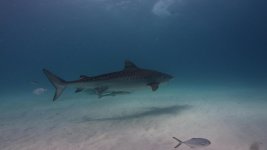
Hi all, RCX frame grab attached, particulate floating in the water attached itself to the dome port, lower right corner of the frame, compromised all the shots on that particular dive. Intended output is to Prores 4444 then edit in FCPX, at what point during the process should I deal with this, and what is the best tool?

Thanks very much
 

Attachments

  • Tiger Shark grab.0000243.jpg
    Tiger Shark grab.0000243.jpg
    54.7 KB · Views: 0
Can you crop it out without affecting things too much? That would be the simplest thing to do in RCX.
 
Thanks Mark, I could, but in some of the shots I'd like to save that portion of the frame, the less edge I have, the less stabilizer I can use. Do you know of any software with automated rotoscoping? Just stabbing in the dark here.
 
If you have After Effects you could duplicate the footage layer, make a small circular mask (the size of the dot) with a feathered edge around pixels right next to the spot, and then move the layer over on top of spot. This should cover up the spot well enough for when it is just blue water or sky. It may "show up" if the spot goes "on top" of a reef or something complex though. The mark is pretty small so I would guess that this fix would camouflage the spot for most of your shots effectively. If you made a Comp in AE with all of the affected shots you could do pre-compose the sequence and duplicate that comp, then do the mask on the nested composition. This would mean you could fix all the shots at once with one mask (As long as the spot doesn't move in the frame). Hope this helps. Let me know if this doesn't work out or if I didn't explain it well enough. Good luck!
 
I need to see a clip to see how bad it is. Also, every shot is going to have a different solution. The easy ones will be where there is not much happening in that corner. You may even be able to warp out that little section out of frame.
 
Ian, the spot appears at the same place, found and removed it from the dome subsequently. Will certainly try your suggestion though, have AE but little experience with it, does it work with ProRez natively, being an Adobe product?

Chris, downloaded the trial version of dh-reincarnation out of curiosity, but for some reason not showing up in my effects browser, any ideas there? Have re-installed and relaunched twice, no joy.

Bob, do you have an FTP site I could send the clip to, or an alternate delivery method? The clip is 1.2 GB. If you have the time, much appreciated.

Thanks all, very generous advice.
 
No need to send RAW files for evaluation. A small qucktime or something will be fine.

Ian, the spot appears at the same place, found and removed it from the dome subsequently. Will certainly try your suggestion though, have AE but little experience with it, does it work with ProRez natively, being an Adobe product?

Chris, downloaded the trial version of dh-reincarnation out of curiosity, but for some reason not showing up in my effects browser, any ideas there? Have re-installed and relaunched twice, no joy.

Bob, do you have an FTP site I could send the clip to, or an alternate delivery method? The clip is 1.2 GB. If you have the time, much appreciated.

Thanks all, very generous advice.
 
Ian, the spot appears at the same place, found and removed it from the dome subsequently. Will certainly try your suggestion though, have AE but little experience with it, does it work with ProRez natively, being an Adobe product?

Chris, downloaded the trial version of dh-reincarnation out of curiosity, but for some reason not showing up in my effects browser, any ideas there? Have re-installed and relaunched twice, no joy.

Bob, do you have an FTP site I could send the clip to, or an alternate delivery method? The clip is 1.2 GB. If you have the time, much appreciated.

Thanks all, very generous advice.

Try looking here: http://www.digital-heaven.co.uk/i-installed-plug-cant-find-it-final-cut
 
http://www.reduser.net/forum/attachment.php?attachmentid=40787&stc=1&d=1374639455

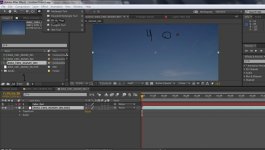
Double click on Step #1 to navigate to your footage. Right click on the footage and choose "New Comp from selection" or click on #2 Drag in all the clips you want to mask. If you are doing multiple clips at once you will need to put in all of the clips into the sequence in a long line (you will probably have to increase the comp duration in comp settings). You will then need to right click on the comp you are working on and make a" new comp from selection" once again. This will pre-compose all of the footage you have lined up into a single layer comp. Now Duplicate this layer in the new comp #2(control D). With the top duplicated layer selected click on the ellipse mask tool (#4). Make a shape like the dot right next to it.

http://www.reduser.net/forum/attachment.php?attachmentid=40789&stc=1&d=1374639792


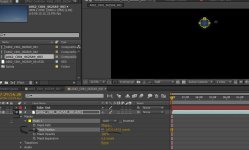
Now twirl down the top layer to reveal the layer mask feather (Steps 5 and 6). Increase to about 50 or so for now. With the top layer selected (the small ellipse of footage) drag it over onto of the dot. Now you may need to adjust the size, shape and feather amount to make the dot disappear behind the mask. Now you should scrub to a couple different parts of the timeline to make sure that it worked on all the shots and that it lined up. Export to your format of choice. Feel free to ask more questions this is a pretty haphazard tutorial.
 

Attachments

  • dot Tut 1.jpg
    dot Tut 1.jpg
    90 KB · Views: 0
  • Dot Tut 2.JPG
    Dot Tut 2.JPG
    80.6 KB · Views: 0
Tom, I have a local guy here that is a After Effects pro. He's reasonably priced and would not charge a lot to do something simple like that. Is this from that Bahamas filming? I had the same smudge now and then on a few clips. Lots of crap in the water that one day. Email me if you can't do it there. I'm sure Davis Zekthi can make it look like its never there.
 
Hey Frazier, yes, it was the Discovery shoot. Thanks very much for the recommendation, but I've decided to go head first into the deep end, so to speak, have signed up for a pro course on After Effects, and will start fixing my footy as soon as we get to the 'spot on the dome port' bit, probably around page 3946 or something like that, this is a big program.

Also have been getting alot of good info from the posters on this thread, as well as Jeff Whitehurst, thanks also to them.
 
One of the best tools I know of for this would be the clone tool in Shake.

It works like the one in Photoshop, but on motion footage.

David
 
Tom. I just sent you some corrected footage.

Hey Frazier, yes, it was the Discovery shoot. Thanks very much for the recommendation, but I've decided to go head first into the deep end, so to speak, have signed up for a pro course on After Effects, and will start fixing my footy as soon as we get to the 'spot on the dome port' bit, probably around page 3946 or something like that, this is a big program.

Also have been getting alot of good info from the posters on this thread, as well as Jeff Whitehurst, thanks also to them.
 
Back
Top