Welcome to our community

Be a part of something great, join today!

  • Hey all, just changed over the backend after 15 years I figured time to give it a bit of an update, its probably gonna be a bit weird for most of you and i am sure there is a few bugs to work out but it should kinda work the same as before... hopefully :)

Split Screen (vertical line down LCD monitor) Issue

Derek Doublin

Well-known member
Joined
Aug 10, 2014
Messages
89
Reaction score
1
Points
8
*SEE EXAMPLES IN POSTS BELOW.*

I have a Red Epic Dragon with a 5" LCD Touch screen. My camera has been exhibiting an issue where a transparent vertical line appears down the middle of my LCD, usually when I press the MAGNIFY button. It alters the image slightly with a weird mirroring/delay effect. This also appears on the director's monitor using SDI or HDMI out. The only thing that has solved this issue for me is a full restart of the camera. On one particular shoot, this issue happened about 8 times, back to back. Now it seems to happen about 3 to 4 times over the course of a full day shoot. It's horrendously annoying and when people rent my camera it alarms them. I am always fearful of renting my camera out with it constantly exhibiting this quirk.

I searched around for "Red Dragon LCD split screen issues" but haven't found anything, yet I know there are others that are experiencing this. I spoke with two Red Camera owners in person that say they have experienced this issue as well. Has anyone here had this problem? Is there a thread on it?
 
Last edited:
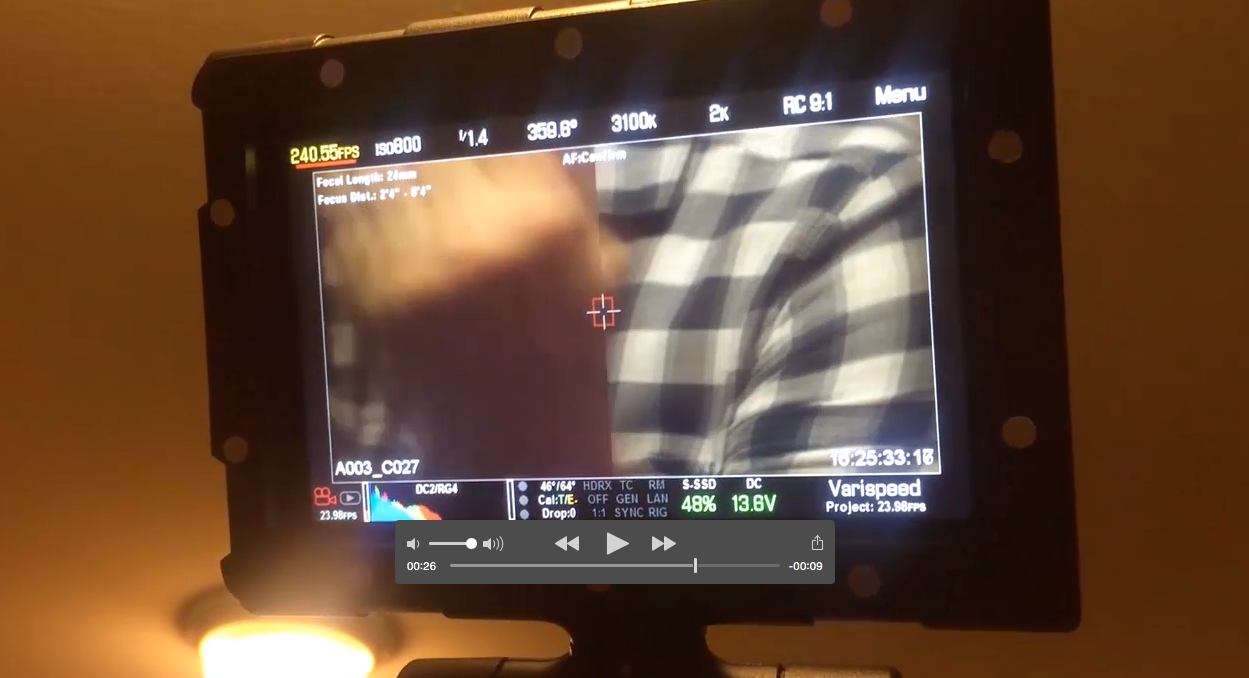
I have included a dropbox video link showcasing the issue I am talking about along with some answered questions RED asked me. They have been pretty quick to respond to my inquiry. Posting all of this on here in case anyone is experiencing the same issues.

What firmware are you using?
Current Firmware Version: 6.0.35
It exhibited this problem with the last firmware update as well, 6.0.31.
In fact this problem did not become an issue until I updated the firmware from to 6.0.31.


Any Third Party Accessories Attached?
Sometimes yes and sometimes no. Sometimes I have the Wooden Camera V-Mount Quickback attached. But that is it.


How was the camera powered?
The issue has appeared when the camera was powered with just A/C power (no quick back attached) and with battery power (Quickback with V-Mount battery along with Revolt inside Sidehandle).


Was there something that led up to this occurrence?
MAGNIFY for Focus. It seems like the MAGNIFY for focus button is what triggers this issue most of the time.
Also, as mentioned before, this issue appeared after my firmware updates. The camera seemed to be running great with older firmware (whatever firmware version existed just before playback thumbnails were introduced).

VIDEO LINK TO ISSUE:

https://www.dropbox.com/s/mf7dk23llbnmyat/IMG_2606.mp4?dl=0

STILLS OF ISSUE:

Clip1.png


Clip2.png


Thankfully, it does not show up in the footage. It happens on both the LCD monitor and on both HDMI and SDI out (so video village and/or director's monitor gets it, too).
 
A support ticket was filed last week. I am posting on this forum in case others have had similar issues. I have personally talked to two previous Red Epic Dragon owners (James Mills and Andrew Wheeler) that have seen this issue occur with their own cameras. I really think it's a firmware problem.
 
Derek,

I have had exactly the same issue. It is only a monitoring issue thank God but still a real distraction. I have occassionally seen this in the past but recently it has become quite regular. The artifact can be seen on my 5" touch screen, OLED EVF and the SDI output. As you point out seems to be tied to the Magnify for focus check.
 
I have seen this issue a few times with my Scarlet Dragon. Would love to hear about a fix/work around. It also, only appears to happen at high frame rates.
 
One work around is to toggle the Magnify and sometimes that can clear it up but no guarantee. Reboot always clears it up. Its hard to be scientific but changing resolutions and camera frame rates can bring on the screen tearing
 
I have this same issue. For me it happens every time I hit record while still zoomed in. And as mentioned I can only clear it up by then zooming back in and then out again. I am getting better at remembering to zoom back out before hitting record but it would be nice if this issue could be fixed.
 
I some times the same problem, some time not 1 reboot is enough! Latest released firmware! I'll find out if it got somthing to do with magnifing! No problem with the recorded footage!!!
 
Thanks goodness I'm not alone.

Did any of you experience this with the older firmware, v5.3.45 and earlier? I'm speaking about the firmware that existed before the latest big upgrades earlier in the year which added all of the new features (playback thumbnails, stills mode, etc)?

I really think this is an issue with the latest firmware upgrades and I would like to encourage everyone experiencing it to file a support ticket with Red. When I did they sent me an email asking specific questions that pertained to the issue. I am pretty sure they are aware of it. But the more information they can get the quicker they can isolate and solve the problem.

My biggest issue is when I rent the camera or when I'm on a big shoot and it starts behaving this way and screwing up the client monitor. My clients pay a premium for the Red and I hate having to say, "Don't worry. It's just a RED monitor issue. The footage is fine. The camera just has some bugs. It doesn't effect the footage."

I really hope they solve this quickly. I was on a shoot for Belkin that was going to be featured on Apple's website. The camera did this 8 times in a row, back to back, while on set. It was ridiculous. I had to restart my camera 8 times with the client just sitting there.
 
Last edited:
I experienced it as well. I thought the aliasing-line might have been from the oversampling. It wasn't showing up in the footage and many of my fellow DP's and AC's that work with us chalked it up to either refresh rate issue or the oversampling to display your signal. Oddly enough we came to that conclusion because it only happened when in the 6k format(all AR)
Just thought i'd share what we have experienced and guessed at from the field.
 
I have had this issue recently.

I sent the camera in for Red to have a look at it. They said one of the boards was damaged as I used a non standard screw that was a tiny bit longer than normal on the right side of camera to side mount a Vlock plate. The screw they said damaged the boards and caused the issue.
Its since been fixed but I have had no time to really test the camera to see If this still happens.

Interesting to see so many people here with the exact same symptom - did all of you put longer than standard crews in the side of your camera?
 
Hmmm. That's interesting that they said it was a board issue. I have not physically attached anything to my camera with a screw aside from a tripod/baseplate and the Red Side handle.

When you have time, please test your camera. The way I am able to recreate the phenomenon is by using the magnify button repeatedly. If it doesn't do it, change some basic camera settings such as the frame rate and continue trying. I can usually recreate the problem after about 5-10 minutes of randomly engaging the magnify command.
 
Latest Firmware Update?

Latest Firmware Update?

Anyone experiencing this on their camera with the latest firmware update?
 
Well it's nice to see I'm not alone on this. We've had it happen quite a few times can't remember exactly but I think it's around the magnify toggle and or playback toggle.

We we usually reboot to fix, sometimes it just stops.
 
Back
Top