Salomon Schulz
Active member
- Joined
- Aug 8, 2013
- Messages
- 42
- Reaction score
- 0
- Points
- 0
Hello everyone,
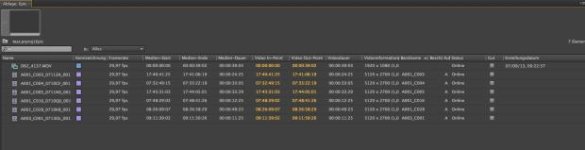
I´m looking for a way to sort my R3D footage by "Date Created" in Premiere. I found the option to show "date created" in the project Bin, but unfortunately it doesn´t show the date for the R3D Files.
For all the other Files e.g. from the DSLRs it does show the date (See attached Image).
If I right-click in the R3D files I can find out the Date under PROPERTIES --> "RED R3D DETAILS", but somehow Premiere doesn´t use this information.
Right now I´m basically only able to sort the files by name, which is a nightmare if you have different reels with the same name (e.g. A001), since they´re all mixed.
Does anyone know how to sort the files by date in Premiere (or even RedCine X)?
I´m Using the latest Version of CS6 (Version 6.0.2.) With RedPreview etc. installed
Any other suggestions?
I´m looking for a way to sort my R3D footage by "Date Created" in Premiere. I found the option to show "date created" in the project Bin, but unfortunately it doesn´t show the date for the R3D Files.
For all the other Files e.g. from the DSLRs it does show the date (See attached Image).
If I right-click in the R3D files I can find out the Date under PROPERTIES --> "RED R3D DETAILS", but somehow Premiere doesn´t use this information.
Right now I´m basically only able to sort the files by name, which is a nightmare if you have different reels with the same name (e.g. A001), since they´re all mixed.
Does anyone know how to sort the files by date in Premiere (or even RedCine X)?
I´m Using the latest Version of CS6 (Version 6.0.2.) With RedPreview etc. installed
Any other suggestions?