Welcome to our community

Be a part of something great, join today!

  • Hey all, just changed over the backend after 15 years I figured time to give it a bit of an update, its probably gonna be a bit weird for most of you and i am sure there is a few bugs to work out but it should kinda work the same as before... hopefully :)

Sonnet Echo Express III R

It's really disappointing that what's advertised as a 8x electrical slot is completely bogus
 
There certainly is the 8 slot function, vs. 16 slot, functioning chassis, but IMHO, I see a real value, still in about 6X transcoding speed, vs. no RRX card in external chassis to a MBR, at this point, with promise for better. To me, a 12 hour to a two hour transcode has value, still.

I don't know if value would be the right word for that configuration. Dollar for dollar, here's the breakdown:

2012 MAC PRO:
$3,000 (approx. price used Mac Pro 2012 full-size tower) + $6,750 (RED ROCKET-X) + $1,000 nVidia Titan card
= $10,750 and you get 6K FF real-time screaming playback with 20 sec/4GB renders. Incredible. All inside one box.

2013-2014 MAC PRO:
$5,000 (reasonably equipped 2013-2014 soda can Mac Pro) + $6,750 (RED ROCKET-X) + $1,050 (Sonnet Echo Express III + Thunderbolt cable)
= $12,750 and you get 6K FF at half-resolution real-time playback.

Spend a lot more for a lot less. The RED ROCKET-X is incredible tech, but this external expansion requirement forced by the new Mac Pro absolutely sucks.
 
It's really disappointing that what's advertised as a 8x electrical slot is completely bogus
It's not bogus. It is an 8x electrical slot. But the RED ROCKET-X wants a 16x so we're seeing a 4x slot error (which I assume is a programmatic error code left-over from the original RED ROCKET 8x requirement). RC-X doesn't have an "8x error" so we're seeing a "4x error". Sonnet isn't false-advertising.
 
I don't know if value would be the right word for that configuration. Dollar for dollar, here's the breakdown:

2012 MAC PRO:
$3,000 (approx. price used Mac Pro 2012 full-size tower) + $6,750 (RED ROCKET-X) + $1,000 nVidia Titan card
= $10,750 and you get 6K FF real-time screaming playback with 20 sec/4GB renders. Incredible. All inside one box.

2013-2014 MAC PRO:
$5,000 (reasonably equipped 2013-2014 soda can Mac Pro) + $6,750 (RED ROCKET-X) + $1,050 (Sonnet Echo Express III + Thunderbolt cable)
= $12,750 and you get 6K FF at half-resolution real-time playback.

Spend a lot more for a lot less. The RED ROCKET-X is incredible tech, but this external expansion requirement forced by the new Mac Pro absolutely sucks.

Hi Rob,

OTOH, if one wanted to and did buy the Carbon Fiber Dragon, the price point for the RRX was roughly $2K less and then there is the statement that the RRX is at 30%, based on current Beta releases. Don't know for sure, regarding the hopefully forthcoming improvements. Then there is the portability, which some may prefer one or the other. But I would like the rascal to double its speed and i suspect it is going to do just that...

Thank you very much

Fury
 
Nick - the 4x vs 8x error stems from early builds of RCX where RED wrote in the message to warn against cards improperly installed. It did not occur with the Magma's due to their expansion architecture being built around PCIe 8x. All TB enclosures still bottleneck to PCIe 2.0 4x with TB2. RED re-wrote the code within RCX to give the warning regardless of performance and/or enclosure (basically all TB applications).

The 8X slot is electrical but limited to PCIe 2.0 4x speed. A RR will saturate this port and function at full performance (within 5% give or take) of an 8x Tower Slot. The issue arrises with the RR-X but again, the card is not operating at full potential (whether that be PCIe or TB) and the DX00 cards are not optimized for Dragon footage yet. We could see a major bump from Non-beta GPU accelerated RCX releases around NAB which is weeks away now. This combined with the fact that RR-X cards aren't readily available yet also means some planning can be done to anticipate what fits your needs.

If you want maximum RR-X performance, I don't think you'll ever get it with the Gen 1 nMP. But you have to decide if you actually need that kind of speed.

Rob - You list a $5K mac pro in your comparison. Are we talking D700 12 core machine or a 6 core D500? A nicely equipped D700 8+ core can deliver some nice results.

Rome - Can you give some more specs on what RAID you built into the Sonnet Chassis? Drives, Raid type, Backplane etc? I get 650MB/s on my Atto R380 card which is limited to Sata II speeds and I'm using a Sata II backplane (Sonnet R800). Anything beyond that has seen 700+ via TB. My Areca TB2 raid can push past 1000MB/s as well, so TB is not a limiting factor if setup properly.
 
Nick - the 4x vs 8x error stems from early builds of RCX where RED wrote in the message to warn against cards improperly installed. It did not occur with the Magma's due to their expansion architecture being built around PCIe 8x. All TB enclosures still bottleneck to PCIe 2.0 4x with TB2. RED re-wrote the code within RCX to give the warning regardless of performance and/or enclosure (basically all TB applications).

The 8X slot is electrical but limited to PCIe 2.0 4x speed. A RR will saturate this port and function at full performance (within 5% give or take) of an 8x Tower Slot. The issue arrises with the RR-X but again, the card is not operating at full potential (whether that be PCIe or TB) and the DX00 cards are not optimized for Dragon footage yet. We could see a major bump from Non-beta GPU accelerated RCX releases around NAB which is weeks away now. This combined with the fact that RR-X cards aren't readily available yet also means some planning can be done to anticipate what fits your needs.

If you want maximum RR-X performance, I don't think you'll ever get it with the Gen 1 nMP. But you have to decide if you actually need that kind of speed.

Rob - You list a $5K mac pro in your comparison. Are we talking D700 12 core machine or a 6 core D500? A nicely equipped D700 8+ core can deliver some nice results.

Rome - Can you give some more specs on what RAID you built into the Sonnet Chassis? Drives, Raid type, Backplane etc? I get 650MB/s on my Atto R380 card which is limited to Sata II speeds and I'm using a Sata II backplane (Sonnet R800). Anything beyond that has seen 700+ via TB. My Areca TB2 raid can push past 1000MB/s as well, so TB is not a limiting factor if setup properly.

Hi Jason,

Thanks for your reply. That is exactly the point, as I see it. There are faster speeds available and more coming, for the MBR, Sonnet II chassis, despite the vestigial warnings and actual limits, of that configuration. The faster speeds and performance are going to be released. For the portability that I have selected (hardware configuration above) and the enhanced performance I have seen, with the alpha builds (despite the same warnings, of course), the present is good and the future quite bright, IMHO, for what the 6K world, etc. pushes us towards. Also, there are a lotta users, whip have a MBR, who have rented my card, for just the configuration I currently own, with very , very satisfactory results. Because of turnaround times, some of those shoots could not have happened, without the card., in its current state, with better results available, albeit, not the theoretical max.

Thank you very much

Fury
 
Last edited:
I have an understanding that the TB2 pipe is 40gb/sec, vs. they b Tb1 of 20 gb/sec. The Tb1 's pipe is split,with 10gb/s available for the display, AFAIK. The result is that, much as with USB3 vs. USB2, at launch, there is, IMHO soon, a very significant difference in the Tb2 enclosures, vs. Tb1, albeit, with a 4 lane functional limit. Then the card's performance enhancements play in here as well., vs. tower.

Thank you very much

Fury
 
Jason,

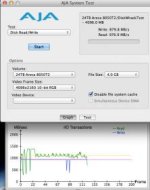
I had the r680 card hooked up to the sonnet EE3 chassis (x8 x8 slot) with the RR card in the middle slot (x8 x16 mechanical slot). The Sonnet was hooked up to a rMBP '13 model via TB2. Coming out of the ATTO card was miniSAS into an 8-bay unit from Maxx Digital (Evo 6G). I filled it with HGST ultrastar 4TB enterprise drives, RAID 10...I got horrible read/write speeds and very erratic. Sometimes I got 700 write 600 read...other times I got high 600 write and 250 read...and using AJA disk test showed the chart all over the place vs. a nice tight line as I would expect. Can't say for sure which one of the pieces in this chain was causing the issue- and I don't want to blame any company's product- SO DONT POINT TO THIS POST AND TRY TO FIND THE BLAME. This may be something on my end. A lot of the reps from these companies reached out...it just didn't work out for me...so I'm moving on to an Areca 8050 T2 that has excellent performance. I'll figure out an enclosure for the RR later...

Also want to point out that Greg from Sonnet has been excellent...the best of all the reps from all the companies I talked with...and he's a sales rep...but his tech knowledge is very deep. We never found the problem with what was going on with my setup, which was very frustrating. Yet, as we all know with technology, it is what it is sometimes...

I do want to point out that if you are initializing a RAID with the ATTO card in the sonnet chassis, let it be the only card in the chassis during the setup. I had the r680 along with the RR and tried to initialize the RAID. 20 minutes in, it overheated and the guys at Maxx had to walk me through troubleshooting what could be wrong...once we took the RR card out, and restarted the initialization (again, RAID 10) it ran smoothly. Once the initialization was done, the RR card was reinstalled. I never had another heat warning from the r680 card with the RR inside the chassis together again...but I never really pushed the system either (no intense editing of r3d footage). Sonnet has said that they tested extensively the combinations of the r680 in their chassis- and I believe them. My guess is that it just got a little too hot during initialization and it may have been even hotter in my office where everything is set up.
 
Last edited:
How are the fans in the enclosure working for others? with a RR-x only I am getting slow fans at first that go into loud hyperdrive after about 10 minutes
 
Paul, other than the issue I had during initialization, when I had it running with the r680 and RR, the fans were quiet but pulled a lot of air out of the unit- which I didn't know until after I bought the Sonnet...the fans don't blow on the pcie cards, they pull hot air out of the chassis and help with circulation as the front portion of the unit is vented/open and air is pulled over the cards and out of the two fans, which are directly beside the cards...interesting to see how the Magma set theirs up as I think they have a fan blowing directly on the cards- don't know for sure though, but looking at their website, it seems like thats the case.
 
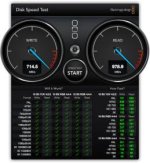
Little off topic, but I wanted to follow up for those wondering what speeds were like with the Areca TB2 8-bay unit is...I'm getting around +750 writes and +850 reads...sometimes I get a little lower reads, and sometimes a lot higher for reads (I get more +900 reads than I thought, and a much tighter line than before)...I'm using a RAID 6 setup now vs. RAID 10 like I had before- all enterprise 4TB drives. People have told me that the r680 card is good, but the Areca RAID card is a little more stable and doesn't suffer from the overheating problems like the Atto does. Here are some screenshots of a couple disk speed tests. Thunderbolt 2 seems to be a lot faster than TB1, but I'm still waiting on the Magma TB2 enclosure to see if the RR works any better than what I had before...For context, I have a 10TB Lacie TB1, RAID 0 which gets me around +750 Read/Write speeds...but no protection, so this Areca setup is faster and much safer. Special BIG thanks to guy named Bob! He's the man!:hurray:& apologies for the small attachment size...don't know how to make them any larger (tried twice now)...
 

Attachments

  • Speed Test_24TB Areca.jpg
    Speed Test_24TB Areca.jpg
    16.1 KB · Views: 0
  • Screen Shot 2014-03-15 at 11.54.37 AM.jpg
    Screen Shot 2014-03-15 at 11.54.37 AM.jpg
    10.9 KB · Views: 0
Last edited:
What are some other good caddies for the RED ROCKET X? I just ordered one, and need to know some options
 
Hodie,

Just picked up the Sonnet III-D and am having trouble updating my Redrocket X firmware. The Sonnet sees both cards...I have a Rocket and Rocket X and both card have the proper drivers but once I try to update the Rocket X firmware in Terminal i get a Error hydraRAW Please shut down.... Any thoughts. MBP with Firewire 1

Thanks in advance

Taylor
 
Just ordered the rack mount version.

Is everyone still having issues with this unit?

Has anyone moved over to the ROBEN?
 
ugh. I wish I had seen this thread before ordering the Sonnet.

I installed my Rocket-X, plugged into nmpro and started time tests. Am getting ZERO results from this box and now have to do a bunch of testing to figure out where in the chain the problem is - sounds like it is the box.

I bought it because I was so pleased with the performance I was getting with my previous Sonnet box and Rocket, but this thing isn't ready for prime time. At all. Not working as advertised on their website, that is for sure.

It would be nice if Sonnet would get a rep on top of this thread, to address some of these issues. I am going to try some of the reduser recommendations and see if I can get this to work at all. Right out of the box, hot-plugged into my nmpro, I'm getting nothing. Not good.
 
Cant you return it?
 
I'd rather make it work. So going to try some of the advice in this thread, to see if that can happen. Otherwise, back it will have to go....

...which means R-X will have to go, too, since I'll have no way to make this setup useful.

just a pain to spend this much time and shipping costs on a thing which advertises itself as plug n play and Rocket-X supported....
 
ok. so. pulled everything apart. reinstalled everything from scratch.

it all seems to be working beautifully now.

sometimes the thing you have to do, is the thing you really, really don't feel like doing.

now I will be able to do all of my time tests on Monday. will report back.
 
Great to hear Meryem!

Okay just got our rack version in.

Wanted to use the 8X for older ROCKET.

Cant due to a stupid flaw in Sonnet design.

There is a tiny little block (resistor?) blocking the cards extra chunk of plastic PCI (place holder?)

I would snap that extra chunk of plastic but Id rather not :P
 
FYI:

Hello Eric,

Thank you for forwarding that link. I read through the responses, and also your additions to the thread.

The very first production run of the Echo III units (11/13-12/14) did have an issue with specifically the Red Rocket card that Sonnet had identified and corrected in all later units (repairing the earlier ones through RMA).

I noticed in the thread that there was also some confusion about the x4 vs x8 Thunderbolt arrangement with the new Thunderbolt 2 systems. The Red Rocket and Red-X cards are both x8 PCIe 1.1 cards (20 Gb/s). Under systems using Thunderbolt 1, that performance is cut in half to 10 Gb/s. Still sufficient for most trans-coding jobs, but not utilizing the full bandwidth that the cards can support.

However, with Thunderbolt 2 on the new Mac Pro and Retina systems, the cards can use the full x4 PCIe 2.0 bandwidth (20 Gb/s) to emulate the x8 PCIe 1.1 cards when installed in the center slot. The Red Cine-X application still sees the Thunderbolt as x4, so it mistakenly still delivers the "x4/x8" error message, but the performance is true 20 Gb/s.

I hope this answers your questions, and thanks for your interest in Sonnet!

Best regards,
Patrick

Sonnet Customer Support
vip.support@sonnettech.com
 
Back
Top