Welcome to our community

Be a part of something great, join today!

  • Hey all, just changed over the backend after 15 years I figured time to give it a bit of an update, its probably gonna be a bit weird for most of you and i am sure there is a few bugs to work out but it should kinda work the same as before... hopefully :)

Solution: Fix frozen images in apple color

David Battistella

Well-known member
Joined
Apr 30, 2007
Messages
10,003
Reaction score
6
Points
38
I see this question asked a lot so I am posting this with the hope that it will be made a sticky.

Sometimes when you have send M, P or F proxies from a Final Cut Pro timeline to apple Color some images appear frozen in the timeline.

The images that appear frozen are multiple clips taken from the same shot in the timeline, the XML will only display the first frame of the shot.

The good news is that the fix is very simple and this is one solution that I use all the time.

If you see this problem with a color project do the following.

1. Save and close the Color project.

2. Download the latest version of CLIPFINDER here:

http://www.daun.ch/software/

3. Open CLIPFINDER

4. In the TOOLS menu scroll down to FIX COLOR LOOPING BUG.

5. Navigate to the Color Project folder and select the Color Project file.

6. You will see a window that runs a script to FIX your Color Project. let it run. It's pretty quick.

7. Close Clipfinder.

8. Open the project in Color and it will work.


IF IT DOES NOT WORK then you may have a problem of CLIP timecode ROLLING over MIDNIGHT :IE CCLip starts at 11:59:30:00 rolls over 00:00:00:00 and the out is 00:00:40:00 or something.

This has to be treated a different way as the MASTER TC of the clip needs to be altered.

I hope this post is helpful to the APPLE WORKFLOW COMMUNITY.
Please consider making this a sticky.

David Battistella
 
I second the vote for a sticky on this one.

A little more tech data, for those who might be interested:

The main stuck frame/looping issue (the one that is fixed by Clipfinder) is due to spanned clips that run bigger than the 2GB file size limits of the FAT32 file system that's used by RED to ensure cross-platform compatibility.

The second, more rare, issue is due (as David said) to the timecode rolling over to zero at midnight, or in the middle of the day if your camera isn't set to the correct TOD. It's a problem that's endemic to all TOD-based systems, not just RED. Easily avoided on set if you have some flexibility. Just take 5 as the TC rolls over. Fixing it in post is a case of rewriting the TC, or using edgecode.
 
I've seen frozen clips in Color (stuck on the last, not first, frame), and the triggers seem to be:

1) Log and Transfer footage to native (quicktime wrapped) clips.
2) Edit, then get annoyed that I can't re-firstlight color grade the wrapped quicktimes.
3) Use clipfinder to reconform the project to use M proxies.
4) Send to Color to find frozen clips, not due to rolling over midnight and not fixable by the clipfinder fix.

I assume there is some metadata somewhere in that reconform that triggers Color to get stuck on the last frame. I'll post some sample XML to my post on this soon.
 
Hi all,
Have a serious issue here with XMLs and Color. Been talking to Hans about it but want to open the discussion up for public consumption:

I'm grading a feature right now in Apple Color and I've split it up into five 20 minute reels. The first 4 reels worked with the exception of about one shot per reel giving me the freeze frame issue. I figured I'd just export those one by one at the end of the grade. Now, on the last reel over half the clips are frozen.

I've been using this workflow from David Batista, and I always use the "fix looping bug" in Clip Finder:

http://www.reduser.net/forum/showthread.php?t=35308

The interesting thing is that when I use the looping bug fix tool, it's still has the freeze frame problem but it shifts to the last frame in the clip.

So I double checked the closest "midnight roll over timecode" clip I could find, and frustratingly that clip seems to playback, grade and export fine (unlike half of this sequence). So that doesn't appear to be the issue.


Hans also mentioned:

"I have occasionally seen cases though where the freeze frame issue seemd to be caused by mixing clips with TOC and Edge Code. It might be worth scanning the FCP project for suspicious timecode changes."

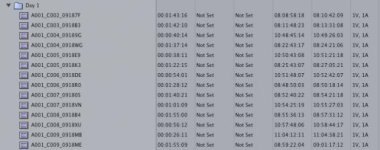
I checked into the timecode and it's all consistent TOD but we did have an issue on the first day. Our AC forgot to format the drive after our prep day so we had two drives labeled "A1". This messes with the time code because to FCP it appears to jump between morning and afternoon on the same reel. I've included a screen grab of my media bin. However, other clips on this sequence from different days are exhibiting the same freeze frame symptoms.
Also, as a last note we shot in 4.5K and I'm using FCP 7.0.1 and Color 1.5.1 and Color's REDCODE plugin v4.0 BETA 2. Mac pro Octocore 16gbs ram, MAXX Digital 7TB Raid etc. . . . since the XMLs were workign on the last reel doesn[t appear to be a hardware issue.

Any help would be greatly appriciated. I can also send out XMLs if anyone wants to peep at that and is feeling extra generous.

Thanks again, of course this happens on the last reel . . . . . . .
 

Attachments

  • Screen shot 2010-04-02 at 3.13.43 PM.jpg
    Screen shot 2010-04-02 at 3.13.43 PM.jpg
    20.5 KB · Views: 0
Here's a more readable version of the bin screen grab.

Sean,

I would try this:

1. In Clipfinder when you run the conform FCP you might want to point to individual folders within the clip directories.

This might be a way to force clipfinder to look at the individual clips. If you want to PM me an e-mail, I will look at the XML's but take a snapshot or two of how you pointed to the R3D's in the first place.

OR

Try cinema tools with an EDL for the last reel.

David
 
Hey David,
Thanks so much for your help. Like I said in the PM, pointing to specific clip folders during the Clip Finder conform didn't help. Now amazingly there are actually more freeze frames than when I originally was doing my conforms a week ago. I have to go back because the sequences for two of our reels were incorrect. So now when I "send to color" with the same process I used last week I get many more frozen clips. Originally I just had one or two per reel. Wow this is frustrating.

I'm not very familiar with Cinema Tools. Do you know a good tutorial for this process? Poking around quickly I didn't see an "import EDL" option in Cinema Tools. I know I can generate Film List in FCP, but how do I get this into Cinema Tools. How is this method different from the XML route?

Also, when I created the EDL I got an error document which his too large to attach for RedUser. Here is a sample:

The start timecode of /Volumes/Evo2K-8TB-Expando/Exterior Films Grade/RAW/Day 1/Reel 1/A001_0918GF.RDM/A001_C006_0918R0.RDC 01:05:06:19 intersects with /Volumes/Evo2K-8TB-Expando/Exterior Films Grade/RAW/Day 1/Reel 1/A001_0918GF.RDM/A001_C005_0918K3.RDC 01:05:06:19 - 01:06:29:10
The start timecode of /Volumes/Evo2K-8TB-Expando/Exterior Films Grade/RAW/Day 10/Reel 1/A025_0929XF.RDM/A025_C009_092919.RDC 01:12:42:13 intersects with /Volumes/Evo2K-8TB-Expando/Exterior Films Grade/RAW/Day 10/Reel 1/A025_0929XF.RDM/A025_C008_0929NC.RDC 01:12:42:13 - 01:16:31:13
The start timecode of /Volumes/Evo2K-8TB-Expando/Exterior Films Grade/RAW/Day 13/Reel 1/A032_10040B.RDM/A032_C021_1004FJ.RDC 01:21:31:02 intersects with /Volumes/Evo2K-8TB-Expando/Exterior Films Grade/RAW/Day 13/Reel 1/A032_10040B.RDM/A032_C020_100480.RDC 01:21:31:02 - 01:22:02:12
The start timecode of /Volumes/Evo2K-8TB-Expando/Exterior Films Grade/RAW/Day 14/Reel 3/A035_1005KE.RDM/A035_C001_1005MM.RDC 01:00:00:00 intersects with /Volumes/Evo2K-8TB-Expando/Exterior Films Grade/RAW/Day 14/Reel 1/A035_1005KE.RDM/A035_C001_1005MM.RDC 01:00:00:00 - 01:02:11:01
The end timecode of /Volumes/Evo2K-8TB-Expando/Exterior Films Grade/RAW/Day 14/Reel 3/A035_1005KE.RDM/A035_C001_1005MM.RDC 01:02:11:01 intersects with /Volumes/Evo2K-8TB-Expando/Exterior Films Grade/RAW/Day 14/Reel 1/A035_1005KE.RDM/A035_C002_1005MX.RDC 01:02:11:01 - 01:02:57:06
The start timecode of /Volumes/Evo2K-8TB-Expando/Exterior Films Grade/RAW/Day 14/Reel 3/A035_1005KE.RDM/A035_C002_1005MX.RDC 01:02:11:01 intersects with /Volumes/Evo2K-8TB-Expando/Exterior Films Grade/RAW/Day 14/Reel 1/A035_1005KE.RDM/A035_C002_1005MX.RDC 01:02:11:01 - 01:02:57:06
The end timecode of /Volumes/Evo2K-8TB-Expando/Exterior Films Grade/RAW/Day 14/Reel 3/A035_1005KE.RDM/A035_C002_1005MX.RDC 01:02:57:06 intersects with /Volumes/Evo2K-8TB-Expando/Exterior Films Grade/RAW/Day 14/Reel 1/A035_1005KE.RDM/A035_C003_1005XB.RDC 01:02:57:06 - 01:03:47:10
The start timecode of /Volumes/Evo2K-8TB-Expando/Exterior Films Grade/RAW/Day 14/Reel 3/A035_1005KE.RDM/A035_C003_1005XB.RDC 01:02:57:06 intersects with /Volumes/Evo2K-8TB-Expando/Exterior Films Grade/RAW/Day 14/Reel 1/A035_1005KE.RDM/A035_C003_1005XB.RDC 01:02:57:06 - 01:03:47:10
The end timecode of /Volumes/Evo2K-8TB-Expando/Exterior Films Grade/RAW/Day 14/Reel 3/A035_1005KE.RDM/A035_C003_1005XB.RDC 01:03:47:10 intersects with /Volumes/Evo2K-8TB-Expando/Exterior Films Grade/RAW/Day 14/Reel 1/A035_1005KE.RDM/A035_C004_100549.RDC 01:03:47:10 - 01:04:40:02
The start timecode of /Volumes/Evo2K-8TB-Expando/Exterior Films Grade/RAW/Day 14/Reel 3/A035_1005KE.RDM/A035_C004_100549.RDC 01:03:47:10 intersects with /Volumes/Evo2K-8TB-Expando/Exterior Films Grade/RAW/Day 14/Reel 1/A035_1005KE.RDM/A035_C004_100549.RDC 01:03:47:10 - 01:04:40:02
The end timecode of /Volumes/Evo2K-8TB-Expando/Exterior Films Grade/RAW/Day 14/Reel 3/A035_1005KE.RDM/A035_C004_100549.RDC 01:04:40:02 intersects with /Volumes/Evo2K-8TB-Expando/Exterior Films Grade/RAW/Day 14/Reel 1/A035_1005KE.RDM/A035_C005_1005SM.RDC 01:04:40:02 - 01:05:00:12
The start timecode of /Volumes/Evo2K-8TB-Expando/Exterior Films Grade/RAW/Day 14/Reel 3/A035_1005KE.RDM/A035_C005_1005SM.RDC 01:04:40:02 intersects with /Volumes/Evo2K-8TB-Expando/Exterior Films Grade/RAW/Day 14/Reel 1/A035_1005KE.RDM/A035_C005_1005SM.RDC 01:04:40:02 - 01:05:00:12
The end timecode of /Volumes/Evo2K-8TB-Expando/Exterior Films Grade/RAW/Day 14/Reel 3/A035_1005KE.RDM/A035_C005_1005SM.RDC 01:05:00:12 intersects with /Volumes/Evo2K-8TB-Expando/Exterior Films Grade/RAW/Day 14/Reel 1/A035_1005KE.RDM/A035_C006_100588.RDC 01:05:00:12 - 01:05:26:15
The start timecode of /Volumes/Evo2K-8TB-Expando/Exterior Films Grade/RAW/Day 14/Reel 3/A035_1005KE.RDM/A035_C006_100588.RDC 01:05:00:12 intersects with /Volumes/Evo2K-8TB-Expando/Exterior Films Grade/RAW/Day 14/Reel 1/A035_1005KE.RDM/A035_C006_100588.RDC 01:05:00:12 - 01:05:26:15

It says there is intersecting timecode, looks like it's reading the edge code, which is surprising because in FCP it's showing TOD.
 
Back
Top