Welcome to our community

Be a part of something great, join today!

  • Hey all, just changed over the backend after 15 years I figured time to give it a bit of an update, its probably gonna be a bit weird for most of you and i am sure there is a few bugs to work out but it should kinda work the same as before... hopefully :)

Smallhd 702 Bright calibrating

I used a regular xrite i1 display pro along with Resolve and displaycal to make a 33^ 3D LUT. I loaded the LUT up through the calibration page on the SmallHD and it worked great.

I'm mostly happy with the results for field use. I also believe this method gives a more accurate result than what's built in the smallHD OS. Although, I wish the backlight would be able to go dimmer.
 
The default calibration lut on mine did look off, but i don't remember it being green. With the calibration disabled, it was very blue, probably around 9300K temperature.

I'm not sure if my calibration lut will help you, every panel really should be individually calibrated. But just send me an email and I'll send it to you to see if it helps. I prefer not to publically share it.
 
Hi Roger,

i'm trying ti calibrate my 702 with diplaycal and a spyder5. But i'm not sure if i'm doing it right.

Can you explain your steps, specially why you use resolve for that. Thanks in advance.

Marcus
 
they cant ever be calibrated correctly, ive had dit's try and try. they seem to have no standard, the best you can do is create a lut, but that doesnt seem to carry on from scene to scene.
 
They can be calibrated correctly but not by any method that seems correct. Yes I've tried the small hd probe as well, I own it. I've calibrated 2 that I own to match my flanders but it took hours of tweaking and they are different in the settings between the 2 702 monitors. But now they are accurate. So I'd say get yourself in front of a calibrated monitor then start turning knobs while viewing a variety of footage. Good luck
 
Hi Marcus,

Resolve has a calibration process to create LUTs for grading monitors. Instead of connecting to a grading monitor, I connect it to the smallHD. It'll treat it exactly the same way.

Follow this method, and you need a Decklink/Mini Monitor to output to your SmallHD.

https://hub.displaycal.net/wiki/3d-lut-creation-workflow-for-resolve/

Once it's done, copy the LUT to your smallHD, and select the LUT in your calibration setting. It'll be more accurate than the SmallHD method because you'll be able to read a lot more patches than the built in SmallHD Calibrator would use. I've had good success doing this, to a point now that I use the 702 more often than my red pro monitor.
 
I'm attempting to do this myself and I have a couple questions:

1) Does anyone know what type of panel the 702 Bright uses, or what is the correct spectral offset setting in DisplayCal?

2) Does anyone know where I can create or download a null LUT that has no effect on the image? In order to have control over the RGB settings during DisplayCal calibration, you have to have a LUT enabled in the SmallHD settings. But you can't use the default SmallHD LUT while calibrating, because it ends up getting replaced and throws off the calibration.
 
Dunno why Small HD is so popular nowadays. It was always waaaaay off in terms of color, I've tried almost every series from the 2012, and they always seem to be yellowish to me. They freeze all the time you touch the power (battery or the dtap cable), buttons are crap on focus series, the highlights are impossible to guess because of the monitor clipping before the camera does. I do like the only thing in them - they are light. Otherwise, I always went the TVLOGIC 058 route, simply because it always works fine, and you literally can judge focus and image without a hassle on them.

My guess is calibrating them could help a little, but not fixing the whole issue. They just seem lacking enough color gamut.
 
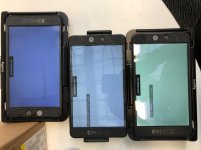
did you guys get some results in calibrating/matching monitors? we have smallhd display probe and were not sucessfull to calibrate it correctly. here is the crazy shift in noncalibrated/calibrated displays. so wondering if manual rgb shifting next to reference monitor is the way, or some resolve process (but we do not have calman hardware)
 

Attachments

  • IMG_2252.jpg
    IMG_2252.jpg
    84.6 KB · Views: 0
Last edited:
did you guys get some results in calibrating/matching monitors? we have smallhd display probe and were not sucessfull to calibrate it correctly. here is the crazy shift in noncalibrated/calibrated displays. so wondering if manual rgb shifting next to reference monitor is the way, or some resolve process (but we do not have calman hardware)

Hey Martin, you don't need calman, just the probe you have, Resolve, a BMD card (or MiniMonitor) and DisplayCal which is open source.

Follow the link above or search on youtube there are a couple of guides.

It works much better, it just take a bit of time and patience. ;-)
 
wow, starting to getting into properly calibrated colors and very close to flanders monitor. can somebody with more experiences guys confirm/hint me about this?

1) did you get any experience in pattern test durations between lets say 4min test / 14min test / 60min test in precision of calibration LUT? or do you follow that 50min test is a need as in tutorial above?

2) what can cause the issue that processing verification readout only (as reference information) on calibrated flanders FSI monitor (1week old with report) show red values that its "not ok"? even the whitepoint shows in the begining out of middle? what can we do wrong? profile is set on monitor to rec 709.
 
As someone who has never done this, can someone post a tutorial of all the things I’d need to calibrate my 702 and 2403?
 
Hey guys,

I'm gonna buy very soon the new 702 touch (with DCI-P3)...

Any luck to calibrate perfectly all SmallHD monitors with OS3 auto-calibration feature and an X-RITE i1 Display Pro ?

Thanks
 
Back
Top