Henry Harrison
Member
- Joined
- Mar 16, 2012
- Messages
- 13
- Reaction score
- 0
- Points
- 0
Hi all, I've searched the boards and Google but haven't found anything specific to this question. (I tried to post this yesterday, not sure what happened there, so apologies if this is a duplicate)
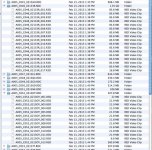
I recently noticed that my Scarlet is creating a LOT of small R3D files in the RDC directories of some clips. I know that large clips get clipspanned at around 2Gb or 4Gb, but these files are all around 21.8 to 21.9 MBs or else around 83.6 MBs and I'm getting up to 17 of them in a directory. These files act like any other clipspanned file in Premiere Pro, Red Cine and Get Info. It's not a huge deal yet but I'd like to better understand what is happening and if possible reduce the total number of files on my server. Any info or links to resources explaining tis would be great. See attached screen shot.
I recently noticed that my Scarlet is creating a LOT of small R3D files in the RDC directories of some clips. I know that large clips get clipspanned at around 2Gb or 4Gb, but these files are all around 21.8 to 21.9 MBs or else around 83.6 MBs and I'm getting up to 17 of them in a directory. These files act like any other clipspanned file in Premiere Pro, Red Cine and Get Info. It's not a huge deal yet but I'd like to better understand what is happening and if possible reduce the total number of files on my server. Any info or links to resources explaining tis would be great. See attached screen shot.