Welcome to our community

Be a part of something great, join today!

  • Hey all, just changed over the backend after 15 years I figured time to give it a bit of an update, its probably gonna be a bit weird for most of you and i am sure there is a few bugs to work out but it should kinda work the same as before... hopefully :)

Simulating celluloid-style clipping with Red (or any digital cinema) cameras

Layi B

Banned
Joined
Nov 14, 2012
Messages
99
Reaction score
0
Points
0
Hello all. I was wondering what the best practices were for getting digital to behave like film when it comes to highlight rolloff and elegant clipping.

My best guess would be to not clip in camera, but instead shoot with a stop or two under clipping the highlights, and perhaps use a (well rounded before ramped) curve at the top end when grading.

Any thoughts with regard to this?

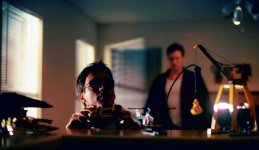
The below picture was shot on film. I'd like to be able to reproduce the aesthetic digitally. Notice the shadow gradient on the face. The clipped highlights on the legos on the right. The dynamic range in general (how much estimated dynamic range would you say this picture has captured?)

Can this shot be done on Red?


Thanks much
 

Attachments

  • Sneak Cropped.jpg
    Sneak Cropped.jpg
    33.2 KB · Views: 0
  • Thread starter
  • Banned
  • #3
Yeah the exposure part during filming is pretty straightforward. I guess a simpler version of the question is how do you bloom highlights in post after digital acquisition?
 
I tend to use LUT's. They are usually built to compress highlights. apply a Lut inside of resolve and then gain up and watch the parade. You'll see your highlight compress without actually clipping. I've noticed Red's ISO adjustment do pretty much the same thing. And yes I do my best not to clip in camera on digital sensors...I never like the results.
 
  • Thread starter
  • Banned
  • #5
This sounds interesting. Screengrabs?

Thanks
 
In this shot thanks to the huge dynamic range of MX sensor the outside was not over exposed at all. You could see the street with cars driving and what not. I used an Arri Log C to Rec709 Lut and just gained up until the windows were over exposed and then leveled out my mids and shadows.
A001_C012_0810EH_0011_00042.jpg
 
  • Thread starter
  • Banned
  • #7
Interesting. I'll have to look into LUTs.

Thanks
 
Slight blooming highlights using luma key and filters maybe... This is serious VFX work, lol. Or maybe you could do it using optical filters with only highlights blooming?
 
Hey Joe, what lenses did you use on that shot? Was it with your Scarlet?

As for the topic: For the look in the example I'd focus on contrast and then level it out with with lift/gain adjustments (for the broad brush strokes, then resolve or other cc software to make it sing). So, for example, max the contrast, then lower gain to recover the highs (which will invariably be blown). Also a slight glow/bloom on the highlights works wonders.
 
Last edited:
Back
Top