Welcome to our community

Be a part of something great, join today!

  • Hey all, just changed over the backend after 15 years I figured time to give it a bit of an update, its probably gonna be a bit weird for most of you and i am sure there is a few bugs to work out but it should kinda work the same as before... hopefully :)

Significantly different Histograms-

Ryan E. Walters

Well-known member
Joined
Sep 13, 2007
Messages
1,213
Reaction score
0
Points
0
Location
Beaverton, Oregon
Website
www.ryanewalters.com
Here is a screen grab of what Red Alert shows and what Red Cine-X shows- the RCX histogram worries me ...
 

Attachments

  • Histograms.jpg
    Histograms.jpg
    92.8 KB · Views: 0
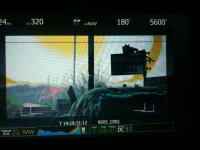
... and neither match the camera ...

... and neither match the camera ...

Although Red Alert is the closest to matching the camera.
 

Attachments

  • 005-002a.jpg
    005-002a.jpg
    87.9 KB · Views: 0
Have you confirmed that RCX is reading the meta data correctly? Do the settings match and does this preview image appear roughly the same?
 
Have you confirmed that RCX is reading the meta data correctly? Do the settings match and does this preview image appear roughly the same?

I'll go back and double check- but all of the settings are the same between RA & RCX- it is even on the same frame ...
 
There are lots of ways of drawing histograms. RedAlert scales more vertically and has a much bigger area but we're working on a bigger/better histogram for redcinex also.
 
That is good to know. If the histrogram could match closer to what the camera displays that would be great- also it would be helpful to be able to resize the histogram window in RCX.

Thanks for all your work on RSX. :)
 
Back
Top