Welcome to our community

Be a part of something great, join today!

  • Hey all, just changed over the backend after 15 years I figured time to give it a bit of an update, its probably gonna be a bit weird for most of you and i am sure there is a few bugs to work out but it should kinda work the same as before... hopefully :)

Shortcuts on Main Menu - How to set up?

Bruce Schultz

Well-known member
Joined
Jul 27, 2010
Messages
161
Reaction score
0
Points
16
Location
Malibu, CA
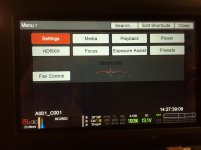
An AC put a nice shortcut to Fan Control on the Main LCD Menu screen below all the normal choices. I've searched through the operational PDF to find this feature without success. Can someone point me to a page or explain how to set up one of these Main Menu Shortcuts?

I've included a picture to illustrate. The Fan Control menu choice is a shortcut, and the word Shortcut is also displayed below the regular menu

Any assistance welcomed.
 

Attachments
  • Red Menu.jpg
    Red Menu.jpg
    91.4 KB · Views: 0
Last edited:
SOLVED

SOLVED

SOLVED - Red tech support directed me to the upper level of the menu screen to make a new shortcut.

For many years now I have wondered why there is no choice on the Color/Gamma menu box to choose Log or Red Gamma 3 or 4 which require several menu choices to get to. Adding a shortcut to the Look/Video tab gets me there now in a split second - which on set is always time sensitive.

Hope this feature helps someone else.
 
Back
Top