Welcome to our community

Be a part of something great, join today!

  • Hey all, just changed over the backend after 15 years I figured time to give it a bit of an update, its probably gonna be a bit weird for most of you and i am sure there is a few bugs to work out but it should kinda work the same as before... hopefully :)

Shooting with Red on a greenscreen

David (dudi) Namir

Well-known member
Joined
Jul 2, 2009
Messages
632
Reaction score
0
Points
0
Location
Israel
I have my list of do and don't when shooting with Red camera on green screen.
We have a shoot coming and the DP heard that many times the plates are soft and the amount of noise make it very hard to cut the key from the green. He can't point out when exactly this may happen and when the images are of a good usable quality.
Any one encountered such problems while shooting with the Red on a green screen and he is willing to share his ideas, knowledge and thoughts?
Thanks
 
Light the screen as even as possible and expose it at 60 IRE. You can use Zebras and set one to 60IRE for exact mesurement. Stay at 320 ASA and around 5000 Kelvin (native sensor settings). If you are shooting under Tungsten use a 80c blue Filter in front of the lense to balance - just takes away 1 Stop. Put your talent as far away from the screen as possible and light him seperatly, matching your backround plates. Keep in mind that it's better to feed the sensor with enough light to keep the bitrate up. If your Backround plate for example is a night scene, just underexpose your talent one stop, making sure that the highlights keep all information, keep the screen at 60 IRE for best keying ability and when compositing get the exposure of your talent down to match the scene.
That's about all for a perfect key. Some will say that with new color science and sensors you dont need to rebalance tungsten, but it will definetly give you the best results, if you do.
So to sum it up: underexposing the screen, and underexposing the blue channel (when shooting under tungsten without filter) or going to a higher ASA, can make a difficult screen. But if you do it like I stated before the result will be exelent. Every tiny hair, with a little amount of keying work.
By the way, I tested a lot of keyers and likes PRIMATTE the most. Almost a one click. If you want to take a look at how my workflow actually looks like, take a look at this:
http://vimeo.com/11617046
Shot with non MX Red all greenscreen and as discribed before.
 
Light your screen with green Kino Flo tubes. I use Image 85 fixtures for a smooth, even screen and the pure green from the tubes makes a dramatic difference.

Be very careful to control spills; white studio walls and floor will reflect the green far more than you might imagine. I try to put my screen in a "black box" with Devetyne.

Of course all the other rules apply.

Good shooting and best regards,

Leo
 
Thanks Justin... Glad you liked it.
The whole production was under enormes time pressure.
About three weeks from start to finish.
I had a really talented 3D artist but with more time we could have
brought it even further and eliminate certain imperfections.
But... That's life, or filmbuiseness, or both
 
Thanks Justin... Glad you liked it.
The whole production was under enormes time pressure.
About three weeks from start to finish.
I had a really talented 3D artist but with more time we could have
brought it even further and eliminate certain imperfections.
But... That's life, or filmbuiseness, or both

Looking at the video I guess you had a green floor, whats the best way to light that? Because talent and floor are in the same space.

Paul
 
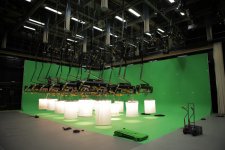
I used Spacelights...
As far as I know this is pretty standart. It gives a soft and even Overhead lighting, like on a overcast day. Here you can see them while we were setting up:

attachment.jpg

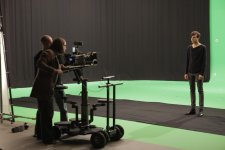
When the floor wansn't in frame I used black muslin (I don't know if that's the right term. in German it's called Mollton) to get rid of the little spill in his face. But it nerver really was an issue. Primatte got easily rid of the little spill left:

attachment-1.jpg

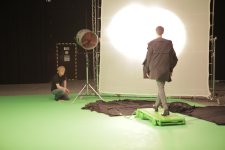
With the Spcelights I really found it important to shut the ones right in front of ( and above) the Talent off. Otherwise they would give me an ugly highlight on the nose. Than I lit him seperatly:

attachment-2.jpg
 
Great explanation and the pics really say it all, thank you.

Paul
 
I can also add- the RED is perfectly suited to this task. I've done a ton of greenscreen shoots on our RED since build 16. With the latest build, I just treat it like a normal camera- I don't even use a filter on it. No problems, and killer keys.
 
"I used Spacelights... As far as I know this is pretty standart".

Kim, out of interest, are those 2K bulbs in each Spacelight or greater?
 
Light the screen as even as possible and expose it at 60 IRE. You can use Zebras and set one to 60IRE for exact mesurement. Stay at 320 ASA and around 5000 Kelvin (native sensor settings). If you are shooting under Tungsten use a 80c blue Filter in front of the lense to balance - just takes away 1 Stop. Put your talent as far away from the screen as possible and light him seperatly, matching your backround plates. Keep in mind that it's better to feed the sensor with enough light to keep the bitrate up. If your Backround plate for example is a night scene, just underexpose your talent one stop, making sure that the highlights keep all information, keep the screen at 60 IRE for best keying ability and when compositing get the exposure of your talent down to match the scene.
That's about all for a perfect key. Some will say that with new color science and sensors you dont need to rebalance tungsten, but it will definetly give you the best results, if you do.
So to sum it up: underexposing the screen, and underexposing the blue channel (when shooting under tungsten without filter) or going to a higher ASA, can make a difficult screen. But if you do it like I stated before the result will be exelent. Every tiny hair, with a little amount of keying work.
By the way, I tested a lot of keyers and likes PRIMATTE the most. Almost a one click. If you want to take a look at how my workflow actually looks like, take a look at this:
http://vimeo.com/11617046
Shot with non MX Red all greenscreen and as discribed before.

Wow, that looks fantastic. I love how you had him wear a green t-shirt near the end. Very cool look. Very Magritte.

I'll have to keep Primatte in mind the next time I've got to do greenscreen work. Definitely agree that lighting talent and BG separately is key. I've also heard (and someone mentioned earlier here) that using green lights to light the screen helps. Have you tried it and found a difference?
 
Ye you're right Magritte was the inspiration for this shot. But I in fact shot it with just a white T-shirt and primatte performed well on this Luma key as I still wanted to see the structure. A green T Shirt could have merged with the backround too much, I considered a blue one, but white seemed the easiest way to go.
Yes I have in fact tried green kinoflow tubes. I have to admit that it was in a rather small studio but I felt that the spill was increased extremly. The green gets so oversaturated and creates such an reflection that went everywhere. With cycloramas for the walls an space lights for the ambient/floor I didn't have any spill issue and modern keyers like primatte don't need this oversaturation and can handle a possibly uneven light situattion very well. Note that primatte was used on many big motion pictures and that even Alice in Wonderland didn't use green tubes but instead an compareble setup as I did in another dimension and extension of cause.
 
"I used Spacelights... As far as I know this is pretty standart".

Kim, out of interest, are those 2K bulbs in each Spacelight or greater?

I'm not quiet sure... There are different types with different amounts of bulbs. I think I had the ones with 2K tungsten but I think there are also ones with 4K
sorry I asked but can't remeber, I trusted my lightning technician. Everything was routed on a digital mixer, so we could control all lights seperatly, even the single rows in the cycloramas. So it was kind of easy to get all the lights to a equal output. But hopefully someone can chime in and answer the Spacelight question
 
I can also add- the RED is perfectly suited to this task. I've done a ton of greenscreen shoots on our RED since build 16. With the latest build, I just treat it like a normal camera- I don't even use a filter on it. No problems, and killer keys.

I have to say that with RED depth of field can be an issue. If you haven't the needed amount of light to really stop down your lense you could get too much of it. The always desired depth of field isn't good for greenscreen if you are using tracking markers in a big studio. They will get too out of focus to give a good track. Also in a very tight close up the edges of a face for example can give a difficult key. In this cases a 2\3 chip camera can be a better choice to get a overall sharper image. If these things are not importand a red can by setting the screen out of focus help to blur some uneven lighting
 
Great Job
 
Back
Top