Welcome to our community

Be a part of something great, join today!

  • Hey all, just changed over the backend after 15 years I figured time to give it a bit of an update, its probably gonna be a bit weird for most of you and i am sure there is a few bugs to work out but it should kinda work the same as before... hopefully :)

Shooting Blue/Green screens with RED

Red Follower

Well-known member
Joined
Sep 28, 2007
Messages
79
Reaction score
0
Points
0
I was wondering, how much does the high quality (2K/4K Raw) filming effect the chroma key of the blue and green screen colours? Or is there no difference? If there is, are there any lighting setups one has to use to get the right colour on the footage?

**not sure if the high quality capturing ability of the camera overexposes the colour of the blue/green screens**

Thanks
 
Green should be better than blue.

I saw a key today that a customer had emailed - one click in Shake and was the most bloody awesome key (on hair too) that I've seen.

I think it all goes back to the fact that the key to a good key is lighting.

Graeme
 
For anyone who has had the opportunity to work on a proper, pre-lite cyc can certainly attest to the fact that, its all about the lighting! Having had the opportunity to work on a few, I can confirm that it makes the task so much easier when all you have to do is light the talent and not have to worry about much else.
 
Stand by

Stand by

About to blow your minds.

Graeme -- I'm pretty sure we are talking about what I think we are talking about. And yeah. It is staggering.

The RED is unbelievable at pulling keys.

Wait.

No.

That just doesn't do it justice.

It is like nothing you've seen.

Getting ready to start a new thread with a hint of the info we are about to share from an amazing day of shooting with #39.

Impacting in a few.

:)
 
Green should be better than blue.

Graeme,

This thread got me thinking... Red will great greenscreen, I'm sure, but, if you knew this next shot was going to be greenscreen (a camera setting) and had extra bandwidth (only shooting at 24 fps vs 30) is there anything you could do to the green channel to make the key even more accurate?

Say, by putting it in "greenscreen mode" there is far less compression on the green channel than normal? Or if you knew the green channel would be used to pull a key, would you use different algorithms to compress it?

If you had full compression on the other channels and zero compression on green would you get a far superior key? What about half the level of compression?

This came up before, and you wrote about taking one step out of the debayering process and you were going to add a checkbox (though I forgot what the particular step was)--is that still the case?

Just a thought. Can't wait to see the latest keys as they sound amazing, but you know the redcode "secret sauce"--could it pull an even better key with less compression on the green chanel?
 
Last week I have been shooting greenscreen with red 0044.
I worked like i used to do with film.
320 asa and a half stop over for the greenscreen.

used the gamma 709 en imported to fc and used colour and and at the studio they made a amazing compositing with the material.

I used mine 85 and 135 mm arriflex lenzen.

With this test shots and the outside shots i confirm that the RED ONE is a 320 asa camera.

I realy love this camera!! Nothing extra is needed!!

with kind regards
Robert
 
Wow great response! thanks guys. So basically, for those who've tested RED with a green or blue screen, green works better than blue? what about when it comes to red objects ... how does that compare with either blue or green screen with a RED camera?


I know that on film, it is better to use blue screens when you have bright red objects in front, but in RED's case, green being the best colour, how does it affect red objects infront of the screen?

Thanks
 
Great! thanks alot sbroock! will keep checking ...
 
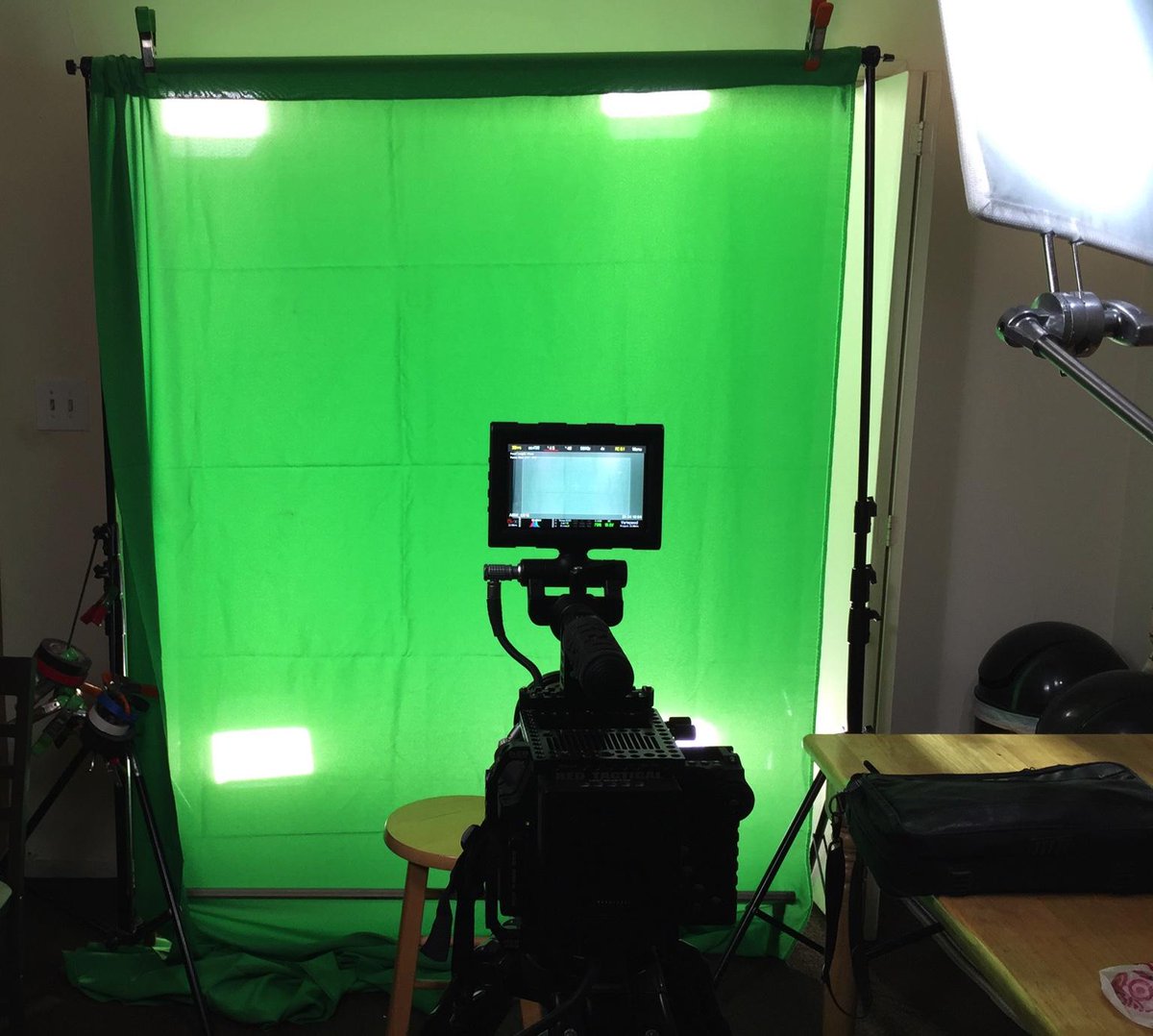
ok, rather than start a new thread, I wanted to see if there was any opinions on shooting a BACKLIT green screen?

Need a small traveling pack to shoot talking heads, and want to keep the green screen and shooting footprint as small as possible, and want a perfect key to make it as one click as possible.

Here is what we were looking at:
CJWlDNOUYAAkoge.jpg

CJWksy4WIAAR0Nw.jpg


and we also were trying this more thick plastic stuff: http://www.procyc.com/products/gs80-portable-green-screen-background-80in-x-80in it back lights very nice with the small sample card we had, with a really nice backlight.

We were figuring to add two light above two below and one on each side. Trying to keep the cost low, but also figure the better the key is, the less time someone has to roto later, which is the bigger cost.

We did notice that the green screen DID let through some slivers of white light, which I don't think helped on the keying, so a tighter SPANDEX knit fabric, maybe from http://www.rosebrand.com/shop/comparison-matrix.aspx?id=178 because don't have time to iron/steam out wrinkles every time. (http://www.rosebrand.com/subcategory327/keying-solutions.aspx)

CJWnZtvUMAAF0zv.jpg


When we shot with 24.98fps, 800 iso, f 5.0 1/48 and 5200k, at 4k rc 6:1, the green didn't really even look that green, either in the monitor or on an adjacent 60 inch LCD TV via HDMI. Open to any suggestions on that too.

Trying to upload a .r3d file to YouTube (not sure if it will work) here: http://youtu.be/BcVlCz3DbV4 (should complete by 9pm PST July 7)

Open to any thoughts.
 
Last edited:
If you want a small footprint system check out ledchromakey or reflecmedia.

You can eliminate the four back lights, and you can quickly switch from a green Key to a blue key by swapping one lens mounted light.
 
My formula: Shoot Green/ISO 320+Blackshade first/Some lights with 1/2 CTB to feed the sensor some blue, at least 90 degrees shutter for sharper edges if moving actors a lot
 
and, keep the subject as far as possible from the screen to avoid spill + get a softer out of focus green which diminishes any creaks or whatnot. Backlight with magenta is the theory I think, but it depends on your keyed scenario really...

Careful with flares also, use flags to get a nice clear image.
 
If you want a small footprint system check out ledchromakey or reflecmedia.

You can eliminate the four back lights, and you can quickly switch from a green Key to a blue key by swapping one lens mounted light.

In theory, that sounds like an elegant solution. Couldn't find a price anywhere, so probably costly for anyone who uses a greenscreen once in a blue moon... or a blue screen once in a green cheese moon. '-)
 
I'm currently working on a project using some green screen with my Red One, I've been happy with the results. I'm shooting several interviews in my studio but I had to shoot one on location in a garage, I'm using tungsten in the studio for now but one location I'm using 4 Aputure 672 LED Daylight lights. My green screen material was a bit wrinkled but the key results were very acceptable. In studio I use foam backed green screen material that always works well.
Jelli-Phone.jpg

sierra-camera.jpg

Jelli-Premiere.jpg

Sierra-Premiere.jpg

Jelli-interview.jpg

Sierra-Interview.jpg
 
ok, rather than start a new thread, I wanted to see if there was any opinions on shooting a BACKLIT green screen?

Need a small traveling pack to shoot talking heads, and want to keep the green screen and shooting footprint as small as possible, and want a perfect key to make it as one click as possible.


Open to any thoughts.

Try to get that background taut. We use "pony clamps" ($1 each at home depot) to pull the sides taut. Then some on the top bar too... I use sand bags to pull the floor taut, and roll them the back side.

After that... GET A MONITOR WITH A WAFEFORM! If when you remove your talent... turn off all 'key lights' for talent... and just look at your wfm... if you have a STRAIGHT line across the wfm at say 50 IRE... you're in business for a one click... if you don't... you won't! Next place talent and then turn on your key lights... if you're hot or dark DO NOT TOUCH that iris! move the lights in or out accordingly, as your "key" is already set up!

To eliminate spill, use a 1/4 magenta gel on the hair/separation lights... it puts the spill light in a different color range other than green.

We've done this for nearly 15 years... I GUARANTEE our keys to be 5 clicks or less, or the shoot is free! That's how well it works!
 
Back
Top