


Nick_Brown
Well-known member
I'm going to make a note here because it took me a while to figure out. Most of the tutorials and instructional videos have long since been taken down so maybe it can help someone else. Eric Birger was very responsive when I reached out but I couldn't quite visualize what he was saying.
When mounted the Birger EF adapter to my camera, and found that I could turn the innermost ring by hand. However, I noticed that I could only turn it a little bit, not all the way around like the numbers suggested. I realized that what you have to do is to take the WHOLE Birger mount off (leave the Canon lens adapter attached), and then you can freely turn the collimation ring from the back side of the adapter. It turns easily without the camera body pushing up against it.
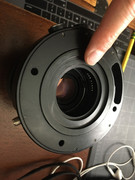
To collimate, I mounted a lens (at fastest f-stop) to the detached mount, measured out the minimum focus distance marked on the lens and placed the camera accordingly, powered the camera on, and then just held the Birger mount up to the camera to see if my target was in focus. Did this a few times until I got a tack sharp image.
When mounted the Birger EF adapter to my camera, and found that I could turn the innermost ring by hand. However, I noticed that I could only turn it a little bit, not all the way around like the numbers suggested. I realized that what you have to do is to take the WHOLE Birger mount off (leave the Canon lens adapter attached), and then you can freely turn the collimation ring from the back side of the adapter. It turns easily without the camera body pushing up against it.
To collimate, I mounted a lens (at fastest f-stop) to the detached mount, measured out the minimum focus distance marked on the lens and placed the camera accordingly, powered the camera on, and then just held the Birger mount up to the camera to see if my target was in focus. Did this a few times until I got a tack sharp image.

