Welcome to our community

Be a part of something great, join today!

  • Hey all, just changed over the backend after 15 years I figured time to give it a bit of an update, its probably gonna be a bit weird for most of you and i am sure there is a few bugs to work out but it should kinda work the same as before... hopefully :)

scarlet noise and need help with redcine-x denoise

J Davis

Well-known member
Joined
Sep 22, 2008
Messages
1,267
Reaction score
0
Points
0
Location
NYC
Hi, I've loaded Tonaci's first scarlet footage into Redcine-x. The footage was downloaded from this post in the 1st Scarlet thread link

I am surprised at the level of noise, is this normal?

I see no effect from the denoise slider in redcine-x.
After pulling the r3d into rcx the only parameter I changed was the denoise slider.
This screengrab below is not scaled. To see it at 100%, click on it, then click again.
Top image denoise=0
Bottom image denoise=6

Any help appreciated ... many thanks !

 
I had the same reaction and results last night. I found the JPG much more robust and satisfying. First, I would not click on the r3d and "open with" RCX. I would open RCX and then find the file in the browser. That gives me the full resolution.

Also, the JPG didn't have nearly the grain the r3d seemed to, at least once you start correcting it.

I guess I am just agreeing and also stating that the r3d isn't responding in the way I am expecting or wanting, not like other r3d's do or jpg's do. MMy most satisfying results are to get the file into Premiere and to get a good color correction program on it, then it is just GORGEOUS!
 
The denoise in RCX is chroma-NR that works on full demosaic only. As I can't really see chroma noise in the dark shadows, it's not surprising you're seeing little effect. The chroma denoise works well when chroma noise is quite visible, otherwise you won't see it. Those darkest shadows are over 8 stops down from clip, and you're seeing a mild organic grain-like effect. I'm not worried.

Graeme
 
Thanks Graeme. When you say "8 stops down from the clip" ...
How are you measuring stops in redcine, is there a scope where I should be looking?
Also, by 'clip' are you referring to the point at which white clips?

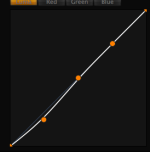
BTW - I switched it to RedLogFilm and applied an S curve and the grain improved dramatically
 
I went into the file and looked at the RAW linear light code values recorded, and yes I'm referring to the point at which the data clips.

Graeme
 
Great. I look forward to seeing more footage from your new camera.
 
The question about noise came up in another thread too, because of Philip Bloom's statement about EPIC/Scarlet being noisier than a F3.

This thread is a example why people could be mislead into thinking the MX-sensor produces too much noise or doesn't perform well in lowlight. The first mistake that has been done here is looking 1:1 at a 4k/RAW-image and probably comparing that to screengrabs of other cameras. You'll notice more noise that way for sure, the pixels are smaller and the image has not been post-processed (slightly de-noised) in camera for more efficient AVC/MPEG-compression. Don't just pixelpeep on 4k-RAW-images and don't use RED's cropped 1080p-footage for comparisons, thats just not fair and shows only a part of the story. The competition with S35-FullHD-sensors better show less noise if you do that, or the people behind those cameras did something essential wrong. ;)

To make a more fair comparison you should downscale the RED-image to 1080p (thats what the competition delivers with a s35-sized sensor) and apply a de-noise-filter if needed (as i said, other cameras do that in real-time). Sure, you have more and better options to choose from, but hey, thats just one good reason for RAW. Remember, shooting RAW is a different strategy, all the post-processing is up to you and hell yeah, you have alot more potential with that insane amount of image-data. It will need some more work to get rid of noise, granted, but you win more freedom and of course 4k!

I'll always take 4k/16bit/RAW over highly compressed 1080p, even if it shows a bit more noise at first sight.

I'll bet that properly post-processed RED images will stay on top of any fair comparison.
 
neat video noise reduction removes the noise very well. Here are before and afters, give em a second to load because they're each about 8mb:

_Scarlet_Before%20Neat%20Video.tif
http://www.sceneblock.com/images/_Scarlet_Before%20Neat%20Video.tif

http://www.sceneblock.com/images/_Scarlet_After Neat Video.tif
 
This thread is a example why people could be mislead into thinking the MX-sensor produces too much noise...

I'll always take 4k/16bit/RAW over highly compressed 1080p, even if it shows a bit more noise at first sight..


I completely agree, Maik. I definitely don't want people to think Red shoots anything other than a color correcting dream! I have even fallen in love with footage from the Red M sensor, and MX is a 100 times better.

I want to make it clear that my twiddling on this thread is more about getting pleasant results in color correction via Redcine X or skipping RCX and getting right into Resolve / Magic Bullet / whatever.

The footage import processes and then the applying of new parameters certainly seems to result in unexpected results. Not wrong, just not ( for me ) intuitive in RCX.

I think that we have to be careful not to give the wrong impressions, but also that people who don't know better have to eventually be expected not to make wild statements about things they don't understand! lol. I have a sound guy who loves to tell me all the problems Red Cameras have.
 
The denoise in RCX is chroma-NR that works on full demosaic only. As I can't really see chroma noise in the dark shadows, it's not surprising you're seeing little effect. The chroma denoise works well when chroma noise is quite visible, otherwise you won't see it. Those darkest shadows are over 8 stops down from clip, and you're seeing a mild organic grain-like effect. I'm not worried.

Graeme

Hi graeme, its really interesting what he's seeing. No doubt, i'm just wondering why i didn't see the same by directly dropping it in vegas pro?
 
This thread is a example why people could be mislead into thinking the MX-sensor produces too much noise or doesn't perform well in lowlight. The first mistake that has been done here is looking 1:1 at a 4k/RAW-image and probably comparing that to screengrabs of other cameras.

Just want to point out that I never compared this image to another camera - that was something you brought to the thread, not me.
Also if you believe in the future is 4k then yes you should be looking at things at 1:1

edit:
I also want to add that my earlier posts never criticized or passed judgement - they asked questions.
If you believe this image makes RED look bad then that is also something you are bringing to the thread.
 
I think this is just a great example of how different programs have different algorithms that respond differently for each codec and also for changing image subjects.

I love my real-time playback and edit in Adobe CS5 workflow that ends with me correcting the footage with Magic Bullet Look Suite and rendering right from the 4k files. I can use Dynamic Link to go into AE CS5 if I need something very specific. No transcoding, no Red Rocket, etc. For now I am still trying to work RCX into my process, but I have one that works amazingly, so there is no rush. Buit RCX is obviously a powerful tool, and it's free, so I am determined....
 
Just want to point out that I never compared this image to another camera - that was something you brought to the thread, not me.
True, true, looks like i've read too much into your statement about being "surprised at the level of noise". Don't take my post that personal, i had a few other statements in mind too.

Also if you believe in the future is 4k then yes you should be looking at things at 1:1
Agreed, but you can compare the results only to other 4k/s35/RAW-cams. ;)
 
Remember that viewing 4k as 4k on a 4k display is quite different from viewing a crop of 4k on a < 4k display. But in this case, I'm playing back the movie clip here and it looks fine. There is a fine organic grain, but no objectionable noise.

Graeme
 
I wonder about what some perceive as noise vs texture or grain in a digital image like this, regardless of what camera it comes from. Noise to me would be obvious pixel values that stand out as not belonging to the image. I don't really see that here.

Personally Graeme I love the way Red images degrade gracefully in shadow detail areas. It gives them a more organic film like look to my eye.
 
I also think it looks very film like but there is something within me that prevents me from calling it grain, that would be inaccurate as its digital.

Maybe its this particular shot but for my own taste I would like to see a little less of it here. Maybe if this had more light.

Since iso is metadata then is this noise/grain amplified because the iso from the camera is set to 800?
What is the native iso for epic/scarlet?
 
When I flip to RedLogFilm and iso 320 (and a slight push down on the lower S) the image suddenly looks very natural
how I imagine it would have looked to the eye on the cloudy day Tonaci described

attachment.php


attachment.php
 

Attachments

  • S.png
    S.png
    15.2 KB · Views: 0
  • Screen shot 2011-11-21 at 1.55.12 PM.jpg
    Screen shot 2011-11-21 at 1.55.12 PM.jpg
    13.8 KB · Views: 0
Being one of many waiting for a Scarlet, I'm so happy to see some grain and noise. I hate images without friction :)
 
Back
Top