Welcome to our community

Be a part of something great, join today!

  • Hey all, just changed over the backend after 15 years I figured time to give it a bit of an update, its probably gonna be a bit weird for most of you and i am sure there is a few bugs to work out but it should kinda work the same as before... hopefully :)

Scarlet : No Clean Feed from HDMI?

Steve Wake

Well-known member
Joined
Dec 7, 2009
Messages
386
Reaction score
0
Points
0
Location
SF Bay Area
I've been reading the Scarlet 2.0.2 manual. In case you missed it, Scarlet will ship with 2.0.2 firmware which is now Beta. To download the manual go here: https://www.red.com/support/all/downloads and click on the BETA tab.

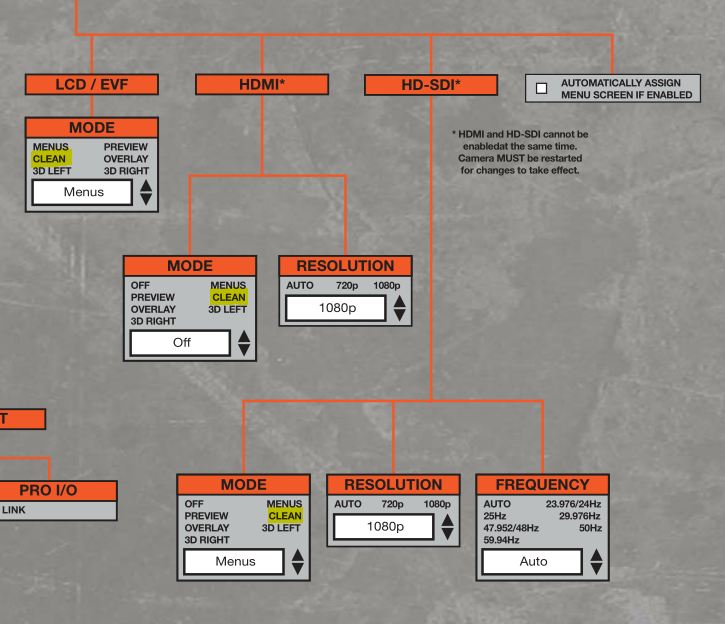
So on p.14 it reviews features and capabilities of the Video Monitoring Outputs. First error: it says Scarlet-X "can simultaneously support one Viewfinder output (Bomb or RED LCD) plus one HD-SDI based PROGRAM output and one HDMI based PREVIEW output. I underlined the "and" because based on the last word from Deanan, that "and" should be "or." Right now even EPIC cannot output simultaneously to both HDMI and HD-SDI. Deanan said that capability will be enabled for EPIC in the future, but NOT for Scarlet.

To the point of this thread:
Later on page 14, "program" output is defined as Clean, while "preview" output is defined as with Menus. So if I'm reading all this right, if you want to record a clean output you need to use the HD-SDI port. I know the menu map shows more options, but the manual also seems clear. Can any Scarlet owners verify this? I think folks debating Ninja vs. Samurai and other external recorder options would be very interested.

And of course many who plan to record 1080p will want full raster HD output, which is also (hopefully) on the roadmap.
 
+1 this seems like need-to-know information. Anyone got the knowledge?
Thanks.
 
Thanks for posting link to Ops Manual!
HDMI concerns noted, which is why I am springing for an SDI-recorder such as the PIX 240....
Stu Aull
Alaska
 
+1. Would like to have confirmation.

Are you planning on recording externally without a Red LCD/EVF option?
From what I understand so far, the operation guide is wrong / unclear at this point, as the Scarlet
will not run both HDMI and HD-SDI simultaneously.

Apparently, the ONLY Way to record HDMI or HD-SDI clean feed from the Scarlet is
while Redmote or Touchscreen is controlling the camera, otherwise you get camera menus in the
signal.

This will change once you buy the Red Pro I/O module which would give you additional I/O,
but at additional cost.
 
I can't see a dedicated Scarlet-Manual there ... just the Epic-Manual ... an in the Epic Manual on the last Pages where you see all the Manu-Structures you can clearly see, that you can customize all the OSD-settings for all Monitoring Outputs (HDMI, SDI, LCD) ... means you can exaclty configure what to bea clean and what not.
 
well, thanx! And there you have it as well:

clean.JPG
 
It would be great if quadHD mode could feed without the black borders on four sides - is there a firmware update coming to fix this?

Also is there a plan to make quadHD full raster? As I understand it the only way to get full raster off the feed is to choose 5k 12fps
 
@ Sascha. I noted in my first post that the menu map showed more options. Thanks for illustrating that point. The problem I pointed out is that the manual says options are limited. There's a conflict. That's why I'm asking Scarlet owners to check. I would think the manual is more accurate than the menu map. For example, the menu map doesn't make it clear that secondary menus will not show on the HD-SDI preview mode IF the viewfinder (RED LCD or Bomb) is attached (see p.14 of the manual).

@ N.D. Interesting points. More reasons to get actual experience from a Scarlet owner.
 
Last edited:
I'm in the same situation. Wondering about Samurai vs Ninja, and simultaneous operation of HDSDI and HDMI. The wording in the manual appears to say that the HDMI feed CAN be clean. I realise it is using the words PROGRAM and PREVIEW a lot, but it does seem to make clear in a couple of different spots that either output could be set to clean.

It is not clear on if both HDSDI and HDMI can be used simultaneously. It is not clear if simultaneous operation is a limitation of current firmware, and will become available in the future, or if it is a technical limit on the hardware, or just a soft limit to help the Epic Vs. Scarlet Venn diagram situation.

My bomb squad rep referred me to page 14 of the manual, which does claim simultaneous operation. I replied to him saying there is still confusion, citing page 3 out of 4 of the menu map. I explained there is some confusion here on the boards, and asked for 100% confirmation either way.

I realise being an early adopter is tough, but damn!!! Since I initially dropped the Red Touch LCD from my order, I cannot simply put it back on my order, I must order again. That means I may have to buy the $900 handle just to use the camera at all in the short term. Ouch!
 
It is not clear on if both HDSDI and HDMI can be used simultaneously. It is not clear if simultaneous operation is a limitation of current firmware, and will become available in the future, or if it is a technical limit on the hardware, or just a soft limit to help the Epic Vs. Scarlet Venn diagram situation.

They can't. Deanan confirmed it. It is in the menu map as well.

Hardware limitation, Epic will be able to do it. Scarlet never will.

+ AFAIK the Ninja does not jive with native progressive signals well at all. Unless that has been changed?
 
They can't. Deanan confirmed it. It is in the menu map as well.

Hardware limitation, Epic will be able to do it. Scarlet never will.

Things got a bit muddied when the manual came out and contradicted itself. Deanan also doesn't use the word "never". And then my bomb squad rep referred me via email to page 14 of the manual that says it can do it. But yes, I am inclined to believe that simultaneous operation of HDMI and HDSDI is not something that Scarlet will ever do. Deanan's comment is the closest we have to confirmation, but with the manual out there you can see why there is confusion.

+ AFAIK the Ninja does not jive with native progressive signals well at all. Unless that has been changed?

No? First I've heard of it.

From their site:

Supported Input Formats HD 1080i60, 1080i59.94, 1080i50, 1080p30*, 1080p25*, 1080p24, 1080p23.98, 720p60, 720p59.94, 720p50, SD 480i, 576i
* from firmware v1.1

Seems okay to me. Does the Ninja do video out by default? It seems like the differences are mainly that HDSDI is a way, way nicer plug and cable, and it seems the Samurai has video out by default? Is that correct? Or is that only with their optional battery pack converter device? The way they have their features grid thing set up is a bit messy.

http://www.atomos.com/samurai/techspecs.xml
 
What about the future of the EVF and LCD at the same time? This would seem to be an essential function, for the camera operator to look through the EVF and someone else, director/focus puller to be able to use the LCD.

I was also not aware that there was ANY difference in the Scarlet and Epic EXCEPT the processor that was not able to essential 'process' as many pixels like the Epic at the same speeds. I thought the whole story that's been said over and over by RED is that they are exactly the same except for the processor... Does this then affect things like whether it can run an EVF and LCD at the same time or output from both ports?
 

Sorry, it does work with progressive, but wraps them all in interlaced. So you have to use pulldown to get it back to progressive. I had remembered people having trouble with it on the FS100. Here is the ATOMOS page on it:

http://atomos.com/news/V1_052011.html#hdmi

So your Prores files are not native 24 or 30p from the Ninja. Adding another step in post. (in addition to zooming your footy to get rid of the letterboxing)
 
Actually, from reading that page on their website, it says that most cameras output all HDMI signals as interlaced (since most prosumer cameras don't have a "true" 24p anyway), and that's why the Ninja's screen will show something like 1080i60 even if the camera is set to 1080p24.

AFAIK, the Scarlet HDMI outputs a real 24p (23.98) signal so that's what the Ninja will record without wrapping it in progressive. I think...

It just doesn't make sense the Ninja would have the computing power to do a telecine from a true progressive signal and then make you de-telecine back to progressive manually. If you record in progressive, that's what you want. Also, if it did have that computing power, why would it not be able to de-telecine interlaced footage (from the prosumer cameras with interlaced output) and record in progressive?
 
The Ninja will record whatever it's given. Most cameras send out at interlaced signal through HDMI because 60i over HDMI is a standard. However, if a camera can send out 24P through HDMI, it will record it as such.
 
Deanan, will there be a firmware update to give us correct scaling of quadHD to 1080p on the HDMI / HD-SDI without black borders?
 
What about the Pro I/O? Would that solve the multiple clean output issue? Is the processing not done there? Doesn't make much sense to do all processing in the Brain. Why not feed a clean signal down to the I/O module and then have all the data lay-overs down there?
 
Back
Top