Welcome to our community

Be a part of something great, join today!

  • Hey all, just changed over the backend after 15 years I figured time to give it a bit of an update, its probably gonna be a bit weird for most of you and i am sure there is a few bugs to work out but it should kinda work the same as before... hopefully :)

Scarlet Grading Advice (R3Ds Included)

Adam Palmer

Well-known member
Joined
Sep 9, 2011
Messages
276
Reaction score
0
Points
16
Location
London, UK
Website
www.falsecolour.co.uk
Hi Guys,

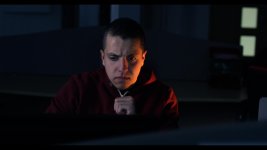
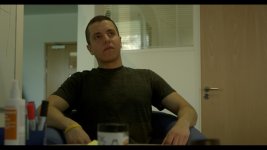
I'm currently working on a shot film shot on Scarlet for my Thesis and wondered if anyone would be up for giving me any input regarding grading. I have seen a few other users start threads like this and get some really impressive looks. Any how, if you fancy giving it a go I have uploaded a few R3D's (which are located below) for you to have a play with. Enjoy!

My First attempts:

IMG_02.jpg


IMG_03.jpg


IMG_01.jpg


Everything was shot 4K, 6:1 on Leica 50mm 2.0 Summicron R/ 35mm Samyang 1.4/ Leica Elmarit 28mm 2.8.


R3D's
https://dl.dropboxusercontent.com/u/61026760/A013_C015_0428HU.0000784F.R3D

https://dl.dropboxusercontent.com/u/61026760/A013_C043_0428E1.0000302_S000F.R3D

https://dl.dropboxusercontent.com/u/61026760/A015_C046_0428AN.0000348F.R3D

Kind Regards

Adam
 
Cool, thanks for sharing. These are always fun.

If you have any background information about the scene, that can help with the grade as well.

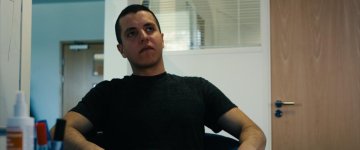
Here's a quick one using log grading. (use REDlogFilm and grade under a display LUT using Offset, Contrast, & Pivot)

attachment.php


attachment.php


attachment.php
 

Attachments

  • IMG_01b.jpg
    IMG_01b.jpg
    25.9 KB · Views: 0
  • IMG_02b.jpg
    IMG_02b.jpg
    22.9 KB · Views: 0
  • IMG_03b.jpg
    IMG_03b.jpg
    14.6 KB · Views: 0
Last edited:
With no idea what you're after in terms of a look here's the 'I spent 1min on it in Redcine' grade...

EDIT: Photobucket seems to have done annoying things to it though :(

Will repost in a sec...

EDIT EDIT: Take #2 - Ahh Photobucket is still doing it. Grrr... My still looks nothing like that.

A015_C046_0428AN0000348F-_S0000000000_zps43e86674.jpg
 
Last edited:
The problem is not seeing the scene in context, which affects everything. I always say, "it's easy to make pretty pictures; the problem is making a series of images flow, so that they seamlessly go from one to the next without any jarring color issues."

To me, the color, contrast, and brightness levels all have to be motivated from whatever drama level is inherent in the scene. Is it happy? Is it tense? Is it murderous? Is it poignant? Is it tragic? I'd color correct completely differently based on the answers to those questions.

So there is no one answer to this except "it depends."
 
This is my grade
 

Attachments

  • TEST0001.jpg
    TEST0001.jpg
    38.4 KB · Views: 0
  • TEST0000.jpg
    TEST0000.jpg
    62.3 KB · Views: 0
This is awesome jonnie!

As some of you have mentioned a bit of context to each scene would help so here goes:

the story of this sequence is a character who is told he is being fired from his job and then proceeds to drink himself into a state where he contemplates suicide. Thanks again guys for the awesome feedback!

I'll try this again:

attachment.php
 
Thanks, Adam!

Sorry for the double post - wasn't sure if my photo was showing up or not.
 
That's cool Are, care to share how you graded that?


Have to admit i cheated. Resolve lite, RC&G3

Edit: Or maybe not if Resolve is allowed:) In that case; mask for face: desaturated highs, careful with the curves. Mask for the corridor far back: lowered mids and hightened contrast in highs. The rest: cold mids and warm lows
 
Don't worry using Resolve isn't cheating Luke lol. Although I'm bummed I haven't had a chance to really use it much as your grade is proof of its power.

It's really fun and easy and free! Have been using it only for three days and the reason it's so easy is because if you don't get the color right at first you can just pile an endless amount of nodes on top of one another going with your gut until it looks good
 
Back
Top