Welcome to our community

Be a part of something great, join today!

  • Hey all, just changed over the backend after 15 years I figured time to give it a bit of an update, its probably gonna be a bit weird for most of you and i am sure there is a few bugs to work out but it should kinda work the same as before... hopefully :)

Scarlet Brain Audio Questions

Sterling Wescott

Well-known member
Joined
Oct 30, 2009
Messages
286
Reaction score
0
Points
0
I've just finalized the details of a student short I'm directing/camera operating this summer. Even thought I've only been making shorts for about two years, I've made it a habit of only using XLR.
However if I do choose a scarlet for this production, I might have to forgo an audio module due to financial constraints. (The props alone come in at just over 10K.)
I am unfamiliar with 3.5 jacks, such as the ones on the scarlet brain and need some questions answered...
#1: Do they provide phantom power? (I think the scarlet does, but I wasn't sure.)
#2: What adaptors will I need to maximize audio quality?
#3: Can they match XLR quality?
Any help would be appreciated.
 
I am unfamiliar with 3.5 jacks, such as the ones on the scarlet brain and need some questions answered...

Nobody is, I've never heard of anyone putting balanced audio over 3.5 mm connectors like that.

#1: Do they provide phantom power? (I think the scarlet does, but I wasn't sure.)

Yes, they will

#2: What adaptors will I need to maximize audio quality?

They'll be very simple adaptors. I'll probably end up making up my own.

#3: Can they match XLR quality

Electrically, yes. Mechanically they're a little more flimsy but I'm sure they will be fine so long as you anchor the cables to the brain or tripod.
 
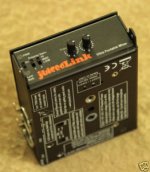
What I think you might want to try is a device called Juicedlink audio mixer.
Depending on which model you want you can find them on ebay for under $100 to $500+

Here are the specs:

Inputs: 2 XLR balanced inputs
• Mic/Line Switch
• Unbalanced input capable - for wireless mic receivers, etc
• Neutrik locking connectors - pin1 direct connection to chassis
• Output: 3.5mm stereo jack
• Low-noise preamplifier:
• 3 gain settings
• Improves camcorder signal-to-noise ratio
• Frequency Response: +/- 1dB typ, 20Hz-20kHz


• Power:
• Single 9V battery (not included)
• Current consumption: 28mA typical
• Battery life ~16 hours (typical, alkaline type battery)
• Mechanical:
• Black Anodized aluminum enclosure for EMI protection and rugged use
• Mounts to bottom of camcorder
• Mounts to top of tripod
• Facilities to attach shoulder strap
• Case Dimensions: 4.3” x 3.4” x 1.53”
• Weight: 12 ounces (no battery

so for the scarlet to record the sound you would just use a 3.5mm extension cord which would go from Juicedlink to the Scarlet.The nice thing is, is that you can mount it to your tripod, and then mount your camera on the box =] I have included a pic of one!hope this helps!
 

Attachments

  • !BnWU70QBmk~$(KGrHqYH-C4EtsQs0yqHBLjIG-rBg!~~_35.jpg
    !BnWU70QBmk~$(KGrHqYH-C4EtsQs0yqHBLjIG-rBg!~~_35.jpg
    18.8 KB · Views: 0
What I think you might want to try is a device called Juicedlink audio mixer.
Depending on which model you want you can find them on ebay for under $100 to $500+

Here are the specs:

Inputs: 2 XLR balanced inputs
• Mic/Line Switch
• Unbalanced input capable - for wireless mic receivers, etc
• Neutrik locking connectors - pin1 direct connection to chassis
• Output: 3.5mm stereo jack
• Low-noise preamplifier:
• 3 gain settings
• Improves camcorder signal-to-noise ratio
• Frequency Response: +/- 1dB typ, 20Hz-20kHz


• Power:
• Single 9V battery (not included)
• Current consumption: 28mA typical
• Battery life ~16 hours (typical, alkaline type battery)
• Mechanical:
• Black Anodized aluminum enclosure for EMI protection and rugged use
• Mounts to bottom of camcorder
• Mounts to top of tripod
• Facilities to attach shoulder strap
• Case Dimensions: 4.3” x 3.4” x 1.53”
• Weight: 12 ounces (no battery

so for the scarlet to record the sound you would just use a 3.5mm extension cord which would go from Juicedlink to the Scarlet.The nice thing is, is that you can mount it to your tripod, and then mount your camera on the box =] I have included a pic of one!hope this helps!

This won't work for Scarlet and isn't necessary. The 3.5mm jacks on Scarlet are professional mono balanced configuration with phantom power. Same as a standard XLR mic input except for the connector. There are two of them. The Juiced Link outputs unbalanced 2 channel stereo on one connector so you shouldn't plug it in to a Scarlet jack. If you use an external mixer it will have to output two balanced channels on separate connectors.
 
Scarlet records at 48k 24 bit! thats awesome! I would love to hear some serious tests. Also to know exactly how easy it is to ride levels. to get 24 bit in camera and have it be awesome would be wonderful! Anone from red who can comment on the specs of the audio recording?

Jeff
 
@david

what do you recommend then? Obviously i havent tried it yet because i dont have a scarlet yet haha. Would it just be a simple XLR to 3.5mm jack then?
 
@david

what do you recommend then? Obviously i havent tried it yet because i dont have a scarlet yet haha. Would it just be a simple XLR to 3.5mm jack then?

Yes all you need is an XLR to 3.5mm TRS plug cable or adapter correctly wired.
 
Yeah, like David said, there should be no need for a JuickedLink or Beachtek with the Scarlet. Most cameras I've used have easy gain controls available that have balanced in and as long as you secure the cables you should be fine.

But even if you needed extra volume control, we always have the boom operator with a field mixer around his neck for local control.

Believe me, I am only using the Beachtek now because some of my equipment doesn't have XLR. It goes when I start using the scarlet. One less battery to deal with!
 
Back
Top