Welcome to our community

Be a part of something great, join today!

  • Hey all, just changed over the backend after 15 years I figured time to give it a bit of an update, its probably gonna be a bit weird for most of you and i am sure there is a few bugs to work out but it should kinda work the same as before... hopefully :)

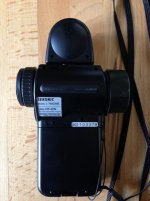
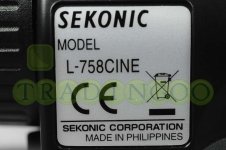
Scarlet and Sekonic l758cine

whats the difference between 822$ Sekonic against Asian ones in ebay which is 550$

Its actually a European version, the one difference is that you will not be able to connect a transmitter for flash photography. If you're only intentions are for cinematography there is no difference. I bought one on ebay, not a single problem to report.
 
Patrick how did you use the actual files that REW has to download? I mean, I understood the image files and how they were used manually to calibrate the camera, but how do you use the profile files?

- You should use the Sekonic program to import the REW file.
- connect your Sekonic to your computer
- using the same program load the profile in your Sekonic the the profile number you prefer.
and that's it... just make sure when you use your Sekonic that you are in the good profile number ("camera 1" is your profile number)
 
Great thread, good information here.

A HUGE thank you to Ryan Walters for setting up the info on his site. This research available to use is invaluable for someone like myself who doesn't have the chart and needs a quick reference for my meter. Also great information to understand the meter and what its doing. My biggest confusion was my spot readings and how it relates to incident. Even metering a grey card with spot, they don't quite match, as Ryan mentioned, but by using my incident to get my key and scene exposure, I can sit back and spot around the scene to see the EV scale and what the values are.

Even though its a digital medium, with a meter like this calibrated to what the camera sees, we can now light actively around the scene just as with film and a manual needle meter. I would encourage everyone to get the cine model and calibrate it to their camera, and go test exposures and see what the meter puts your 18% at for IRE. As a shooter you can really undestand the image exposure and have a well lit scene, as well as confidence that your readings are correct.

My only question is regarding the ISO changes for calibrating the meter. Has anyone made sense of this? So far I understand it that I need to meter with the sekonic chart with the ISO, or EI as it is said, that I want to shoot with. I tried to add in the images Ryan has supplied for EI 800 with other ISO, but the program tells me they are used for a different EI and can't continue. So I am left to assume the program knows those files as 800 ISO and won't record them for another ISO. Has anyone calibrated more ISO settings without recording the chart?

Thanks for the help!
 
Awesome! Thanks Patrick, your a life saver! Once again, I tried to make something more complicated this it really was :)
 
Always glad to help. :)

Always glad to help. :)

I'm glad that you guys have found the files to be helpful. :) I'm continuing to develop and update all of the information on that page. The last update I did was on 07/25/2012: http://www.ryanewalters.com/SP/sekonicprofiles.html
 
Ryan: last year you reported taht Sekonic was revamping the firmware for the 758 Cine to make it more usable for motion. Any idea when that will be rolled out? Thanks
 
Yep- it is already out- it is DTS version 03 : http://www.sekonic.com/Support/Downloads/DTSSoftwareforMACandWindows.aspx

It now has a cine mode that allows for settings that we are familiar with. :) (Unlike the previous versions that were photo-centric only, and we cinematographers had to jump through a lot more hoops to make it work for us.) After you begin to create a profile with the software you will find an option for CINE mode giving you access to what you need. You can see it in action in the Camera Profiling / DTS tutorial I made on my Sekonic page .
 
My only question is regarding the ISO changes for calibrating the meter. Has anyone made sense of this? So far I understand it that I need to meter with the sekonic chart with the ISO, or EI as it is said, that I want to shoot with. I tried to add in the images Ryan has supplied for EI 800 with other ISO, but the program tells me they are used for a different EI and can't continue. So I am left to assume the program knows those files as 800 ISO and won't record them for another ISO. Has anyone calibrated more ISO settings without recording the chart?

Thanks for the help!

DTS version 3, is supposed to let you also input values manually, but right now, it appears that you can only enter all values manually, or enter them via using a chart, but not both. Ugh ...

So, what I would do - AND YOU NEED TO TEST THIS OUT AND VERIFY - is download the R3D's that I have on my site and then process them with RedCine using different ISO's. Since Red shoots RAW, and all that the ISO setting does is shift the mid tone value up and down between over and under exposure, theoretically, you could process all of the ISO's from these R3D files. I have not tried this yet, so I can't say for sure that it is 100% viable. But in theory / on paper it sounds possible ...
 
Oh, its firmware for the DTS software. I thought it was a firmware upgrade for the 758 that would give more cine-friendly menu choices and language. That's not what I was hoping for.
 
That would be nice. And I've put that request in to Sekonic many times- they are aware of the need, and I'm sure they'll respond as soon as they are able to. :)
 
Thanks a lot Ryan, again! That is a great idea, will give it a try when I have some time.

As for the 800EI setting, it worked great for me the past 4 days. Shooting motivated ext daylight sun sources with HMI through most rooms windows for the short and int softs for key, it was great to meter the int lights, and know my general scene exposure, then compare what the sunlight was and move it according. Did some tests before using the profile and my grey card was around 45 give or take a colour channel. Having more EI settings would be for the times needed to change it, but I think I stayed 800 the entire shoot, I like the fall off for highlights here, and that was the primary visual style for the piece. Lots to do yet for exposure but I am getting there, and having your profile and a calibrated meter I know gets me the correct 18% grey for my scene exposure is a world of difference when shooting, then coming to the grade afterwards. I know I am getting the most of the shot to have room to grade.

My next tests will be to settle on a technique for balancing color temperature. I have liked the theory behind the 80A if needed for 32 lighting, but have yet to try this out. For the most part, I like the warmth 32 kinos have at 5000, but should it not be needed, what is your technique to balance out 32 lighting scenes with a daylight sensor? Thanks again Ryan.
 
Great thread! Thanks for sharing!
Now I'll be able to fully use the benefits of my L758 cine :)
 
Back
Top