Welcome to our community

Be a part of something great, join today!

  • Hey all, just changed over the backend after 15 years I figured time to give it a bit of an update, its probably gonna be a bit weird for most of you and i am sure there is a few bugs to work out but it should kinda work the same as before... hopefully :)

ROCKETCINE-X Bugs, Comments, Help...

Status
Not open for further replies.
Correct. That is what clicking on the Rocket icon does, turn on external video.

Nick,
So it is different than redcine-x where the rocket is automatically highlighted then.....

Question: if i use rocketcine-x without a monitor hooked to the rocket card, the rocket is of course not highlighted, but i don't seem to get any acceleration from the card itself....basically i can not view within the viewer on my monitor any clips at more than 1/4 speed without the skipping. So rocketcine-x will not allow the card acceleration at all (like redcine-x) without external monitor hooked direct to rocket card OR...am i missing something? I sure like rocketcine-x for quick clip looks.

Thanks....
 
You should still be getting acceleration from the card. Remember RedCineX buffers in RAM before playback, RocketCineX doesn't. So RocketCineX won't playback as smoothly. If you set "full" you are asking the card to send 4k RGB data to the computer, which scales it for display. This will never be real-time. Select "half" and the Rocket does a full de-Bayer, hardware scales to 2k, and sends that to the computer. That gives it a much better chance, but I still don't quite get RT.
 
You should still be getting acceleration from the card. Remember RedCineX buffers in RAM before playback, RocketCineX doesn't. So RocketCineX won't playback as smoothly. If you set "full" you are asking the card to send 4k RGB data to the computer, which scales it for display. This will never be real-time. Select "half" and the Rocket does a full de-Bayer, hardware scales to 2k, and sends that to the computer. That gives it a much better chance, but I still don't quite get RT.

Nick-

It's the opposite for me. With a rocket, rocketcine works perfectly. Redcine-x doesn't play back smoothly until the ram buffers.

-CJ
 
Nick-

It's the opposite for me. With a rocket, rocketcine works perfectly. Redcine-x doesn't play back smoothly until the ram buffers.

-CJ

Yes. RedCineX always needs to buffer before it can play back. RocketCineX plays straight from the card to the screen via the system bus. Depending on the system configuration that could achieve RT at screen resolution. It just doesn't quite do it consistently on my system.
 
Render issue

Render issue

Reporting an error that occurred yesterday:

I rendered a project that was about four hours in length through RCX in order to do my online edit. But it seemed like some clips weren't rendered as whole, and those were the shots that were spanned into about four to five R3D's. Only a small bit of those clips were rendered which made my onlining.. well.. a nightmare :badputer:

By the way, how do I render out clips using the Edge-code?
 
Reporting an error that occurred yesterday:

I rendered a project that was about four hours in length through RCX in order to do my online edit. But it seemed like some clips weren't rendered as whole, and those were the shots that were spanned into about four to five R3D's. Only a small bit of those clips were rendered which made my onlining.. well.. a nightmare :badputer:

By the way, how do I render out clips using the Edge-code?

Can you email me the log files and the clip names?

We're adding the timecode output selector to the export dialog
in the next build or the one after.
 
Can you email me the log files and the clip names?

We're adding the timecode output selector to the export dialog
in the next build or the one after.

Yeah!
 
I am using RocketCine-X on the set to make MXF files for the editor and other things and have several problems. I couldn't find if some of these problems are known problems so sorry for posting them again if they are.

- random crashing in the middle of a batch
- files that won't render in a first try (cannot decode etc), but will render after a second try
- no audio or distorted audio on playback
- screen has just random noise on it after starting up the computer and/or Rocket doesn't work but works after a restart
- some MXF files give problems when importing into AVID, the editor has to do a manual trim to make it work

The random crashing is the most annoying thing. The idea of a batch is that you can walk away and let the computer do the job, not that you have to watch it and find out where it stopped and which files have to be rendered again.

early 2009 MacPro 8-core 2.26GHz with 12GB ram system 10.6.2
 
Using rocketcine I rendered my QT DNxHD 36 rushes with a nice RSX using the new RedColour and FLUT™ control as well. After my client was happy with the offline edit and grading my next step was to online my sequence from DNxHD 36 to 185x but because rocketcine does not offer full conform at this stage I used monkey extract. However, my renders colourspace is all wrong. I can only assume that this is because their is RSX information that monkey extract can't understand now that rocketcine has been updated with Redcolour? Or am i doing something wrong here? Because if I'm not then I guess the redcolour and FLUT™ control are useless to me unless i go straight to DNxHD 185x.

Any advice appreciated thank you.
 
I am using RocketCine-X on the set to make MXF files for the editor and other things and have several problems. I couldn't find if some of these problems are known problems so sorry for posting them again if they are.

- random crashing in the middle of a batch
- files that won't render in a first try (cannot decode etc), but will render after a second try
- no audio or distorted audio on playback
- screen has just random noise on it after starting up the computer and/or Rocket doesn't work but works after a restart
- some MXF files give problems when importing into AVID, the editor has to do a manual trim to make it work

The random crashing is the most annoying thing. The idea of a batch is that you can walk away and let the computer do the job, not that you have to watch it and find out where it stopped and which files have to be rendered again.

early 2009 MacPro 8-core 2.26GHz with 12GB ram system 10.6.2

Email me the crash logs and the rocketcine log files.

We work with productions who use rocketcine on large features for months straight so crashing is not normal or expected but we can help figure out why.

Most often we've found crashes related to bad ram or something bad in the os install or ocassionally a bad motherboard or a rocket that has been damaged from moving around alot without properly static handling.
 
Error exporting full res

Error exporting full res

Hello All,
I'm having an issue exporting files in Rocketcine. Everything works fine when I use the prores 422 (HQ) setting. When I use the prores 422(HQ) full res setting I get this error:

"Exporter unable to assign frame to decode . Frame: 125-invalid setting. Check image dimensions and frame range."

I am new to the Red workflow, so I might be doing something simple incorrectly. For instance, I'm attempting to export this footage to an external firewire drive. Anyway, here's my system:

Mac
2X2.93 Ghz Quad core Intel Xeon
OS 10.6.4
RED Rocket card
RocketcineX1740


I attempted to do the same in Redline and had similar problems. Any help would be greatly appreciated. Thanks!
 
Hey Rebecca,

I have had that same message come up on me several times. If it is a consistent frame that is saying can not be rendered I would check the proxy QT and see if it a dropped frame within the master.

If the frames are not consistant, cutting the clip into two video clips by making in and out points within Rocketcine sometimes does the trick. You will have to render each to its own folder so you maintain the original Clipname for accurate conform though.

Hope that helps.
 
QuickTime Setup Window doesn't appear!

QuickTime Setup Window doesn't appear!

Hello,

System specs...

MacOS 10.5.8
2x3Ghz Quad Intel XEON
8GB 800MHz DDR2 FB-DIMM

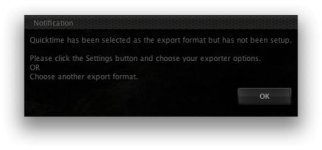
After installing the new version of RCX (v262) I've tried to create my own Export Preset based on ProResHQ and when it comes time adjust QT settings the QuickTime setup dialog doesn't appear. I've tried hiding the workspace BG but it's just not there. I've attached the warning RCX gives me about the lack of setup..

Thanks,
Pasquale

--
Pasquale Tropea
Production Workflow Consultant
BBC Media Center - White City
Production Village - MC3 B1

Support Partners (UK) Limited
Shepherds Building F2
Rockley Road
London W14 0DA

UK Mobile: +44 7525 123 473
Tel UK DDI: +44 208 008 4921
Tel UK Main: +44 207 043 8206
Tel UK Fax: +44 207 043 8205

www.support-partners.com
pasquale.tropea@support-partners.com
 

Attachments

  • Picture 2.jpg
    Picture 2.jpg
    12.2 KB · Views: 0
Status
Not open for further replies.
Back
Top