Welcome to our community

Be a part of something great, join today!

  • Hey all, just changed over the backend after 15 years I figured time to give it a bit of an update, its probably gonna be a bit weird for most of you and i am sure there is a few bugs to work out but it should kinda work the same as before... hopefully :)

Restricted SMPTE levels

Job ter Burg

Well-known member
Joined
Nov 23, 2007
Messages
203
Reaction score
0
Points
0
Age
54
Website
www.terburg.com
Using RedCine-X, I can't get proper levels in Avid MXF files. Without the option to use restricted SMPTE levels, blacks are too low, and detail in the blacks is lacking on my Rec709 calibrated monitor. With the option to use restricted SMPTE levels, blacks are increased to around 32 in stead of 16.

How to fix this?
 
Job - I'm assuming you're on latest version of MC? And what hardware and connection type are you using to your monitor? And what version of REDCINE X are you using?

Michael
 
I'm on RedCine-X 261, the version that allows me to be on the same firmware as MC and MF need with my Rocket, AFAIK. Editor version is 5.5.

The data handlers on set, however, are using RedCine-X as well, not sure about their version. I'm seeing the same thing. MetaFuze creates an image with correct black levels, RedCine-X either gives me 0-255 or blacks at 32.

I'm just measuring the levels in the WFM in CC mode in Symphony and MC and it's very clear that there is a gap between the lower blacks and the '16'-line. I have a Rec709 calibrated Panasonic Pro Plasma (TH50PF11), with an HDSDI board. Connected HDSDI from the Nitris DX.
 
OK, after further investigation, it seems that the levels end up correct if you do NOT restrict to SMPTE levels. If you restrict to SMPTE levels, you end up with something like a 31-245 swing.

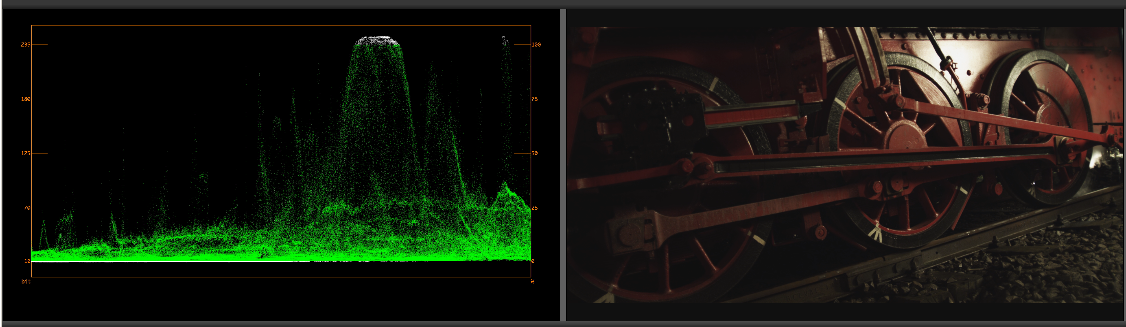
Here's the WFM when using AMA:
110516_AMA.PNG


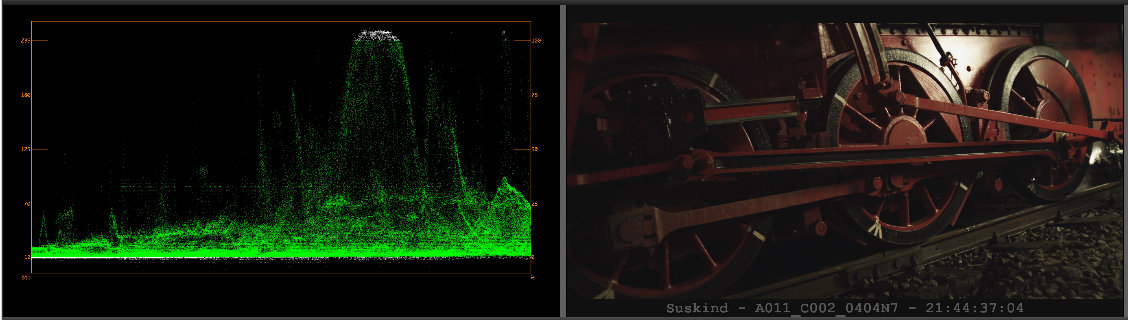
Here's the WFM when using MetaFuze:
110516_MetaFuze.PNG


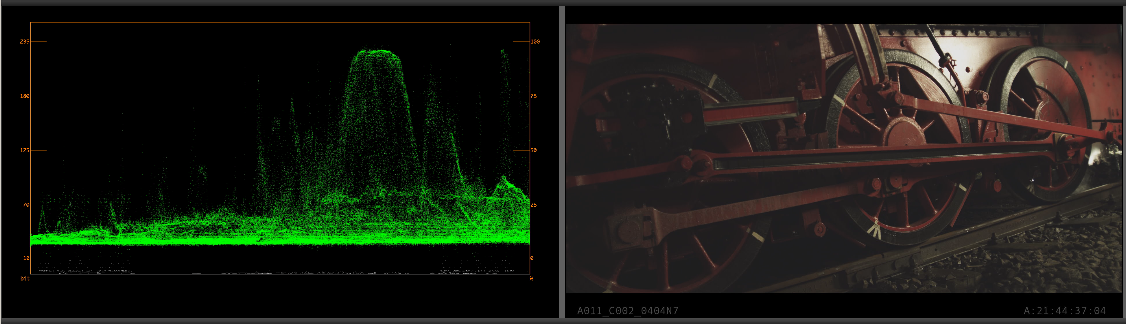
Here's the WFM when using RedCine-X with the option to restrict to SMPTE levels:
110516_RedCineX_Restricted.PNG


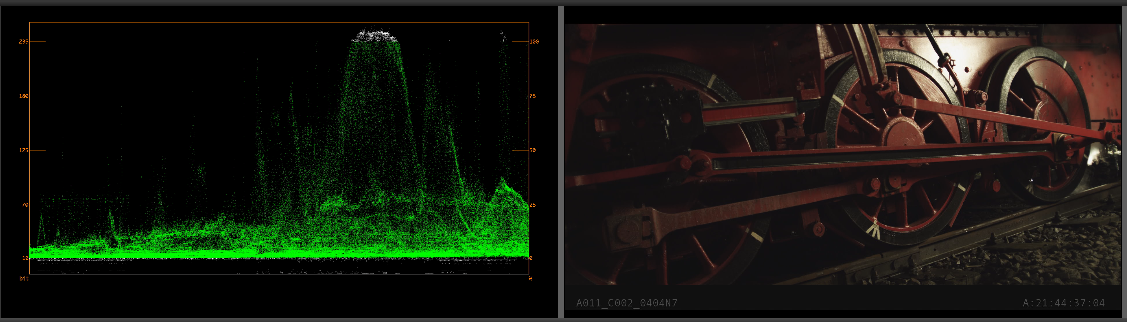
Here's the WFM when using RedCine-X without the option to restrict to SMPTE levels:
110516_RedCineX_Unrestricted.PNG


Using RedCine-X, the black letterbox bars are still at 0, rather than 16. Not the end of the world, but not the way it should be, IMO.
 
I would recommend going up to RCX 454.
261 is pretty old.

Are adjusting shadow/black point in RCX so it's close to 0?
Restricted range takes the full range and scales it down to restricted range.
 
I'm getting the same results with RCX 454. Will try to post that WFM snapshot as well.

I just want a "one-light" conversion, so I'm not adjusting anything, not in any of the methods used.

But MetaFuze and AMA place the blacks in the same place as RedCine-X does. Except when RedCine-X is in "restricted" mode, then the blacks appear to be elevated too much.

Also, when choosing "restricted", the letterbox bars are not being restricted, and are illegal black (0). Can't be intentional, can it?
 
I'm getting the same results with RCX 454. Will try to post that WFM snapshot as well.

I just want a "one-light" conversion, so I'm not adjusting anything, not in any of the methods used.

But MetaFuze and AMA place the blacks in the same place as RedCine-X does. Except when RedCine-X is in "restricted" mode, then the blacks appear to be elevated too much.

Also, when choosing "restricted", the letterbox bars are not being restricted, and are illegal black (0). Can't be intentional, can it?

Blacks are always lifted by default in RCX to leave room for grading. They're coming out ok in the other tools by chance.
Recommendation to add a negative shadow to bring the black point down. Without restricted mode, the blacks pass
through as is (same for highlights) and land in approx the right place. Restricted mode on the other hand takes
the full range and scales to fit restricted range.

Letterbox at superblack was a request by a couple of customers/facilities.
We can look at making that optional.
 
Blacks are always lifted by default in RCX to leave room for grading.
Thing is: last time I checked (many many months ago), if you didn't use "restricted" blacks would fall well under 16. I recall I had to use "restricted" if I wanted the image from RCX match the image from MetaFuze back then. But that was some revisions of either application ago, of course.

Letterbox at superblack was a request by a couple of customers/facilities.
We can look at making that optional.
Thanks Deanan, I think that would be most helpful.
 
Thing is: last time I checked (many many months ago), if you didn't use "restricted" blacks would fall well under 16. I recall I had to use "restricted" if I wanted the image from RCX match the image from MetaFuze back then. But that was some revisions of either application ago, of course.


Thanks Deanan, I think that would be most helpful.

For RCX without restricted, it could fall below depending on what you adjust (ie. curves or shadow) and part of the reason why the black are lifted so we aren't clipping the black by default.

However, restricted mode is important because if you encode with the lower blacks, there is potential for some apps to import them into restricted mode by clipping. I'm not sure if Metafuze is doing anything special.

Once it's apparent that the restricted output option is taking the full range and scaling it to restricted, you should be able to get a matching image in MC.
 
Avid AMA takes a different approach (or did last time I checked, and it is one I do not agree with) to RCX. It does not have a "scale to SMPTE" function, and expects the user to sit the values in the SMPTE range using the SDK parameters. As Deanan says, the inherent black offset in RED's RAW data happens by chance to sit the blacks at approximately the SMPTE black level if you do not adjust shadow or curves. Since RED's gamma curves are designed for full range data, the AMA approach seems wrong to me, and means that an identical set of SDK parameters will give a different result on the SDI output of a Rocket than they will on the SDI output of an Avid using AMA.
 
As you can see in the test, AMA, MetaFuze and RedCine-X are giving me the same results by default. It's only that restricting the SMPTE range in RCX changes the levels.
 
Avid AMA takes a different approach (or did last time I checked, and it is one I do not agree with) to RCX. It does not have a "scale to SMPTE" function, and expects the user to sit the values in the SMPTE range using the SDK parameters. As Deanan says, the inherent black offset in RED's RAW data happens by chance to sit the blacks at approximately the SMPTE black level if you do not adjust shadow or curves. Since RED's gamma curves are designed for full range data, the AMA approach seems wrong to me, and means that an identical set of SDK parameters will give a different result on the SDI output of a Rocket than they will on the SDI output of an Avid using AMA.

Nick,

Like Job said, I'm not sure I follow you. There doesn't appear any gamma discrepency between the Avid and RCX unrestricted images.
 
Nick,

Like Job said, I'm not sure I follow you. There doesn't appear any gamma discrepency between the Avid and RCX unrestricted images.

Not talking about gamma discrepancy, it's a levels thing, and as Job says its not there with MXF rendered unrestricted.

BUT the Rocket takes the full range output and scales it to legal before displaying it on its SDI output, so to get the same image on the SDI output of an Avid you need to use "SMPTE restricted" in RCX when rendering to MXF. But to see the same image on the Avid output (for the same RED parameters) with AMA as with MXF rendered from RCX you need to switch "SMPTE restricted" off in RCX (as Job says). Hence the discrepancy. Make sense?

The important thing is this:

…an identical set of SDK parameters will give a different result on the SDI output of a Rocket than they will on the SDI output of an Avid using AMA.

If you don't monitor your Rocket SDI output via SDI it's not really an issue, as you can use RCX the way AMA works, and render MXF with "SMPTE restricted" off.
 
Last edited:
Ran into this issue the other day. Using Avid v4 so had to import DNxHD QTs. The QTs were rendered using Redcolor/Redgamma with a rec709 profile. Upon quick import the blacks were severely crushed. Telling avid to import as RGB fixed the issue, but took forever. It was faster to use our rocket to re-render MXF media directly keeping the restriction off on RedCine-X. Will do further testing today to see what's what...

to sum what's in the thread to date...

RedCine-x using Rocket via SDI - mapped to legal levels.
RedCine-x on computer monitor - no mapping.
Avid via SDI w/ MXF - render w/ SMPTE restriction
Avid via SDI w/ AMA - render w/o SMPTE restriction to 709QT?
Avid via SDI w/QT import - render w or w/o SMPTE restriction to 709 or RGB and import as 709 or RGB?

edit - BTW, this is really much more difficult than it should be...
 
To follow up - was able to do some tests today, but unfortunately did not have an avid room with scopes and was limited to v4 of avid. However, settled things enough for me for now...

Having gone through the excercise things make sense; however, I have yet to exactly match what I see in RedCine-X on the monitor to either Avid or FCP.

Feel free to take a look at the spreadsheet I made up. I'd be interested in any comments, insight, or futher tests.

EDIT - FYI, I used some footage I had around... it was shot in a studio with the MX sensor against green.
 

Attachments

OK, FCP and its scope are in the mix. Sorry to sound arrogant, but that makes me not trust any of it, as it uses Quicktime. I have not been able to import test graphics without altered levels into FCP, whereas they work fine in Avid.
 
Agree - fcp scopes aren't the most accurate. I could bring the same media in and likely get slightly different results. The point being the levels move around pending codec (indirectly pending how said codec is handled) and SMPTE restriction - and at times the restriction can be doubled pending codec and import by your NLE.
 
In my limited experience, it wasn't just the scope, it was the way color levels were handled during import and export.
 
...
BUT the Rocket takes the full range output and scales it to legal before displaying it on its SDI output, so to get the same image on the SDI output of an Avid you need to use "SMPTE restricted" in RCX when rendering to MXF. But to see the same image on the Avid output (for the same RED parameters) with AMA as with MXF rendered from RCX you need to switch "SMPTE restricted" off in RCX (as Job says). Hence the discrepancy. Make sense?
...

It does. Thanks for clarifying that. I do have to say that it sounds like just of much of a Rocket issue as anything else. Why isn't there an option to not rescale the SDI output in Rocket? Esp. since the odds of the rescale in Rocket exactly matching the rescale done when actually finishing to the broadcast legal range seems pretty slim.

It's funny that Avid is considered by many to be at best a broadcast tool when it comes to finishing with MC and Symphony. And in many way, I can understand this sentiment. But Avid actually seems to handle full range colors better than any other NLE. I say this b/c it does not rescale unless you explicitly ask it to.

BTW, I know that automatic rescaling was a major issue for Cineform to deal with. According to a talk given by David Newman about three years ago at Kappa Studios, he had to implement all sorts of extra trickery to get this under control in FCP and Premiere.
 
Back
Top