Welcome to our community

Be a part of something great, join today!

  • Hey all, just changed over the backend after 15 years I figured time to give it a bit of an update, its probably gonna be a bit weird for most of you and i am sure there is a few bugs to work out but it should kinda work the same as before... hopefully :)

Resolution, softness and back focus...

Status
Not open for further replies.
This is a very informative thread ... terrific!

I absorbed as much as I could with my rudimentary scientific knowledge of optics and was still puzzled. A resulting internet search helped fill in the gaps in my understanding of OLPFs and such. I thought I would share a link to a site I found with a definition for the specifics of "Optical Low Pass Filters" (as well as other info), just in case I am not the only one wading through the knowledge that others much more experienced just take for granted.

http://www.optics-online.com/CCDlens.asp

The exact definition for OLPF is found at the bottom third of the page. Downloading the application note on OLPF is also very instructive.
 
This is a very informative thread ... terrific!

I absorbed as much as I could with my rudimentary scientific knowledge of optics and was still puzzled. A resulting internet search helped fill in the gaps in my understanding of OLPFs and such. I thought I would share a link to a site I found with a definition for the specifics of "Optical Low Pass Filters" (as well as other info), just in case I am not the only one wading through the knowledge that others much more experienced just take for granted.

http://www.optics-online.com/CCDlens.asp

The exact definition for OLPF is found at the bottom third of the page. Downloading the application note on OLPF is also very instructive.

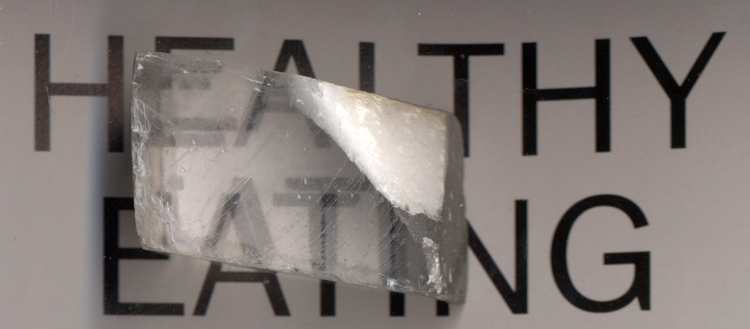
That's a great link. The wikipedia page on "Anti-aliasing filter" has this excerpt

The typical implementation in digital cameras is a two layers of birefringent material such as lithium niobate, which spreads each optical point into a cluster of four points. The choice of spot separation for such a filter involves a tradeoff among sharpness, aliasing, and fill factor. In a monochrome or three-CCD or Foveon X3 camera, the fill factor alone, if near 100% effective with microlenses, can provide a significant anti-aliasing effect, while in color filter array (CFA, e.g. Bayer filter) cameras, an additional filter is generally needed to reduce aliasing to an acceptable level.​

The birefringent material, I believe creates several images that are shifted relative to one another.
Calcite.jpg


The example of color aliasing in the image from the application note you posted is really interesting. I hadn't fully understood how much aliasing can reek havok on the bayer pattern.
 
It's is incorrect that fill factor alone provides for an AA effect. It can only maximize the potential AA effect of the OLPF. Chroma aliasing can be nasty, but good demosaicing can really help there. However, remember all sensors need OLPFs (or really bad lenses) to avoid aliasing. You can get strange chroma artifacts too on 3 chip cameras using pixel offsets too. There's no perfect solution to problems in this field, but there are some solutions more optimum than others, especially if you want to use standard lenses.

Graeme
 
Fill factor is how big the light sensing area is compared to the pixel pitch. You can see that as fill factor approaches zero, you get a point sample, and as it gets larger you get an area sample, but both have exactly the same spacing. It's that spacing that samples the spatial frequency, and that spacing that determines your maximum recordable without aliasing frequency. Increasing the fill factor will reduce the MTF of the aliases, but not remove the aliases.

Graeme
 
Fill factor is how big the light sensing area is compared to the pixel pitch. You can see that as fill factor approaches zero, you get a point sample, and as it gets larger you get an area sample, but both have exactly the same spacing. It's that spacing that samples the spatial frequency, and that spacing that determines your maximum recordable without aliasing frequency. Increasing the fill factor will reduce the MTF of the aliases, but not remove the aliases.

Graeme

I really quoted that paragraph because it says "such a filter involves a tradeoff among sharpness, aliasing, and fill factor." Though you made a good point in saying that non-bayer sensors need the same treatment.
Does this "tradeoff" mean that you can't experience aliasing on Red? Or is there a situation where you could?
 
I've seen some very mild aliasing under extreme circumstances, but I've not seen any in real world images. I think that's about the right balance.

OLPF filters are very "slow" in terms of roll-off. They're not brick wall filters by any means.... They don't "ring" though, but they have to be brought in early to kill aliasing. So there's a fine balance to be achieved. I think we've done so.

Graeme
 
I've seen some very mild aliasing under extreme circumstances, but I've not seen any in real world images. I think that's about the right balance.

OLPF filters are very "slow" in terms of roll-off. They're not brick wall filters by any means.... They don't "ring" though, but they have to be brought in early to kill aliasing. So there's a fine balance to be achieved. I think we've done so.

Graeme

I've been looking over some footage. I was always averse to sharpening HD material, it's interesting how sharpening is essentially now one of the main tools defining the look of a project on Red.
SharpenLooks.jpg
 
In any case, this is all leading up to a question: Is it possible that Red could include sharpening in the meta-data for .R3D, and put unsharp mask parameters into RC,RA and QT? I imagine this would be difficult to preview in camera, but otherwise very useful. (And great for handing over .R3D footage that is supposed to look sharp.)

IBloom
 
In any case, this is all leading up to a question: Is it possible that Red could include sharpening in the meta-data for .R3D, and put unsharp mask parameters into RC,RA and QT? I imagine this would be difficult to preview in camera, but otherwise very useful. (And great for handing over .R3D footage that is supposed to look sharp.)

IBloom

An interesting idea Ian. But maybe the unsharp mask parameters are in an external meta-data file which is linked to the .r3d - that feels safer.

But you got me thinking ....
 
I wonder how sharpening would be dealt with if one was planning a film-out to 35mm for release prints.
A good one to discuss with your post-house. If you're not doing much in the way of VFX then you could leave it to the DI suite to do an overall sharpen prior to output of the dpx/cineon files (normally at 2k) for filmout, and that would (should) be based on their experience having done many features already. That way it can be added only to the final conform and done pretty much real-time if on a high-end system.
If its a VFX heavy show, the VFX supervisor should be consulted so that thay can test the footage early to decide if the sharpening you plan to add is a help or hindrance to any compositing.
 
An interesting idea Ian. But maybe the unsharp mask parameters are in an external meta-data file which is linked to the .r3d - that feels safer.

But you got me thinking ....

Hmmm it's just meta-data right?

Put it in a menus somewhere around brightness and contrast, default it to zero. Put meta data aware sharpening into all of your .R3D apps. That way if you are handing off .R3D to a client that isn't savvy...then that phone conversation about OLPF compensation can be about the next gig they have for you....

I understand your concern about sharpening last...for a Scratch user however this would be a non-issue.

Ian
 
Status
Not open for further replies.
Back
Top