Welcome to our community

Be a part of something great, join today!

  • Hey all, just changed over the backend after 15 years I figured time to give it a bit of an update, its probably gonna be a bit weird for most of you and i am sure there is a few bugs to work out but it should kinda work the same as before... hopefully :)

Request to Red Team regarding timecode

Brant Hadfield

Well-known member
Joined
Nov 14, 2011
Messages
251
Reaction score
0
Points
0
As I understand it, and operate it, the only way to get Record start/stop timecode is with edge code. The problem with that, is that edge code is an ancillary type of time code, that most problematically, most producers, and many editors either don't know how to get at, or can't, depending on their editing platforms. This, in turn, means that if I want to display time code for a client on a monitor through SDI out, it cannot be record start and stop. And further, the excellent method of labeling formatted Redmags with edge code starting with the mag number in the hour digits is thus not possible to display for client or producer.

Recommended, and highly desirable solution:

Add an option in the time code menu setup box to have standard timecode mirror edge code. Very simple.

Bottom line - there needs to be a way to have the time code most commonly available to producers in post, a standard record start and stop type of time code without it being the elusive (to many) "edge code"
 
Edge Code IS Run Record timecode.

So just select that to be the primary timecode and your problem is solved.
 
Thanks for your reply Stuart. But either you don't quite get the problem, or there's a menu dialogue I don't know about. Unless I am mistaken, and certainly might be, there is no way to actually change "primary time code" to edge code in terms of what's being recorded as primary timecode. That's precisely what I'm asking for in my post above. The only thing my menu appears to actually allow is switching the timecode DISPLAYED to edge code. My camera is still going to record two different time codes, and I still cannot make that primary code mirror the edge code run record. Thus, if I do set my timecode display to just show edge code, my clients and producers see a completely different number than is actually being generated and recorded as "primary timecode" as you call it. Again, the only thing I seem to be able to do to that timecode track that most of the civilized world is used to and able to see, is change it from user generated free run, or RTC. It will not ever mirror that record start/stop edge code. That is the problemo.

We really need to be able to record primary timecode that can mirror the edge code that follows the mag formatting, and importantly, is record start/stop. Yeah, I can display and use edge code in Avid (it's aux 1), but it's obscure and most producers and editors are not familiar with it.

Bottom line: Mirror edge code to primary option. Please.

Edge Code IS Run Record timecode.

So just select that to be the primary timecode and your problem is solved.
 
Last edited:
This, in turn, means that if I want to display time code for a client on a monitor through SDI out, it cannot be record start and stop. And further, the excellent method of labeling formatted Redmags with edge code starting with the mag number in the hour digits is thus not possible to display for client or producer.

I'm confused by your question. All the clients I've ever had typically want time-of-day timecode, so they can see at a glance when something was shot. Reel numbers are a non-issue and are taken care of by the script supervisor and the D.I.T., with notes given to the editor later on (often via email or as PDFs). Our usual method involves an external timecode box on the side of the camera, with the camera jammed (or externally fed) by the box, which in turn is jammed to sound timecode and also jams the timecode slate.

Are you simply trying to see the elapsed running time of each shot? Or just trying to see embedded reel numbers in each shot? As far as I know, this is a feature I can't recall seeing in any digital camera so far. We generally take care of this in editorial, prior to the editor.

I'm reluctant to make the camera operator responsible for entering more information into the camera as it is, since they're already under the gun and trying to get the shot done. The Cameron-Pace system has a method for embedding this information, but as far as I know it's proprietary and not available to non-clients.
 
Every single camera I have used since my news days allows the operator to enter beginning record start/stop timecode values. When we were on tape, we would put the tape number into the hours field, and it helped keep straight, for everyone, the source of a particular shot. While that's less important than it was, I still need the ability to have record run timecode as primary, and I like putting the mag number into the hour digit. Keeps things straight when your on a shoot, especially when mags are flying in and out and you've shot 18 of them, which 2 projects did this month. Yes, edge code does this. Again, the issue is that not many people know about edge code, or can access it. Making record start/stop timecode primary is not a dangerous or technically difficult option, and has been standard on broadcast video cameras I have used in my career which covers 22 years. This camera should do it.

I'm confused by your question. All the clients I've ever had typically want time-of-day timecode, so they can see at a glance when something was shot. Reel numbers are a non-issue and are taken care of by the script supervisor and the D.I.T., with notes given to the editor later on (often via email or as PDFs). Our usual method involves an external timecode box on the side of the camera, with the camera jammed (or externally fed) by the box, which in turn is jammed to sound timecode and also jams the timecode slate.

Are you simply trying to see the elapsed running time of each shot? Or just trying to see embedded reel numbers in each shot? As far as I know, this is a feature I can't recall seeing in any digital camera so far. We generally take care of this in editorial, prior to the editor.

I'm reluctant to make the camera operator responsible for entering more information into the camera as it is, since they're already under the gun and trying to get the shot done. The Cameron-Pace system has a method for embedding this information, but as far as I know it's proprietary and not available to non-clients. [/COLOR]
 
Last edited:
Every single camera I have used since my news days allows the operator to enter beginning record start/stop timecode values. When we were on tape, we would put the tape number into the hours field, and it helped keep straight, for everyone, the source of a particular shot. While that's less important than it was, I still need the ability to have record run timecode as primary, and I like putting the mag number into the hour digit. Keeps things straight when your on a shoot, especially when mags are flying in and out and you've shot 18 of them, which 2 projects did this month. Yes, edge code does this. Again, the issue is that not many people know about edge code, or can access it. Making record start/stop timecode primary is not a dangerous or technically difficult option, and has been standard on broadcast video cameras I have used in my career which covers 22 years. This camera should do it.


Yes all understood, and what you are asking for is available, its just a question of specifying that the RUN REC / EDGE CODE is the primary timecode track - the camera records both types of timecode.

BTW - what camera build are you using and what editing system are you using ?


Thanks for your reply Stuart. But either you don't quite get the problem, or there's a menu dialogue I don't know about. Unless I am mistaken, and certainly might be, there is no way to actually change "primary time code" to edge code in terms of what's being recorded as primary timecode. That's precisely what I'm asking for in my post above. The only thing my menu appears to actually allow is switching the timecode DISPLAYED to edge code. My camera is still going to record two different time codes, and I still cannot make that primary code mirror the edge code run record. Thus, if I do set my timecode display to just show edge code, my clients and producers see a completely different number than is actually being generated and recorded as "primary timecode" as you call it. Again, the only thing I seem to be able to do to that timecode track that most of the civilized world is used to and able to see, is change it from user generated free run, or RTC. It will not ever mirror that record start/stop edge code. That is the problemo.

We really need to be able to record primary timecode that can mirror the edge code that follows the mag formatting, and importantly, is record start/stop. Yeah, I can display and use edge code in Avid (it's aux 1), but it's obscure and most producers and editors are not familiar with it.

Bottom line: Mirror edge code to primary option. Please.


I'll check on what you said, doesn't sound right..
 
Last edited:
Yes all understood, and what you are asking for is available, its just a question of specifying that the RUN REC / EDGE CODE is the primary timecode track - the camera records both types of timecode.

BTW - what camera build are you using and what editing system are you using ?

I'm using the latest beta. It's 96% rock solid. I edit Avid MC6. But once again, the issue isn't what I am editing on, it what OTHERS who will be handed the footage edit on. The issue is "primary timecode", which everyone in the universe knows, can see, references, understands, is only free-running, and "edge code", which for others is abstract, on some mystery auxiliary drop down menu in Avid, and who knows if Premiere can even reference it. Try explaining it to a producer during the lunch break. They don't want the hassle. But they may not always want free-running time code! I know I don't.


I'll check on what you said, doesn't sound right..

You keep saying I should "specify EDGE CODE is the Primary". I know I can specify edge code is DISPLAYED, instead of free run/RTC, but nowhere have I seen I can specify it as "Primary", meaning it's recorded both as primary and edge code. What you keep asking me to do is exactly what I want the camera to do, but it appears it can't. Please tell me where in the menu system I can tell Scarlet to RECORD edge code as the "PRIMARY TIME CODE", not just display it.
 
You keep saying I should "specify EDGE CODE is the Primary". I know I can specify edge code is DISPLAYED, instead of free run/RTC, but nowhere have I seen I can specify it as "Primary", meaning it's recorded both as primary and edge code. What you keep asking me to do is exactly what I want the camera to do, but it appears it can't. Please tell me where in the menu system I can tell Scarlet to RECORD edge code as the "PRIMARY TIME CODE", not just display it.

Brant, the camera software has been set up to allways records both types of timecode - absolute time (TOD) and continuous (EDGE / RUN REC) - its only a metadata question as to which is "displayed" or in other words what is used as the default timecode track by the camera / post system.
 
Brant, the camera software has been set up to allways records both types of timecode - absolute time (TOD) and continuous (EDGE / RUN REC) - its only a metadata question as to which is "displayed" or in other words what is used as the default timecode track by the camera / post system.

Thanks Stuart. You've pretty much repeated what I said in the first post, but displaying Edge Code doesn't make it the "default timecode" as you call it. All it does is change which metadata gets shown, and that's exactly why a change is needed. I'm not sure why RED is so stubborn about this unless none of the engineers have a background with time code in broadcast video cameras. The metadata which edit systems default to, and maybe in the case of Premiere, the ONLY one available to it, is your free-run metadata slot. Edge code is useless to most producers and editors, unless they're on Avid and more importantly, someone has taken the time to show them something unorthodox. Stuart, essentially what you're telling me is that you CANNOT change the "primary timecode" metadata slot to be record start/stop. That's the whole problem stated in my first post. Essentially what this means is that the camera can do start/stop timecode, but few people will know how to access it in post, unlike EVERY OTHER PRO or SEMI PRO CAMERA MADE. Seems odd.

A simple "Mirror Edge Code" would allow the camera's timecode system to behave exactly like every other broadcast camera made in the last 30 years. (and no, we don't need to get into a conversation about this camera not being a "broadcast" camera. It has to function in that world.)
 
Last edited:
Brent, let me do the check ? I do have a broadcast background, so yes I do understand why we need both types of timecode, but I'll also affirm we do need both.
 
In case anyone wonders why a person would want record start/stop timecode as primary. One example (other than keeping timecodes and redmags consistent, and not having your timecode always spinning, even when you aren't recording) - my nanoflash is a perfect backup/proxy external recorder. Its start and stop trigger is timecode starting and stopping. So, if I choose to display Edge Code, and the Nanoflash records as it should, triggered by timecode (edge code) displayed and sent through SDI, I am of course also displaying that Edge Code on monitors. Then, when the producer makes notes from time code on the monitor, and they get in to edit, what shows up on their timecode display in edit is some whacky free-run timecode that was never even shown on the monitors on location during the shoot. Then I get a call. Then I have to ask what they're editing on. Then I have to do research, then I have to tell them Avid can use edge code, Premiere, maybe not. "'So sorry," I say. I just wanna record start/stop edge code as the primary timecode metadata, not free run. Is that so wrong? ;-)
 
Brent, let me do the check ? I do have a broadcast background, so yes I do understand why we need both types of timecode, but I'll also affirm we do need both.

Thanks Stuart, that's good to hear. And I would love to know I am wrong about not being able to make "edge code" the primary TC data.
 
Every single camera I have used since my news days allows the operator to enter beginning record start/stop timecode values. When we were on tape, we would put the tape number into the hours field, and it helped keep straight, for everyone, the source of a particular shot.
I must have a different life experience than you. I've worked in LA in post and production for 30 years, and never heard of that. Our reel numbers often get into the hundreds, and there aren't enough digits to enter a reel number into the hour field, plus we often need letters in multicam shoots. This is for episodic television, feature films, documentaries, commercials, and music videos. Perhaps things are different in news -- but I go back all the way to shooting on film in that world, and spent some time in ENG even in the 3/4" and Betacam days.

My problem with not using time-of-day for timecode is that it makes syncing multiple simultaneous cameras and external audio recording very difficult. To me, it's far easier just to slave everybody to TOD code, and embed the reel numbers later on as metadata. My work with Panavision cameras, Sony cameras, Arri cameras, and other manufacturers is the same. And I've had projects that had as many as 400 reels of material. It's a real challenge in post to keep everything straight and make sure all the dailies, preliminary temp looks, ongoing edits, final locked edit, and the final conform all navigate successfully in the workflow.

Then, when the producer makes notes from time code on the monitor, and they get in to edit, what shows up on their timecode display in edit is some whacky free-run timecode that was never even shown on the monitors on location during the shoot.
So this is about what the producer sees on the set? Can you not simply display the actual timecode that the camera is using, and have a script supervisor or some other assistant keep track of reel numbers? I've worked many shows where the camera crew routinely writes the camera reel number (actually a drive number or card number) in the upper left of the timecode slate, in the tradition of film rolls from the old days, and this works quite well for editorial and scripty.

I have worked with script sups who had fairly sophisticated iPad setups where they could capture good frames in real-time from a wireless feed whenever directed by a producer, so at the end of the shoot they'd have screen grabs of every key moment from circled takes. This is doable on a variety of platforms, and the timecode is visible. If the DIT is keeping good notes as they go, finding these shots later on is trivial. It was hard in the film days; very easy today.
 
I must have a different life experience than you. I've worked in LA in post and production for 30 years, and never heard of that.

On some jobs, I work under different conditions than yours most likely. In the month of August, I shot in two projects where I had an AC/DIT, a producer, and nobody else. I shot a total of about 35 cards for those 2 projects. These were documentary-style corporate projects. I did not have 5 people to fill all the other roles. Those are the jobs I like to have time code move only when I record, and I like being able to reference that first digit for my mag numbers, to help keep those things straight in my head, as there's a lot going on. I can assure you that the old practice of numbering the first hour digits for tape number was pretty much standard in my world going at least back to Beta SP.

I had another project last week, that had a fully staffed crew, in a well controlled location and ran like those you are accustomed to. There were people taking notes, moving media, and I could focus on my role as a DP. It was nice. We ran time of day, and that's of course what works for that sort of project. Not all projects are like that for me though. (and I actually probably prefer few people!)

One of the strengths built into Red cameras is user flexibility. For me, a timecode feature built into cameras decades ago is still useful for many kinds of projects today. I think Stuart agreed with me on that in a previous post. I see no good reason to limit that capability in a camera built today. You may not need those capabilities, but that does not mean nobody would.
 
Update:

Time to move this question onto the NLE's as we can confirm .R3D metedata is being correctly set when you select EDGE CODE (run record style counter) timecode as the "primary track" i.e. what is DISPLAYED in the UI etc...

If NLE's have folowed the RED software development kit (SDK) instructions properly, then the NLE will auto-select whichever one of the two recorded timecode tracks is defined to be the "primary track" by the metadata... in other words, both "time of day" and "run record" are present and the .R3D metadata directs the NLE which one to use.

Of course, as it is metadata you can override that choice if you desire...
 
Thank you for checking that. I have put a few clips into a Premiere 6 project, to see what Premiere is saying about the metadata recorded. In this shoot, I DISPLAYED only edge code. Premiere is saying that the Timecode Preference as set in Metadata was "Absolute". As a result, Premiere is defaulting to the free running timecode. Copied from the media properties in Premiere:

Red R3D Details:

Camera Firmware Version: 3.3.3
Minimum Color Version: 2
Resolution: 4096x2160
FrameRate Num: 24000
FrameRate Den: 1001
Reel ID: 005
Timecode Preference: Absolute
Edge Timecode: 05:20:59:19
Absolute Timecode: 03:35:47:16

So, yes, I see there is a Metadata place for something called "Timecode Preference". But, strangely, the value recorded there, despite the fact I was displaying edge code, is "Absolute". And the timecodes showing for all my clips are from the free-running values. That seems to contradict what you're saying Stuart, unless we are saying that Premiere (and also Avid), are somehow changing Red metadata in some way. I'm not sure what to make of this, but I do know that with footage shot with Edge Code displayed, both Premiere and Avid MC6 display, as primary, the running RTC or free-run timecode.

I should add, this timecode behavior has remained consistent across all firmware versions I've ever run on the Scarlet.

What do you make of it? Are you certain this isn't a metadata issue?

Update:

Time to move this question onto the NLE's as we can confirm .R3D metedata is being correctly set when you select EDGE CODE (run record style counter) timecode as the "primary track" i.e. what is DISPLAYED in the UI etc...

If NLE's have folowed the RED software development kit (SDK) instructions properly, then the NLE will auto-select whichever one of the two recorded timecode tracks is defined to be the "primary track" by the metadata... in other words, both "time of day" and "run record" are present and the .R3D metadata directs the NLE which one to use.

Of course, as it is metadata you can override that choice if you desire...
 
On some jobs, I work under different conditions than yours most likely. In the month of August, I shot in two projects where I had an AC/DIT, a producer, and nobody else. I shot a total of about 35 cards for those 2 projects. These were documentary-style corporate projects. I did not have 5 people to fill all the other roles. Those are the jobs I like to have time code move only when I record, and I like being able to reference that first digit for my mag numbers, to help keep those things straight in my head, as there's a lot going on.
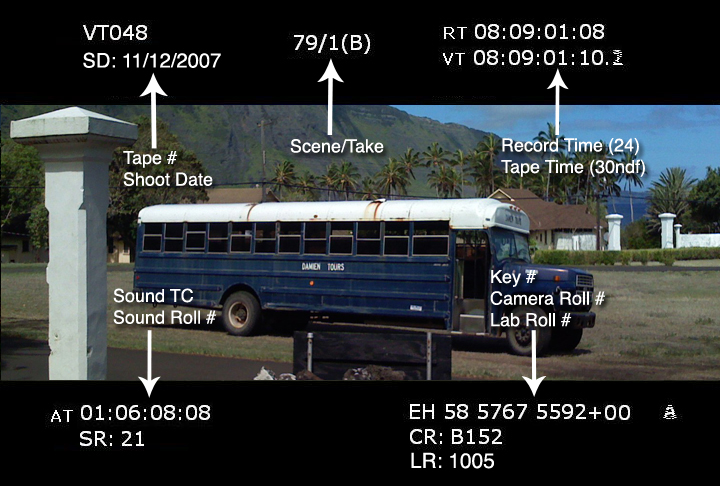
How do you go past Hour 23 for the first number? I'm still confused. [In traditional dailies, we do have a specific standalone field for a Tape Reel number and a Camera Roll number, even a Lab Roll in the film days, but that metadata is entered by a human. In this case, I'd go with a DIT or an assistant editor, whoever is available.]

2069147686_c83c71a516_o.jpg


Again, if you're under the gun, I'd just hire a secretary or a PA with a clipboard to write this stuff down. Literally, it's possible to keep track of when the camera drives change, so you know, "oh, it's 2:37 in the afternoon -- that's when we started roll 12. So this is timecode 14:37:43:00, and that was a great moment we need to use. Make a note of that." Piece of cake.
 
Hey Marc, I think again, the workflow that works for you, may not be the workflow that works for me. Maybe I have a PA, a secretary, maybe I have a guy to peel grapes and throw them into my mouth. Maybe I don't.

It's about what we decide to make primary timecode, and I have reasons, often, to prefer record-run timecode as "Primary". Record-run timecode is not a novelty, nor should it be a relic of the past. I may decide to put my lucky number in the hour digits, the day number of the shoot, my cat's age, it really doesn't matter what you or I do with it. It's a decades old function of timecode that has found uses in ways you or I may not envision, or ways that I do. That's why it's been there all these years. (and yes, if a single project exceeds 24 loads, then the numbers roll over)

The point is that Stuart has said the metadata slot for "Preferred" timecode was designed to change in accordance with what we select as DISPLAYED timecode. What I found yesterday is that the camera is NOT doing that. It always keeps "Absolute" timecode in that metadata field which Stuart has said is supposed to change. I know a workaround in Avid. Premiere is not as easy to deal with. And I don't want to have to explain it to every editor and producer that takes my footage.

That means the NLEs will reference a timecode I did not display at any point during the shoot.

From unaltered Scarlet metadata of a shot reel, shown in Premiere CS6. DISPLAYED timecode on this shoot was EDGE CODE:

Red R3D Details:

Camera Firmware Version: 3.3.3
Minimum Color Version: 2
Resolution: 4096x2160
FrameRate Num: 24000
FrameRate Den: 1001
Reel ID: 005
Timecode Preference: Absolute
Edge Timecode: 05:20:59:19
Absolute Timecode: 03:35:47:16


According to Stuart, if I understand him correctly, the way the camera is supposed to work, that "Timecode Preference" slot should read "Edgecode", if I displayed edgecode during the shoot, which I did. Clearly, it's showing "Absolute".
 
I think Stuart is saying that if NLE designers have followed the Red SDK exactly then your displayed timecode should be auto selected as the default timecode. So perhaps your question should be equally asked of Avid and Adobe?
 
That seems to be what he's saying Eric. But the NLE can only know that based on what the Metadata is saying was the displayed timecode on the camera. Look at my post above, showing the R3D metadata. Noting, I had displayed Edge Code during all of that shoot. Look at what the camera recorded for "preferred timecode" metadata: "Absolute". That's not what it should be saying. I wasn't displaying absolute timecode, I was displaying edge code. The NLE is just doing what it's told to do by the metadata. I don't think the Scarlet is recording the metadata the way Stuart says it was designed to.

I think Stuart is saying that if NLE designers have followed the Red SDK exactly then your displayed timecode should be auto selected as the default timecode. So perhaps your question should be equally asked of Avid and Adobe?
 
Back
Top