Welcome to our community

Be a part of something great, join today!

  • Hey all, just changed over the backend after 15 years I figured time to give it a bit of an update, its probably gonna be a bit weird for most of you and i am sure there is a few bugs to work out but it should kinda work the same as before... hopefully :)

Report Redcine Bugs

Status
Not open for further replies.
Hey guys...

If your clips are black, and they magically appear when you hit the Color button on the top toolbar, that means your graphics card doesn't have the necessary capability to run Redcine.

Lucas
-----
ASSIMILATE, inc.
LA, CA, USA
 
What are the supported video cards for RedCine? I don't remember seeing a compatibility list. It hasn't been a problem beforehand, why would this be an issue now? Running an ATI X1900 on a Mac Pro.
 
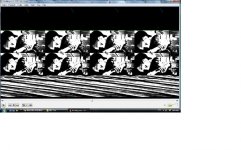
Srry about my name. i know its supposed to be my real name, imported shouldnt be infront of it. that happened when i changed my password. If a moderator could change it i would appreciate it. my bug is that redcine looks like this when i open it. I am running on windows 7 PC with an ati 4870 graphics card and 4 gb of mushkin ram. it says redcine beta when i open it, it was the only download that supported this os. any help is appreciated
DSC00302.jpg
 
Output Not Working

Output Not Working

So most everything about RedCine works great for me on my laptop with the following specs:

2.0 Ghz Intel Dual Core
4 Gb RAM
32-bit Vista
5400rpm Harddrive
ATI Mobility Radeon HD 3400 Series Graphics Card

The one problem is that the output in ANY wrapper or settings results in the attached image. The picture moves, it just.....does so in that strange output. Any ideas?
 

Attachments

  • redtestscreenca[.jpg
    redtestscreenca[.jpg
    93.8 KB · Views: 0
Hey guys...

If your clips are black, and they magically appear when you hit the Color button on the top toolbar, that means your graphics card doesn't have the necessary capability to run Redcine.


Hi Lucas

I dare to disagree.

My RED V20.1.3 Files come in black too while the older V17 come in as they should. (Old quadro FX 1500 here)

In every other application that can run R3D Files (Adobe Premiere/After Effects or even VirtualDub) it's not a problem at all.

So I'm tempted to say that it can't be the graphics card. I call it a bug.

Peter
 
It's a small thing.... but I've notice that with Redcine v20.0.0 that no matter how many times you deselect "crop" in the project settings and save the project.....it's is always selected when you re-open the project.
 
Hi ppl!
I'm working on Mac Pro with 2x2.8 Quad Core, 8Gig RAM.
I have 328 R3D files and do folowing:
1. Create a new project.
2. Choose Load All… and select the directory containing all of my R3D's
3. Choose "Open" to load my XML an see... nothing! On left side of dialog window i see list of folders (Applications, Users, Library,Network and Volumes) but when i clicks on any of it nothing happens on the right side. But if i load not all 328 files - dialog window works fine. What i'm doing wrong?
 
i wiped all red software and plugins off of my computer and then downloaded fresh versions of the FCP plugin and redcine-x. i had been using redcine before, and i got redcine-x because i thought it might work better/differently than redcine had been.

i decided that it wasn't any better and deleted redcine-x... and now i can't install redcine on my machine. why is this? it installs a new red alert and red rushes, but not a new red cine when i attempt to install the software package. redcine-x installs and runs perfectly, but i can't go back to the other red cine.
 
Well a bad one, at least is phreaking me out.
Shot in build 20. 4k 2:1 36 redcode
I see it in Quicktime player and red alert but ... RA last version Quick 7.6.0
I load the clips in redcine and is all black and only see "solarized" highlights, the redcine keeps working no crushing but i see sit.
The thing is last week with the same setting, the only posible change was to redcode 28, and it was perfect. I have reloaded redcine and clear library but nothing any suggestions gladly apreciated. to night I shoot again ...
Jon

I had a similar issue with Redcine thismorning. Only shooting in 16:9. It happened to the first two 16GB CF cards of the day. No settings were changed from the day befor. Our solution was to reset the camera back to the factory defults and reload our look and user profiles. This fixed the issue with the way the R3Ds were showing up in redcine, but I still have no idea what could have caused this to start happening. Anyone else out there have any ideas?

Internet was down earlier. I could only post from my phone. Anyway I am running version 20 of Redcine on a Macbook pro 2.5 Intel Core 2 Duo with 2 GB Ram, Camera build 20.1.3,

Later today I found that when I had the buggy clips in Redcine I could change the exposure or the brightness settings and the picture would come back looking fine. But this was buggy sometimes only the brightness would work but not the exposure and vise verse.

I don't think this will affect anything in the long run, but confused as to what could be causing it?
 
Last edited:
Hi
I have posted this in the main section before i saw this post.
I have Macbookpro (intel) and when i try to launch Redcine it locks rightaway, the app doesnt get started,I do get a nice picture of the Redcine emblem.
Perhaps it doesnt work with Macbook pro.
Thanks C.
 
12Core Scrub Crash

12Core Scrub Crash

Im not sure if this thread is still going with bug reports but here goes.
My bug is a basic Mac Pro crash. Occurs after numerous scrubbing with diff clips. Now I cant prove thats the cause due to prior problems with this workstation set-up (Quadro 4000, RED Rocket and Mac Pro 12core). Ive posted my findings with this combination and have not had the best results to date.
However with newly installed OS (thanks PNY) and latest Nvidia drivers the system is more stable where it wasnt before.
This time around after regular color editing with numerous clips the system throws the "Grey Screen of Ecck :P".
Now only reason I mentioned the scrub is that it has died twice while scrubbing.
Does RCX have specific hard-drive settings/combos?
Do I need to have a RAID system to play back files even with a ROCKET?
The files were played off the desktop.

Any help would be grateful ;)

RCX Build 351
ROCKET/BOB latest drivers
Mac Pro 2.93GHz 32GB RAM 1TB System Drive
Nvidia (PNY) Quadro 4000
Apple Cinema Dual 30's
 
Last edited:
On Win 32 with RC-X 416...when I launch I get "RedRocket #0 Driver and or Firmware is out of date. This version of REDcine-X requires Driver: 1.4.4.0 and Firmware: 1.1.14.17 to use this RedRocket card."

I've searched and cannot locate these anywhere...any ideas?
 
I am running RCX 454 I have a MACPRO 1.1 with a 3.0 ghz quad core (x2) so an eight core with eleven gigs of ram and the NVIDIA GeForce 7300 GT graphics card.
I x-code all the time with no issues, I always use RCX, this is the first occurrence. When I transcode (overnight) It goes for the first few clips then it renders out black frames, all my footage came out black, somewhere through the third clip it goes black, I still have audio on all my clips. My energy saver settings are off, it does not put hard drives to sleep, I turned those settings off a long time ago. What could be the issue Im having? It also did a few clips with the S000 ending. It is a Red One camera from Brooks Institute I have no idea what build it is, I can get this info if necessary. Im going to redo it, will repost if i had success. Thanks for any advice on this.
 
Status
Not open for further replies.
Back
Top