Welcome to our community

Be a part of something great, join today!

  • Hey all, just changed over the backend after 15 years I figured time to give it a bit of an update, its probably gonna be a bit weird for most of you and i am sure there is a few bugs to work out but it should kinda work the same as before... hopefully :)

Rendering problem with REDCINE-X build 221

Dominique Grenier

Well-known member
Joined
Dec 28, 2006
Messages
431
Reaction score
0
Points
0
Location
Quebec, Canada
Website
www.lumenilux.com
I've got some rendering problems using the latest version of Redcine-X. I had those same problems for a short period using the build 194 but they didn't last.

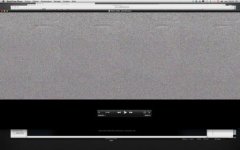
Basically, when I render any clip I get what's pictured in the attached image, that is, random noise for what seems the be the upper 3/4 of the clip and a black bar at the bottom. This is for the duration of the clip.

Any ideas?
 

Attachments

  • redcine_bug.jpg
    redcine_bug.jpg
    17.4 KB · Views: 0
I just had the same problem.

Source footage is 4096 x 2304 25fps.

I first converted to Quicktime 1080p ProRes 422 (HQ) and everything was fine. I just tried Quicktime 4096 x 2304 ProRes 4444 and I got exactly what Dominique describes: 3/4 noise and a black bar along the bottom.
 
what are you rendering to? detail your full settings.
also, detail your source footage.

Sorry, had an unexpected job.

My source footage was 4096 x 2048 at 23,976. I, too, was rendering in full 4K. I didn't tried rendering in 1080p first, I'll try that tomorrow and report here. But when I think about it, I did a job a couple weeks ago where I rendered in 1080 and didn't have a problem. It wasn't on build 221 though.
 
I don't believe the current Quicktime architecture supports 4K resolution. Not sure if that could be part of the issue but it would definitely be an issue once you try to work with the footage.
 
I don't believe the current Quicktime architecture supports 4K resolution. Not sure if that could be part of the issue but it would definitely be an issue once you try to work with the footage.

Well, I've rendered in After Effects much bigger formats than 4K! We've already rendered a 26,000 x 8000px clip, so I don't think this is the problem.
 
Well, I've render in After Effects much bigger formats than 4K! We've already rendered a 26,000 x 8000px clip, so I don't think this is the problem.

I'll admit I live in Final Cut world and FCP craps itself with anything over 4000
 
I just tried a 4K at ProRes HQ 422 and same issue.

I've done 4K quicktimes in the past without issues. Oh, and FCP can now handle 4K quicktimes. It's not elegant, but it works.

Hi Sam!
 
Hey Paul,

Oh well, good to know Quicktime + 4K is not the issue. I'll stop spreading false rumours.
 
Had same issue on a clip that was the first one after installing Build 30. When it displays in the player window you get a thin red-lined border around the frame of the image. 4HD clip at 29.97 and taking to Prores SQ. After transcoding at 1/2 premium debayer, had the random noise upper, black lower result. Sound was present.

So, I trimmed the head a few frames and it transcoded with a soft image but with an overall beige tint. A second pass after double-checking settings (redcolor, redgamma, look settings)and re-pasting grade this time to Prores HQ, it worked out the grade I had made. Redcine-x 221, QT4Beta, MBP 2.66, 4GB, G-Drive, Esata, bottle of Moose Drool...

Paul Hickey
 
I'm having problems rendering out to prores444 or for that matter any format. In that the QT Component does not seem to be passing the new color science info on to QT. So colors are unsaturated and washed out and don't look ANYTHING like what i saw while color correcting. I am wondering (based on your problems) if the Beta Redcode QT component and build 221 are not yet functioning as they should and require a "tuneup". Speculation on my part, but after three days of testing that's all I come up with since Redcine build 20 was outputting everything perfectly for me and now the new Redcine-x builds along with new color science do not produce same results.

RED?
 
I can confirm on my side too. I rendered a clip in 4K 16:9, and it had the noise and black bar. I rendered the very same clip in 1080p, and it was all good.

In my case, this is footage shot last July. I'm gonna try footage shot on build 30 later today, if I can.
 
May I just raise the question of why you need to render the QT files in 4K?

David
 
May I just raise the question of why you need to render the QT files in 4K?

David

Selling stock footage. There shouldn't be a reason why anyway, since 4K originated footage should be able to be rendered in 4K, right?

It is obviously a bug, which mean it can be fixed...
 
Back
Top