Welcome to our community

Be a part of something great, join today!

  • Hey all, just changed over the backend after 15 years I figured time to give it a bit of an update, its probably gonna be a bit weird for most of you and i am sure there is a few bugs to work out but it should kinda work the same as before... hopefully :)

Remote start/stop for audio

Tobin Sanson

Member
Joined
Feb 3, 2017
Messages
22
Reaction score
0
Points
0
Location
San Francisco, CA
Hello, all!

I'm shooting a doc on my Scarlet-W soon and am in need of suggestions for location audio recording. I'm a complete neophyte when it comes to this stuff, so feel free to tell me what's up...

I will be a single-person team, therefore I'm in need of a relatively simple setup. I want to record audio to an external recorder rather than in camera, but don't want to have to start and stop the recorder every time I start and stop the camera. Is there any kind of timecode/sync box that will do a remote start/stop on the recorder? i.e. when camera starts speeding, audio starts as well without me touching the recorder.

Maybe it's a pipe dream, maybe it's something that was solved decades ago... Thanks for any info!

Tobin
 
Just hire someone for it! Sound is half the resulting product, it deserve a person devoted to it.

Alternatively, you could maaaaybe hook up your camera to an external recorder and MAYBE using the RED as the external timecode source (UGH!) then that will trigger the recorder (if RED is sensible and doesn't output anything too odd over TC, or alternatively you might use an HDMI trigger with a MixPre10T/MixPre6/DR701D).

For example: https://www.sounddevices.com/tech-notes/external-time-code-auto-record-modes
 
You may be able to find voice-activated recorders that'll fit with your device.
 
tentacle right?

Tentacles are just one of many timecode box options.

But I'd suggest checking out the Ultrasync ONEs, I feel like they're the best pick at the moment.


You can see me using one of my Ultrasync ONEs with a Scarlet-W:

 
The Sound Devices MixPre-3 and MixPre-6 can see a start-stop signal via HDMI from the camera for some cameras. It's not clear if Red is supported here or not, but if it is, it would be a great solution.

The Atomos Shogun will record external audio, and is triggerable from the camera via SDI or HDMI, but I'm not sure I'd recommend it as a pure audio recording quality.

I've never used this, but a Pix-E from VideoDevices with the Pix-LR attachment looks like a pretty capable solution if 2 qudio imputs are enough. It's the sister company of Sound Devices, so audio ought to be as good as you're likely to need.

Another thought: Timecode audio sync will work (at least in Resolve or RedcineX, I can't speak to other software) wth one continuous audio file and any number of video files. You could simply free-run the audio recorder, and as long as the TC is in sync, you're all set. Not the most elegant solution, but one I've used from time ot time.
 
The Sound Devices MixPre-3 and MixPre-6 can see a start-stop signal via HDMI from the camera for some cameras. It's not clear if Red is supported here or not, but if it is, it would be a great solution.

The Atomos Shogun will record external audio, and is triggerable from the camera via SDI or HDMI, but I'm not sure I'd recommend it as a pure audio recording quality.

I've never used this, but a Pix-E from VideoDevices with the Pix-LR attachment looks like a pretty capable solution if 2 qudio imputs are enough. It's the sister company of Sound Devices, so audio ought to be as good as you're likely to need.

Another thought: Timecode audio sync will work (at least in Resolve or RedcineX, I can't speak to other software) wth one continuous audio file and any number of video files. You could simply free-run the audio recorder, and as long as the TC is in sync, you're all set. Not the most elegant solution, but one I've used from time ot time.

I used the pix for about 3 years, its killer, I also own the mix pre 3 and it is also a killer peice, replaced the pix xlr

steve
 
Just hire someone for it! Sound is half the resulting product, it deserve a person devoted to it.

Alternatively, you could maaaaybe hook up your camera to an external recorder and MAYBE using the RED as the external timecode source (UGH!) then that will trigger the recorder (if RED is sensible and doesn't output anything too odd over TC, or alternatively you might use an HDMI trigger with a MixPre10T/MixPre6/DR701D).

For example: https://www.sounddevices.com/tech-notes/external-time-code-auto-record-modes

Red doesn’t output TC by itself. Can the Sound Devices devices younreferenced read TC from SDI or HDMI?
 
Red doesn’t output TC by itself. Can the Sound Devices devices younreferenced read TC from SDI or HDMI?

There are RED backs with a TC output option.

As for HDMI (sorry, no SDI trigger options from Sound Devices), the Sound Devices MixPre recorders have an HDMI input but it is unknown as to if both Sound Devices and RED support each other via this.
 
There are RED backs with a TC output option.

As for HDMI (sorry, no SDI trigger options from Sound Devices), the Sound Devices MixPre recorders have an HDMI input but it is unknown as to if both Sound Devices and RED support each other via this.

DSMC2 red cameras don't seem to be able to output TC or record triggers over HDMI. If they did they would likely work fine with the MixPre.
 
If you have a shogun monitor connected using hd-sdi to the red camera. The atomos shogun will convert the sdi signal to hdmi. Could you not send the hdmi signal with this triggering to a sound devices mixpre6 or similar sound devices unit?


Im trying to investigate this a little further. Atomos have another device, a sdi to hdmi converter.
https://www.atomos.com/connect

They say,
TIMECODE & TRIGGER PASS THROUGH
Allow for pass through of timecode and start/stop trigger between devices.

But at the same time the are listing this...
Timecode & Rec Trigger Exchange
SDI: Sony, Canon, Panasonic, Arri, RED
HDMI: Sony, Canon Timecode, Canon Start/Stop

So its not clear if atomos connect can pass through the triggering...


a side note.
https://www.newsshooter.com/2014/08...en-standard-for-hdmi-triggering-and-timecode/
Atomos set new open standard for HDMI triggering and timecode

"HDMI on the other hand was seen as a consumer connector which originally implemented didn’t send timecode or record start/stop commands."

"Thankfully external recorder manufacturer Atomos have addressed this by working directly with manufacturers to create and
implement a protocol that offers these functions over HDMI. "

"Now Atomos have gone further and offered their protocol as an open, free and available standard that other manufacturers can use. Hopefully it won’t be long before every new camera has the ability to output timecode and start/stop commands via HDMI."

Red, if you have not implemented this yet. Please, its 2018 and this is long over due.
 
I just got a answer from Atomos.

"Yes, you are right. A Shogun Inferno or Shogun Flame could do this job. SDI In triggered by the Red Camera, HDMI out signal is then also triggered for another recording device."

Is there anybody on reduser that can also confirm this aswell? I dont have either shogun or the mix pre yet.


Also the reason that Red does not have the start/stop triggering in the hdmi is.

"Can I please clarify that you are referring to the record flag sent out via HD-SDI when the camera is recording?
This is provided via the Horizontal Ancillary metadata, which conforms to SMPTE 12M-2 Specifications.

Unfortunately this isn't a feature of HDMI, apologies."
 
In case anyone was interested in knowing whether the Atomos Connect works, it does not unfortunately. It doesn't convert the SDI trigger into an HDMI trigger that is understood by the Sound Devices HDMI trigger input. So the only option appears to be with a full size Atomos product with SDI and HDMI out and the option to configure the triggers in the menus. Shame this kind of thing has to be trial and error and there are no industry standards! And that Sound Devices don't include other ways to trigger the Mix Pre, I might take mine apart and see if there's a way to hack into the start stop button and add an external trigger....
 
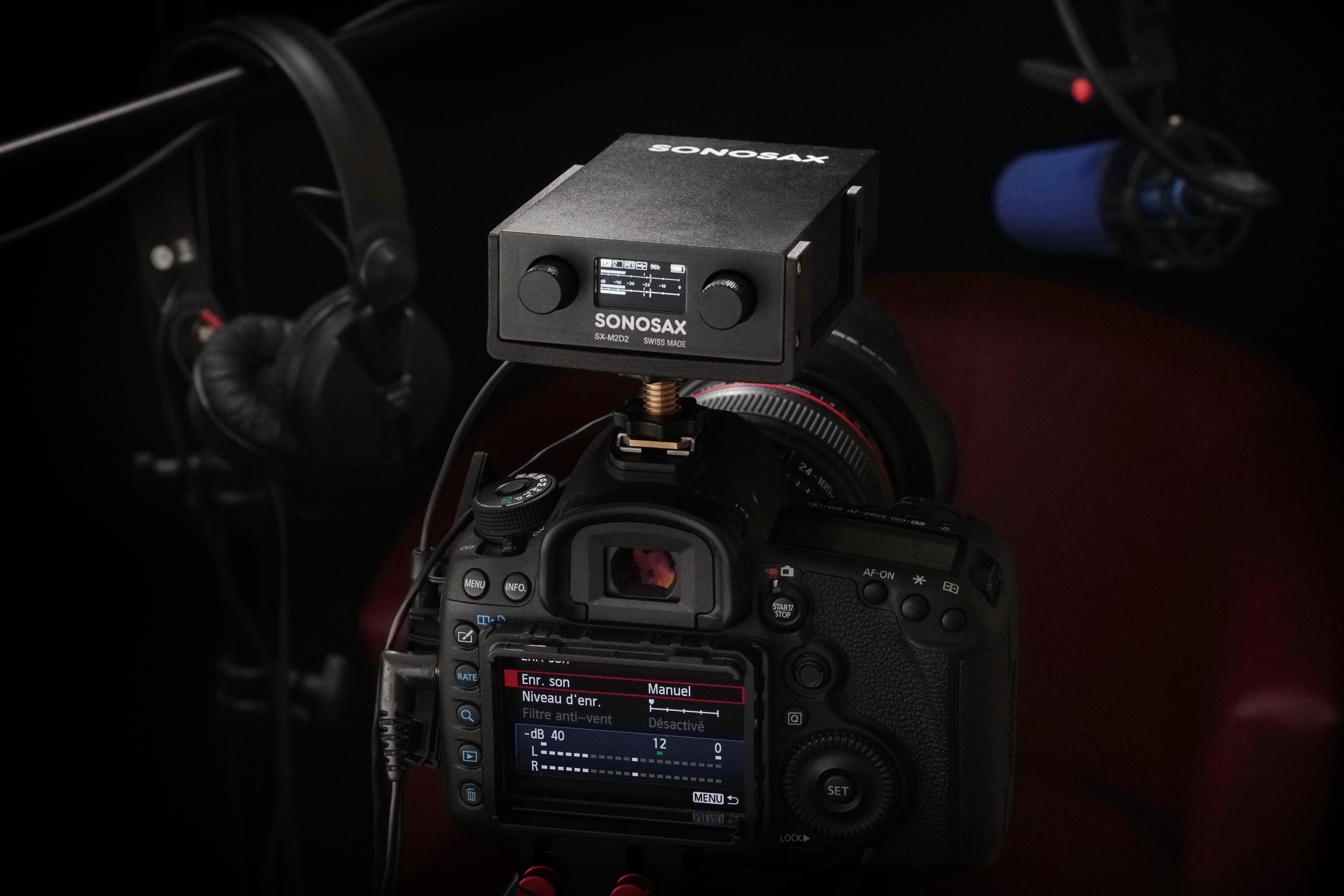
Record it on camera with a good preamp = no synching necessary and one man band compatible!

Use the Sonosax M2D2 as preamp and limiter

2 channels 48V preamp.

 
In case anyone was interested in knowing whether the Atomos Connect works, it does not unfortunately. It doesn't convert the SDI trigger into an HDMI trigger that is understood by the Sound Devices HDMI trigger input. So the only option appears to be with a full size Atomos product with SDI and HDMI out and the option to configure the triggers in the menus. Shame this kind of thing has to be trial and error and there are no industry standards! And that Sound Devices don't include other ways to trigger the Mix Pre, I might take mine apart and see if there's a way to hack into the start stop button and add an external trigger....

Have you updated the soundevices firmware lately? The updated the support for triggering. But I did not se red among them.
 
Have you updated the soundevices firmware lately? The updated the support for triggering. But I did not se red among them.

No support for Red, again I think it's because the HDMI doesn't support triggering and TC

I own a Cine7 with Red control, I wonder if this monitor, connected from camera via SDI, would allow the HDMI output from Cine7 to enable the MixPre record trigger and TC...
 
No support for Red, again I think it's because the HDMI doesn't support triggering and TC

I own a Cine7 with Red control, I wonder if this monitor, connected from camera via SDI, would allow the HDMI output from Cine7 to enable the MixPre record trigger and TC...

Me too. I just asked my self the same question. I´m searching for a new Audiorecorder and love the feature of the mix pre series to be triggerd via mini usb. Hope that it willl work with the cine7!
 
Back
Top