Welcome to our community

Be a part of something great, join today!

  • Hey all, just changed over the backend after 15 years I figured time to give it a bit of an update, its probably gonna be a bit weird for most of you and i am sure there is a few bugs to work out but it should kinda work the same as before... hopefully :)

RedWideGamutRGB: discuss!

I think I misunderstood Marc's post. The way I understood it was that he usually asks for full frame shoots of Xrite color charts , however if I could provide a closeup view of the DataColor chart in the grade above, That would be helpful also.

I also like the DataColor chart because those color sheets can be replaced when they start to fade, Which will be indicated when the small orange box changes color.
 
I also like the DataColor chart because those color sheets can be replaced when they start to fade, Which will be indicated when the small orange box changes color.

And I just caught the fact that I called it an Xrite colorchart.
 
rand thompson said:
And I just caught the fact that I called it an Xrite colorchart.
I was just being pedantic. :) X-Rite, DataColor, DSC, they are all great charts and using any one of them is a good thing. You can get the known RGB values from the manufacturer.
 
I was just being pedantic. :) X-Rite, DataColor, DSC, they are all great charts and using any one of them is a good thing. You can get the known RGB values from the manufacturer.


No problem, thanks for the correction.
 
Hello all,

First thank you all for the feedback. I really appreciate it.

Here are the log conversion LUTs:

https://lutify.me/free-redwidegamutrgb-log3g10-log-conversion-luts/

If you don't feel like visiting that page for the download, here's a direct download link:

Free REDWideGamutRGB Log3G10 LUTs

In the download you'll find four LUTs:


REDLog3G10 – REDWideGamutRGB – DCI-P3
REDLog3G10 – REDWideGamutRGB – Rec.709 – V.1 (Neutral Rec.709 conversion)
REDLog3G10 – REDWideGamutRGB – Rec.709 – V.2 (Slightly higher contrast Rec.709 conversion with deeper tones and warmer skin tones)
REDLog3G10 – REDWideGamutRGB – Rec.2020

You can see some examples at the above url.

All best,
Goran

Goran, as the thread starter (see below), I am obviously interest in this subject...

There are a few different threads that started off as Helium or 8K VV threads, but which morphed into the topic of color science. Awesomely, the RAW R3D format means that even those of us with conventional WEAPONs (and DRAGONs) get the new color science. Yay!

I submitted a badly behaved R3D frame to RED some months ago. When viewed in linear light, it is clear that nothing is clipping. But when converted to DC2/RG4, multiple bizarre color artifacts emerged. Architectural lights (meaning colored glass that let light pass through, not lights aimed at architectural elements) that were blue started fringing purple in the hot spots. Changing the color temperature from warm to cold reduced that, but then architectural lights that were purple would fringe blue. And the colors were way, way too saturated.

With RedWideGamutRGB, the colors stay in the box, but they are very much desaturated from the real-life vibrant colors of the diamond lights. If you know what light looks like when it goes through cobalt-blue glass, that is the color blue we are aiming for. It's blue. It never turns purple. In any case, I think RedWideGamutRGB will be a very helpful starting place for me to build a LUT that ultimately handles my (architectural) glass.

Here is the R3D file, along with some JPG stills showing how things change across temperature (with DC2) compared to RedWideGamutRGB:

https://www.dropbox.com/sh/id1lhjnss1ot8uw/AAAZh3JrW_lGmQrhSw4Awb_6a?dl=0

RWG + Log3G10 + your LUT did a wonderful job on that troublesome image. Thanks for your work, and of course the folks at RED (especially Graeme Nattress) for all your work. A new day has dawned!
 
Paul -
Thanks for the detail and perspective.
I did not know that about premiere - is that documented anywhere? It ignores any info from OS about native display colorspace? (Apple now seems to manage - minimal documentation)
The HP 27x monitor has sRGB D65 - so I could actually flip to that color space before using Premiere, but I was planning on Resolve - maybe even editing in Resolve. Wonder if FCP X ignores native display colorspace? The comment about iPadPro and other displays (iPhone 7?) is interesting. Whenever I switch to Rec709 now I feel like someone took away all the color ;)
 
Heh heh heh.
Fun times ahead.
 
Paul -
Thanks for the detail and perspective.
I did not know that about premiere - is that documented anywhere? It ignores any info from OS about native display colorspace? (Apple now seems to manage - minimal documentation)
The HP 27x monitor has sRGB D65 - so I could actually flip to that color space before using Premiere, but I was planning on Resolve - maybe even editing in Resolve. Wonder if FCP X ignores native display colorspace? The comment about iPadPro and other displays (iPhone 7?) is interesting. Whenever I switch to Rec709 now I feel like someone took away all the color ;)

I was told by one of the engineers on Lumetri that internally all math is based around sRGB/709 Primaries and in fact the image is stored with a gamma. The in out out to Lumetri goes through a gamma conversion but still with sRGB/709 primaries. This was perhaps two versions ago and things could change. Ultimately i'd imagine the whole of the internals would go to Linear floating point and Rec2020 at some point.

So no, premiere itself has no tools for adding a display transform. In Nuke for example you can swap between different viewers that handle the display transform depending on what you're viewing on, if you're viewing the output on a P3 projector your viewer should be P3 and the same output on a sRGB monitor should be sRGB once those are correct then the two images side by side should look as similar as they can be.

But in Premiere there's no colour management like that AFAIK, the standard output is expected to be sRGB. This covers 99% of what people are usually viewing on so it's probably not that much of a deal. Anyone running DCP projectors is most likely not grading in PPro!

As it become a more capable colour corrector then i'm sure this will change.

I am not so sure what happens with R3D files though. With DNG when you import they are kind of 'snapshotted' at a certain set of settings and you get what is basically a baked view of the image and not the full range to work with. So you can have a full range DNG but in Lumetri it will clip. You can go back to the DNG import and reduce exposure and see more highlights. Not ideal.

This is one reason why RWG and the Log curve is useful because it would bring everything the camera can see into 0 to 1 range. With the right conversion in the Input LUT you can get the image into the ballpark and work on it more. In fact you could sort of grade in log and then add a LUT in the Creative options to make the image display referred (but the exposure controls in Lumetri act through an S curve so they're not *proper* exposure controls therefore it always assumes it's working ontop of a display referred image). Whilst not always very intuitive there is the possibility of doing all sorts in PPro. Plus also perhaps the HDR stuff works with R3D better, last time i played with that it was all a bit odd but that will bed down i'm sure.

cheers
Paul
 
Set your RED RAW decode. Then it is in your project settings which can behow it is read in your timeline.

David

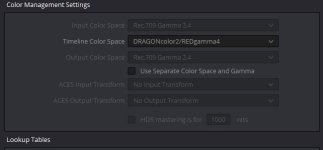
The decode is correct, that's already set, I'm talking about the timeline color space under color management.
 
Goran, as the thread starter (see below), I am obviously interest in this subject...


RWG + Log3G10 + your LUT did a wonderful job on that troublesome image. Thanks for your work, and of course the folks at RED (especially Graeme Nattress) for all your work. A new day has dawned!

Thank you!
 
Graeme,
pictures are looking great, informative thread to get back to basics.
In respect of the Helium sensor, what lighting colour temperature is required to shoot a greyscale so that it needs the least colour temperature shift (through tweaking in post), to be accurate?

How many degrees kelvin outside this ideal CT before re-balancing becomes impossible or seriously affected by artefacts?


Mike Brennan
 
Great info in this thread guys.

I'm finding the new combinations pretty excellent across a wide range of older, recent and newer footage. This makes my archive that much more valuable.

David
 
You also need to click the "Show Advanced Controls" box in Redcine's preference I believe.
 
Back
Top