Welcome to our community

Be a part of something great, join today!

  • Hey all, just changed over the backend after 15 years I figured time to give it a bit of an update, its probably gonna be a bit weird for most of you and i am sure there is a few bugs to work out but it should kinda work the same as before... hopefully :)

REDundead no function sir

oliver imfeld

Well-known member
Joined
May 5, 2007
Messages
249
Reaction score
0
Points
16
Location
Bruxelles, Belgium, Europe
Website
www.oliverimfeld.com
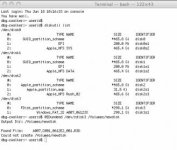
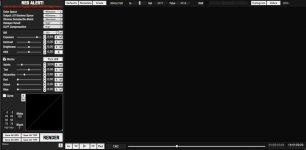
Me again, still the same problem; i filmed a low light dance piece with build20 and can play back the clips inside the camera, but once the red drive hooked up to Mac nothing shows up in RA (i mean all the clips are black as black can be); and REDundead gives me the "Could not create / Volumes/newdisk" message.

Any suggestion is welcome, cheers
 

Attachments

  • REDundead#01.jpg
    REDundead#01.jpg
    16.9 KB · Views: 0
Me again, still the same problem; i filmed a low light dance piece with build20 and can play back the clips inside the camera, but once the red drive hooked up to Mac nothing shows up in RA (i mean all the clips are black as black can be); and REDundead gives me the "Could not create / Volumes/newdisk" message.

Any suggestion is welcome, cheers


Hey Oliver-

I had an issue like that before. We were shooting the beautiful and talented Venus/Serena Williams sisters against a black background. The director wanted it more contrasty then it already was so I went in the menu and upt the contrast a bit. When I brought it into RA all I saw was a black screen... Now they are dark skinned but surely something was wrong here. I ended up clicking on the "matrix" box and like magic my image appeared. It may not be the same issue you are having but worth a shot I suppose.

Good Luck!

-r
 
Ryan,

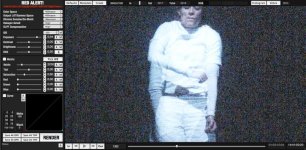
either you're a magician or just so much smarter that i am; you're completely right, unchecking the matrix box brings the images back; but still i beleave this must be a bug to be resolved quickly! Anyway, thx so much for this precious advice !

ps: and guys, don't get insane about picture quality, it's a test frame...
 

Attachments

  • BlackMistery_01.jpg
    BlackMistery_01.jpg
    51.2 KB · Views: 0
  • BlackMistery_02.jpg
    BlackMistery_02.jpg
    98.9 KB · Views: 0
Mark Pederson said:
Just a word of caution for RENTAL HOUSES - we tested the REDundead app at various stages and it is SO GOOD at recovering R3D files that in most cases it will also recover PREVIOUS RECORDED CLIPS from past jobs.
Just to clarify...does this mean that it recovers multiple generations of media? That is, the footage most recently shot, the footage shot previously to that, etc?
 
Hey Oliver-

I had an issue like that before. We were shooting the beautiful and talented Venus/Serena Williams sisters against a black background. The director wanted it more contrasty then it already was so I went in the menu and upt the contrast a bit. When I brought it into RA all I saw was a black screen... Now they are dark skinned but surely something was wrong here. I ended up clicking on the "matrix" box and like magic my image appeared. It may not be the same issue you are having but worth a shot I suppose.

Good Luck!

-r
Ryan, thanks for this info.

I tried opening this same clip in RedCine 3.1.8 when trying to troubleshoot it with Oliver and got only black frames also (this is on a PC, not Mac).

Any idea what setting would restore the picture like the Matrix checkbox does in RedAlert?

Cheers (love the knowledge base of this community!),

Paul
 
Paul, did clicking on the R to reset the curve (in the color panel) do anything? What about the M button on the top (RGBML buttons)?
 
..unchecking the matrix box brings the images back; but still i beleave this must be a bug to be resolved quickly! Anyway, thx so much for this precious advice !

No bugg. Looks like RED, GREEN and BLUE are at 0, then the picture should be black. Klick the "R" so thay go to 1 and you have picture again.
 
JJ,

on my drive i have 10 clips; the firts 3 and the last 1 open in RA without any problems; for the others i need either to unklick the matrix button or put the RGB buttons back to one; nevertheless, for those 6 "black" clips even their proxies are black. I guess it's rather unusual the RA settings changing so drastically from one clip to another, knowing that R1 settings remained the same for all 10 clips. What do you think is the reason ?
thx, o
 
Paul, did clicking on the R to reset the curve (in the color panel) do anything? What about the M button on the top (RGBML buttons)?
No, I tried all those things and more but nothing brought the image back. I even set all the settings to neutral, 5000K, 320ISO etc but nothing showed.

So I'm wondering exactly what the Matrix setting in RedAlert is affecting that isn't being affected by anything in RedCine?

Cheers,

Paul
 
Had this same problem after shooting some lowlight stuff where I used AUTO white balance on the camera under some funky LED stage lights.

Moving the tint slider solved my problem and the footage showed back up in both REDcine and Redalert.
 
Hmm, I tried the same clip using RedAlert 20.0.1 today but couldn't get back the image as you show it Oliver. I'm wondering if my download wasn't corrupted?

Tried tint sliders etc in both RedAlert and RedCine, but no luck.

No doubt we'll figure this out eventually, though at least your problem is solved :)

Cheers,

Paul
 
Ryan,

either you're a magician or just so much smarter that i am; you're completely right, unchecking the matrix box brings the images back; but still i beleave this must be a bug to be resolved quickly! Anyway, thx so much for this precious advice !

ps: and guys, don't get insane about picture quality, it's a test frame...


Awesome Oliver!! I know a few card tricks! ;)

-r
 
Back
Top