Welcome to our community

Be a part of something great, join today!

  • Hey all, just changed over the backend after 15 years I figured time to give it a bit of an update, its probably gonna be a bit weird for most of you and i am sure there is a few bugs to work out but it should kinda work the same as before... hopefully :)

Redcine-x Transcodes to Prores 4444 look WASHED OUT

Looked at all the files in FCP and here are the results.

Correct gamma compared to RC-X

PR4444
PR422 HQ
PR LT
DPX


Raised GAMMA (blacks) compared to RC-X

DVPROHD
UNCOMPRESSED 10 bit
SHEER
PR Proxy
PR 422


What a Charlie Foxtrot this is.

If I open all of these files in QT the reverse happens with ProRes.

Advice.
Before creating a deliverable. Know what software the files will be edited in. Test. test . test.

David

Yes, that is about what i experienced. ALTHOUGH for my looking at underwater footage with big blue background with raised whites....I can see in MUCH greater detail the washout effect. If i import that pr4444 into FCP it does look better, but still not nearly as good as in RC-X--i would not say that it matches the look, but just has 50% better saturation as compared to viewing it in QT
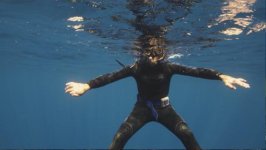
 
Here is a TIFF file that I had worked from Rocketcine-X using dreamcolor monitored from HD-SDI thru AJA to HDMI so viewing and correcting at 10bit with dreamcolor monitor set to "FULL" as colorspace with the Gamma in FULL mode set to 2.2

Looked great on the Dreamcolor monitor, but on my Mac via DVI and ATI 4870HD graphics card at 8bit using Mac's gamma of 2.2 it looks washed out and de-saturated. Not sure if this screenshot will do this rant justice.

Comments?

EDIT: the screenshot does not show anything....since i have no reference.
 

Attachments

  • Screen shot 2010-04-27 at 11.15.26 AM.jpg
    Screen shot 2010-04-27 at 11.15.26 AM.jpg
    15.8 KB · Views: 0
Ok....I think I've run out of ideas and tests. I would be perfectly willing to send you guys a clip to see for yourselves what i have tested. Say (as David suggested) a small 2-3 second clip to see for yourselves. It would be however nice if one of you had a dreamcolor to monitor extactly what i see, but at the least a QT prores 4444 clip transcoded may tell???
 
Is this not because the dreamcolour is a wide gamut display ?

going to 8 will clips/distort your chroma in an image no ?

s

I don't think so...In fact have some new examples to show the HUGE change in flavours.
 
Here are two screenshots of the EXACT same image BUT one was corrected in Redcine v 20 and the other in Redcine build 221 with redcode QT component 4.1 added.

You'll notice a big difference in the saturation in the two shots. I had originally corrected the RCv20 image using my Dell U2410 and the image showed on my non-calibrated screen nicely, but on a REC.709 it is darker and more saturated--but the difference is not ovewhelming.

The image RC-X-build221 was corrected using RC-X and corrected on my Dreamcolor emulating REC709. Looked great while correcting on the monitor, but when I output a QT it looked terrible and washed out.

CONCLUSION: i can only come to the conclusion (no science--only my eyes and two days of testing) that RC-X build 221 and the new QT component are not outputting the new color-science correctly. It is clear that with Redcine V20 i could get images to look fairly close to what i saw them looking like in Redcine and the prores transcodes, but that is NOT the case in my recent transcodes using build 221.

Comments?? other ideas?
 

Attachments

  • RCv20.jpg
    RCv20.jpg
    20.2 KB · Views: 0
  • RC-X-build221-QTbeta4.1.jpg
    RC-X-build221-QTbeta4.1.jpg
    20.2 KB · Views: 0
i thought i would test a tiff output vs a qt output to see if there was any difference. BUT, the TIFF matched the QT. So guess that at least there is conformity in that respect. I'm going to continue on with testing here.

TIFF output becomes gamma 1.8 at default even in Snow Leopard, so be careful.
 
please post the short r3d.
 
TIFF output becomes gamma 1.8 at default even in Snow Leopard, so be careful.

The two images i posted were only screen grabs off of my mac from the original QT files beginning at frame one. So all they are is representative of the color de-saturation effect that i am seeing and represent the problem i see when outputting the prores transcodes. It's quite easy to notice that the old RC held saturation and the new RC-X looses saturation after transcoding to prores.

I'll see about posting two clips tomorrow.
 
Hi Kaku and John,

Yep...QT gamma is still all over the place. It's not serious.
Snow Leopard was supposed to solve the gamma problem... :)

Just for fun, try to calibrate your monitor on a Mac using their calibration tool and then set it to gamma 2.2 as recommended.

Then, compare the QT look on your computer monitor (now calibrated) to a calibrated NTSC or HD monitor...NOT THE SAME...!!!!

And now, compare the QT X output to QT 7 output...NOT NECESSARILY THE SAME...!!!!

Oh...because it's not finished, do we check the "match FCP" in QT 7 Pro prefs ?

A real joke...

Cheers!

Antoine
 
match FCP (which means gamma 1.8 monitoring but to make it 2.2) is really bad and unspecific name. People who started using from Snow Leopard and FCS3 would get really confused.
 
Hi Kaku and John,

Yep...QT gamma is still all over the place. It's not serious.
Snow Leopard was supposed to solve the gamma problem... :)

Just for fun, try to calibrate your monitor on a Mac using their calibration tool and then set it to gamma 2.2 as recommended.

Then, compare the QT look on your computer monitor (now calibrated) to a calibrated NTSC or HD monitor...NOT THE SAME...!!!!

And now, compare the QT X output to QT 7 output...NOT NECESSARILY THE SAME...!!!!

Oh...because it's not finished, do we check the "match FCP" in QT 7 Pro prefs ?

A real joke...

Cheers!

Antoine

Yes, the monitoring is a bit all over. I have noticed that. However the looks seem to be slight IMO--but you can see them. The real culprit where I see a HUGE difference is when monitoring them after transcode and just looking at the basic image--it's WAY off. If i take that transcode into FCP or to my Dell Monitor from Mac (gamma set 2.2 with FCP monitoring on) you see a small gamma shift and same (and expected) when i take it to my calibrated Dreamcolor monitor plugged into the DVI port on my mac---but that is really expected since my DC is emulating a REC709 monitor with gamma of 2.4

I also (last night) checked and monitored off of my MXO2 and looks EVEN different--funny, but the transcodes look better when monitoring off of MXO2 via HDMI out to my LCD TV---when running them through FCP.

However, still takes this main discussion far from the point which is that the QT files look like hell when played directly within QT. There are FAR from representative of what one color corrected in RC-X.

I'll try to post a few clips later today and pop back and give a link.
 
Having the same issues playing around with some footage I shot. Just testing on my imac for fun and noticing that what i see in redcine x (latest version) is nowhere close to what i get after rendering a prores or avid dnxhd QuickTime. The quick times are more washed out and destaurated when viewed in QuickTime x, QuickTime 7, or FCP.

This is terribly disconcerting. As a DP if i grade dailies on set but the delivered transcode does not match, my job is on the line. Color consistency should be on the top of reds priority list for redcine x.
 
Have you tried setting gamma correction to "Automatic" in your video export settings? I have found that this tends to produce more accurate results on my system than when the gamma gamma correction option is "off," and I've been told by another DIT that this is the root of the "washed out" problem.

Hope this helps...

- Jordan
 
Have you tried setting gamma correction to "Automatic" in your video export settings? I have found that this tends to produce more accurate results on my system than when the gamma gamma correction option is "off," and I've been told by another DIT that this is the root of the "washed out" problem.

Hope this helps...

- Jordan

I believe you mean set it to "NONE" yes? When you set to none then QT will play it at the gamma you set it at. If you choose Automatic, then there is a chance that it may play at 1.8 instead of 2.2.....this is how I understand the transcode option of checking none vs. automatic.
 
Having the same issues playing around with some footage I shot. Just testing on my imac for fun and noticing that what i see in redcine x (latest version) is nowhere close to what i get after rendering a prores or avid dnxhd QuickTime. The quick times are more washed out and destaurated when viewed in QuickTime x, QuickTime 7, or FCP.

This is terribly disconcerting. As a DP if i grade dailies on set but the delivered transcode does not match, my job is on the line. Color consistency should be on the top of reds priority list for redcine x.

Ok...now i know i am not alone in seeing this and it's not my system setup. In fact if you look back in my posts i showed where redcine v20 was producing consistent and very good results when transcoding to prores. Then in the newer redcine-x builds and the new QT codec i seem to get nothing but washed out and desaturated transcodes out of redcine-x. I'm confident of my results since i loaded the redcine v20 again yesterday, then redcine-x build 104 and redcine-x build 221 and my tests yielded same results. So as you say....job is on the line. There is NO WAY IN HELL i can send out these transcodes to my clients or to my stock house to put on the web and for sale since they look horrible. I'm better to go back to build 20 with the old color science and no flut control and do my transcodes from there until we get a build that will yield WYSIWYG---or at least 90% close to that.
 
Even with NONE selected it still comes out with less contrast and saturation. Not severe but DEFINITELY noticeable. Creates a bit of guesswork and compensating during edit/grade. Not a great situation and would love for it to be addressed.

Have you tried setting gamma correction to "Automatic" in your video export settings? I have found that this tends to produce more accurate results on my system than when the gamma gamma correction option is "off," and I've been told by another DIT that this is the root of the "washed out" problem.

Hope this helps...

- Jordan
 
Even with NONE selected it still comes out with less contrast and saturation. Not severe but DEFINITELY noticeable. Creates a bit of guesswork and compensating during edit/grade. Not a great situation and would love for it to be addressed.

Yes, definately, and choosing none as i understand allows FCP & QT to use the gamma it was transcoded to. There is a slight difference in saturation, BUT in cases i am seeing the problem---underwater and big blue background---the gamma shift is HUGE. Topside footage I've shot does not show as much washout since not those big blue underwater backgrounds with lots of light.

So for me the washout/desaturation is HUGE
 
I believe you mean set it to "NONE" yes? When you set to none then QT will play it at the gamma you set it at. If you choose Automatic, then there is a chance that it may play at 1.8 instead of 2.2.....this is how I understand the transcode option of checking none vs. automatic.

I would try it both ways... If "none" isn't looking proper, try "automatic." I've had successful results both ways, but if you're transcoding to ProRes HQ, 4444, or Avid DNxHD, automatic should select 2.2 gamma.

- Jordan
 
Back
Top