Welcome to our community

Be a part of something great, join today!

  • Hey all, just changed over the backend after 15 years I figured time to give it a bit of an update, its probably gonna be a bit weird for most of you and i am sure there is a few bugs to work out but it should kinda work the same as before... hopefully :)

Redcine X Pro M1 Mac Pink Lines On Footage

Han Vogen

Well-known member
Joined
May 23, 2018
Messages
332
Reaction score
38
Points
28
When attempting to use the latest REDCINE—X PRO version (55.51981) on my brand new M1 Max MacBook Pro, I immediately noticed pink lines appearing on the footage. These pink lines stream from right to left across the footage. When opening the same files on my older Intel based MacBook Pro, the footage displayed as expected. No pink line artifacts.

This looks like a decoding error. Perhaps caused by the different GPUs in the new Apple silicon Macs.

Has anyone else noticed this problem? Is this issue documented with Red?
8DA69083-77C3-4753-99E0-231241B8CC15.png - Pink artifacts
 
Not seeing it with mine. Got it yesterday testing now. What generation of camera/ compression? Monstro at this end.

Just checked with Komodo footage. Lots of random little pink dashes all over it at 1/4 or less resolution. 1/2 and full don't show it.
 
Tom Hanmer it goes away if you disable GPU. But this is not how anyone would want to work.
 
Han on mine doesn't happen with wavelet compression, so not on DSMC1 or 2 but does happen with Komodo's DCT compression at 1/4 or less so I assume it would happen with Raptor footage also. If I play Komodo footage at 1/2 premium it goes away. Don't know if it would play Raptor footage at 1/2 premium smoothly but no struggle at all with Komodo. Komodo playing back at between 22 and 25fps at full quality.
 
Tom, good to know. However, I think it should still be addressed .
 
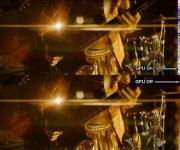
Having some issues show up on my M1Max Macbook Pro. In Redcine, artifacts show on the right side of the frame only with GPU enabled. If the GPU is disabled, the artifacts are gone and are replaced by the image information that was hidden underneath the artifacts. So far I only see the issue with footage shot on my Monstro DSMC2 in ANA 2x 7K 6:5 4536 x 3780.
 

Attachments

  • photo119228.jpg
    photo119228.jpg
    97.7 KB · Views: 0
Having some issues show up on my M1Max Macbook Pro. In Redcine, artifacts show on the right side of the frame only with GPU enabled. If the GPU is disabled, the artifacts are gone and are replaced by the image information that was hidden underneath the artifacts. So far I only see the issue with footage shot on my Monstro DSMC2 in ANA 2x 7K 6:5 4536 x 3780.

Resolved in the latest Redcine 60.1.2. The Check For Updates feature in Redcine 55.1 wasn't aware of the new version.
 
Back
Top