Welcome to our community

Be a part of something great, join today!

  • Hey all, just changed over the backend after 15 years I figured time to give it a bit of an update, its probably gonna be a bit weird for most of you and i am sure there is a few bugs to work out but it should kinda work the same as before... hopefully :)

REDCINE-X Build 351... finally.

come on guys is fast export a couple of frames of comparison...
:)

i would love to see something before go to bed here (1 Am already)...

g
 
I'm a bit confused...

I'm a bit confused...

EDIT> had to come back and edit my post -- was up too late when I started first testing last night...

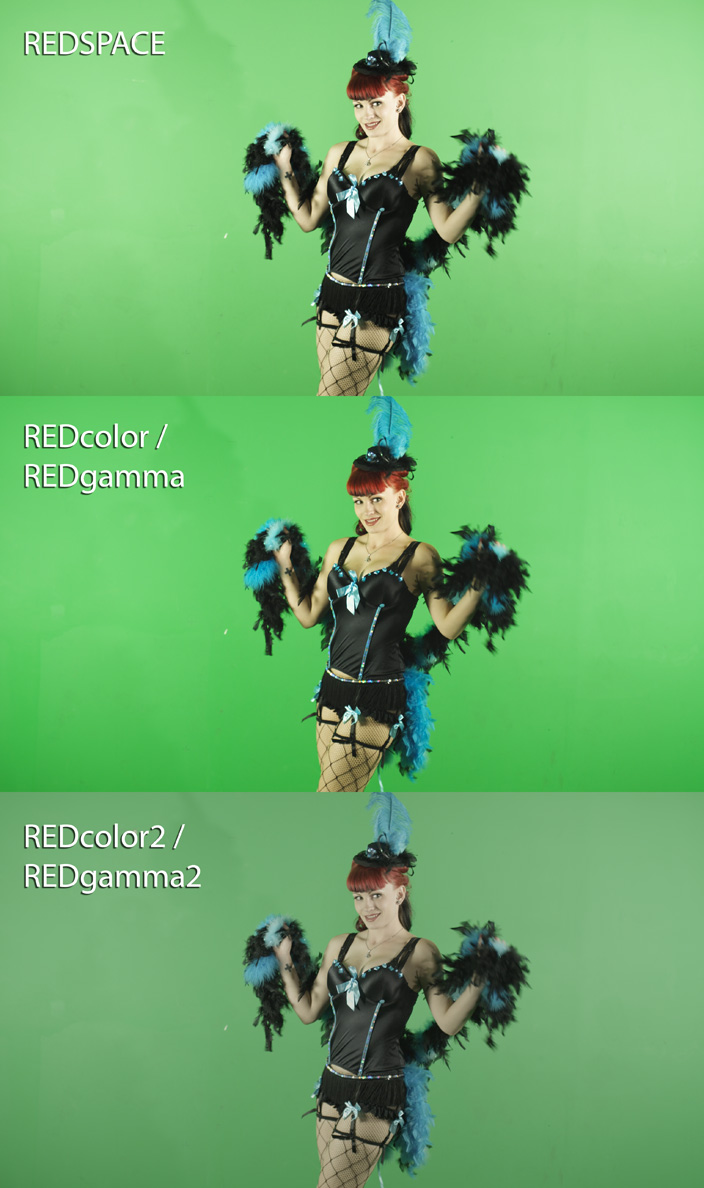
I'm loving what this is doing here. It's a much flatter image out of the camera, but you have much more realistic base tone and color levels to work with. It doesn't look as punchy as the older color science modes right out of the camera, but is much easier to get a pleasing image with minimal tweaking.

> Old post stuff retained...
Anyway, off to do more testing. On this particular example, the Redcolor/Redgamma looks the best on my plasma here for some of the color reproduction. A bit punchy flesh tones and they quickly become too yellow if I start to push the color any further. The RC2/RG2 space starts off a bit flatter, but it's easy to get it where I want it with a few minor adjustments. Nevermind the grungy greenscreen or the shadow, this was mostly just some testing and shots done during setup from way back when, but FWIW, it still keyed beautifully as RED footage always does...

This was shot on original M sensor over a year ago - Build 20.1.3
redcscompare.jpg
 
Last edited:
Although i don't think the size does justice to what i see in RC-X here is a frame from some very old (2 year old) Mysterium footage:

Redspace:
78n11dhup8.jpg


REDColor2, REDgama2:
19m7zukj7a.jpg


REDcolor2, REDgama2 with minor curve adjustement:
dts4bd75ez.jpg


Jeff, REDgama2 changes the image's characteristics dramatically so i am not sure if it's possible to compare it with REDspace or REDcolor/REDgama without adjusting it a little.

The improvement is more pronounced when you add a lot of saturation in RC-X. In that case the improvement in REDcolor2 is eyeopening!
 
A couple ABs

A couple ABs

Ok, lores jpegs attached.

No grade - just white balanced. Same for each clip - red color 1 and red gamma 1 out of build 262 then red color 2 and red gamma 2 out of build 351.

fullres tifs available at:

http://www.markwilkinsondirector.com/redcolor_compare.zip

Hm. Seems like it's built for grading...
 

Attachments

  • football_rc1.jpg
    football_rc1.jpg
    9.5 KB · Views: 0
  • football_rc2.jpg
    football_rc2.jpg
    8.2 KB · Views: 0
  • street_rc1.jpg
    street_rc1.jpg
    14.7 KB · Views: 0
  • street_rc2.jpg
    street_rc2.jpg
    11.7 KB · Views: 0
wow! I think it's more improvement than version1. Love it!
 
Here's another example from the same old footage i posted earlier:

REDColor - REDgamma2
vcy5pyo8c3.jpg


REDcolor2 - REDgamma2
cvaplzhies.jpg


They both have REDgamma2 to make comparison easier. I set Saturation to 2. No whitebalance or other color settings were adjusted.

The second frame (REDcolor2) has much better and more natural skin color reproduction. In comparison i could even say that REDcolor now looks bad to me. :laugh:
 
Jeff, REDgama2 changes the image's characteristics dramatically so i am not sure if it's possible to compare it with REDspace or REDcolor/REDgama without adjusting it a little.

That's what I'm seeing here for sure. Still mostly looking at old footage tonight as that's what I have loaded up right now. It's a flatter gamma curve and it seems like it controls exposure and tone better. It needs adjustment and does not provide as punchy or vibrant of an out of camera image that the previous Redcolor/Redgamma did. However, I'm finding it's easy to quickly adjust and gives some impressive results by just bumping contrast and saturation.

The improvement is more pronounced when you add a lot of saturation in RC-X. In that case the improvement in REDcolor2 is eyeopening!

Yes, definitely seeing that. Before, I was just comparing the looks as it applied to existing footage with no adjustment. But a little tweaking after switching to the new color science and some of these images are looking great.
 
Is there a beta firmware that will let me get RC2/RG2 out of the video tap for video village?

Getting ready to start something really good, and it would be sweet to have this for on set monitoring...
 
BTW, redgamma 2 looks like the best startingpoint for non-log workflows to date.

I looked at the examples posted and thought: Finally!!!

So much flatter in the mids, and finally totally abandoning the RedSpace legacy.

Fantastic!
 
Amazing!!!

RCX B351 = Film Look ...finally!!!

Also it works well with old M files.

Lighting: Halogen shop light.

B351_SGAFilmEffects_01.jpg

Shot on R1-M with Canon FD L 50mm f/1.2 wide open @ f/1.2, ISO 320, RCX RedColor2, RedLogFilm, default CC in Genarts Sapphire Film Effects, Negative Film Kodak 5245, Print Film Kodak 5283.

B351_NoCC_01.jpg

Shot on R1-M with Canon FD L 50mm f/1.2 wide open @ f/1.2, ISO 320, No CC, Original R3D file output in RCX B351, RedColor2, RedGamma2.

B351_SGAFilmEffects_02.jpg

Shot on R1-M with Canon FD L 50mm f/1.2 wide open @ f/1.2, ISO 320, RCX RedColor2, RedLogFilm, default CC in Genarts Sapphire Film Effects, Negative Film Kodak 5245, Print Film Kodak 5283.

B351_NoCC_02.jpg

Shot on R1-M with Canon FD L 50mm f/1.2 wide open @ f/1.2, ISO 320, No CC, Original R3D file output in RCX B351, RedColor2, RedGamma2.
 
WAY BETTER!!! I totally wish I had this on my last paid gig! :emote_head_explode:
 
Mmmmm even once you get the general gamma and saturation matched the skin tones are much nicer in REDColor2/Gamma2. This would have saved a lot of time in trying to keep skin tones from yellowing in the past.

Thanks everyone for posting comparisons.
 
Back
Top