Welcome to our community

Be a part of something great, join today!

  • Hey all, just changed over the backend after 15 years I figured time to give it a bit of an update, its probably gonna be a bit weird for most of you and i am sure there is a few bugs to work out but it should kinda work the same as before... hopefully :)

RedCine, Redrushes, and FCP L&T problems with 4k footage

Andrew R

Member
Joined
Jan 12, 2010
Messages
21
Reaction score
0
Points
0
I've been trying to transcode a number of clips that won't work. the producers are getting me the original hard drive in case these duplicate files i'm working on are corrupted. i'm using snow leopard on an 09 mac pro 8 core 2.66 with 6gb RAM. transcoding 4k red media on a 2TB raid 0 array, (from a late model RED, still waiting from the DP to get the build, file structure untouched)

at this point i'm trying to get them to any prores QT format-- ideally 2:1 2k's in ProRes 4444 or 422 HQ. the issues that i'm having are consistent for all that i've tried: native red FCP ingest, every prores setting.

FCP: only a frame or two will preview, and then only if i don't move the playhead or start the ingest. then, any video i preview or qt files that i make show up as a static green frame with no sound for the duration of the clip

Redrushes: a number of the clips will only transcode to a certain percentage and then won't finish. there's some more luck getting redrushes to complete these clips if i do them one at a time, but in FCP and QT(P) these files loop video (audio is fine) after the percentage of the clip that was transcoding fine plays out [so if redrushes originally stopped transcoding on the 25th frame of a 2 second clip, in FCP the action would loop after 25 frames plays]

Redcine: crashes. every. single. time. i. try. to. transcode. these. problem. clips.

in redcine, all of these clips play back just fine. i'm stumped. please note that i have transcoded red media just fine in FCP and redrushes on this machine in the past with the same versions of everything (except for snow leopard apple pro apps updates)
 
I was having transcoding issues with RR, RA and FCP recently. shooting 4K Anamorphic. I went to red.com/support and re-downloaded everything that is free. They released newer versions of things since the last show I was on (about a month prior). There are more options available in RR and RA now and it handled the media fine. If you haven't tried this yet, I'd do it first, just to rule it out. If it works, great!
Currently on a show using build 20.6.1 (or 20.1.6 maybe...forget). Everything works fine.

btw, RR now does the thing where it shows every 25 frames getting exported. FYI.
 
I was having transcoding issues with RR, RA and FCP recently. shooting 4K Anamorphic. I went to red.com/support and re-downloaded everything that is free. They released newer versions of things since the last show I was on (about a month prior). There are more options available in RR and RA now and it handled the media fine. If you haven't tried this yet, I'd do it first, just to rule it out. If it works, great!
Currently on a show using build 20.6.1 (or 20.1.6 maybe...forget). Everything works fine.

btw, RR now does the thing where it shows every 25 frames getting exported. FYI.

i forgot to mention that i did re-download the latest, and i even tried with the two other previous builds of the software as well. (red's, that is... not FCP) all with no luck. thanks anyway.

any other takers?
 
A few things I can think of are, is the drive you're transcoding to fragged? Is it either brand-new, or freshly reformatted? Are you doing other things with the computer while transcoding (web surfing, other applications open etc) that might interfere? Are thee any non-alpha-numeric symbols besides slashes and dashes (%, #, & etc) in the file path?
 
A few things I can think of are, is the drive you're transcoding to fragged? Is it either brand-new, or freshly reformatted? Are you doing other things with the computer while transcoding (web surfing, other applications open etc) that might interfere? Are thee any non-alpha-numeric symbols besides slashes and dashes (%, #, & etc) in the file path?

no, it was an overnight render with only FCP running the first night, and with only redrushes running the second.

the scratch disk i'm using is not new or freshly reformatted... it's a 2tb striped raid that i have other footage on, and including this project in the used space i have 1.2 tb of it free.

there are no symbols in the file path. here's the path of the output from RR: Scratch/Anomaly/AnomalyRedRushes

for FCP:
Scratch/Anomaly/FCPfiles/Capture Scratch

for the red footage (example):
Scratch/Anomaly/AnomalyRedRushes/AnomalyTheory1114K1.RDM

I just got this information from the DP:

Camera Build : 20.x
Type of media : We had both 8 GB CF cards and Red 320 GB Hard drive
Camera's MAX setting was enabled as we shot in 4k 2:1 ratio.
I used Mac to load the data on to Drives.

also, some of the clips from the same cards came out just fine. it's just about 20 problem clips.

also, just for good measure, after the first round of problems, i used a can of dust off and also and made a new transcoding setting in SMC fan control to keep my computer good and cool while it was transcoding. it didn't work.
 
Last edited:
If you can't find a solution, try this workaround: open a file in redalert, set the outpoint before the corrupted frame and try to render, after that set the inpoint after the corrupted frame and try to render.
With clipfinder is easier to make it in batch.
 
If you can't find a solution, try this workaround: open a file in redalert, set the outpoint before the corrupted frame and try to render, after that set the inpoint after the corrupted frame and try to render.
With clipfinder is easier to make it in batch.

:emote_head_explode: ...i don't think i have time to do that but i genuinely appreciate your help.

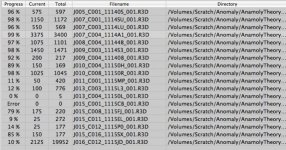
btw, here's a cap i took of redrushes after the first round of failed transcodes. this list is AFTER i removed all of the clips that worked.
 

Attachments

  • Screen shot 2010-01-10 at 8.44.58 PM.jpg
    Screen shot 2010-01-10 at 8.44.58 PM.jpg
    75.4 KB · Views: 0
I find L&T though final cut to be very buggy and REDRUSHES very solid. How is your drive connected?
internal sata. i tried with the producers drive that they gave me originally, which was a usb 2.0 as well
 
Sounds like you have everything set right, have you tried transcoding it on an altogether different computer?

i wish that was an option, but i don't have any other machines. again, though, other clips from the same shoot came through just fine and dandy, as have two other red projects on this machine (shot on build 18 and build 20)
 
This is now sounding like there is something wrong with the Hard drive itself. Were the two other projects that worked on, the same hard drive you are transcoding from with the problems? Are you transcoding to a different drive? what Hard drive model is it? Have you tried hooking the hard drive to a different drive bay on the computer?
 
This is now sounding like there is something wrong with the Hard drive itself. Were the two other projects that worked on, the same hard drive you are transcoding from with the problems? Are you transcoding to a different drive? what Hard drive model is it? Have you tried hooking the hard drive to a different drive bay on the computer?

the other projects were on this hard drive. i don't have any other open bays on my computer, and i'm not sure that that's a good idea considering that it's a software RAID and my scratch disk... i don't know if there will be consequences for rearranging it.

i spoke to a video engineer and an editor today who both told me that it sounded like a CF card problem.

i tried a few more things, all to no avail:

new, clean installs of all of the RED software and plugins
trying to transcode in quicktime from the reference file (a last ditch effort)
exporting a dpx and trying to open it in after effects and color.
exporting portions of the clip before/after/far after the corrupted frame to try and piece more or less the whole clip together

nothing worked at all, except the exporting of the shortened clips before the corrupt frame (which i already had).

the most frustrating thing is that the reference QT's play back fine, as do the clips in redcine, redcine X.
 
Try using ClipFinder.
Instead of transcoding to 2K 4444, try transcoding a clip to 1/4 Res (1024x512) Pro Res standard. Unless you have a video card that can handle 2K, your tower probably won't play it back.
 
Try using ClipFinder.
Instead of transcoding to 2K 4444, try transcoding a clip to 1/4 Res (1024x512) Pro Res standard. Unless you have a video card that can handle 2K, your tower probably won't play it back.

thank you very much for the recommendation to use clipfinder.

i've got an ati radeon 4870 in an 8-core 2.66 mac pro (march 09). i've edited 2k on it before seamlessly.
 
I would suggest getting a hold of red, perhaps they can trouble shoot. It's very odd that the QT's play back fine and you can't render the footage.
 
i will get ahold of RED this week, but i just bought a different hard drive to swap out with a clean install of Leopard (instead of snow leopard) exclusively for transcoding. i intend to start upresing as soon as that arrives. i hope it's just SL that is my problem
 
i'm completely at my wits' end. since i last posted, nothing has changed for the better.

i bought a hard drive and put Leopard on it (which was a problem in and of itself because the install DVD that apple sent me didn't support the nehalem architecture or my video card-- but i got an image of leopard from a tech at work and now it's up and running)

Here are some new problems:

--redrushes takes a long time to transcode clips, and then when they reach 100% they disappear in finder, as though it's deleting them or something as soon as they're done. while they're going, a 4kb QT file shows up in the output folder. the status bar in the program only progresses a short distance before stopping, but the frames and percentage done progress to 100%

--clipfinder in leopard won't import anything. anything at all. i've tried to import red files and mov's from my system disk, an external NTFS drive, an external mac OSX formatted drive, and my internal RAID volume (also mac formatted, a software raid made on this machine when I was running snow leopard). all clips and r3d's are grayed out when i use cmd+i, and nothing will drag/drop into either section in the main window.

--the looping bug is back with a vengance in FCP, looping more if not just the same as before. mostly, though, it just freezes or crashes when i try to mount RED media volume.

--Clipfinder in Snow Leopard (which i had been using before, albeit to no avail) now won't open at all. the program launches, but displays no windows at all. its icon just appears in the dock with a blue light bubble under it to show that it's open.

--Redcine-X now crashes when i try to play back long clips, at or around the points where the R3d's join. and takes a VERY long time to load clips when i navigate to them in the program's browser.

all of the problems i was having initially still exist as well.

edit/update: clipfinder in snow leopard now opens, but crashes shortly after the import of RED clips.
 
Last edited:
Back
Top