Welcome to our community

Be a part of something great, join today!

  • Hey all, just changed over the backend after 15 years I figured time to give it a bit of an update, its probably gonna be a bit weird for most of you and i am sure there is a few bugs to work out but it should kinda work the same as before... hopefully :)

RED Workflow - AVID - AFTER EFFECTS - NUKE - REOLVE

Vince Masciale

New member
Joined
Dec 6, 2011
Messages
1
Reaction score
0
Points
0
Hello Red Community,

I shot a short film on a Scarlet late last year that I'm finishing now. We're trying to finish in 4K. I cut offline in AVID and I'm trying to figure out the best way to maintain a 4k RAW workflow all the way to the end. It's easy for me to get the footage into Davinci Resolve, to color the film in 4K, but my problems arise when thinking about VFX.

We have 40+ shots of VFX in our short, mainly simple composites. I've passed off Trimmed R3ds to our VFX guy who's doing the effects in Nuke. His plan is to use Redcine X to convert the r3ds to EXR Image Sequences to then bring into Nuke. The problem is, he's going to be working with uncorrected Log files, so what's the best way for him to create the composites and hand it back to us for color? Will he be able to create log vfx that will match our red log files? Or will he have to give us alpha vfx that we color separately from the red footage?

I also plan to take a few shots into After Effects to do some minor roto work. What's the best way for me to bring the footage out of AE?

I'm confused about this process and not sure what is typically done to retain the most amount of raw data all the way through.

Any help would be greatly appreciated!

Thanks,

V
 
For the feature I edited, the VFX artists took the graded footage and did the effects on that. If the grading is too heavy and mess up tracking and such I would suggest grading the footage and handing over both the ungraded and graded, let them do tracking and stuff where they need all the information in the image and then they do all the VFX based on the graded footage.
Alternatively, if there are 3D elements with HDR chrome ball footage needed, they might want the ungraded footage, then I would suggest either grading that footage as well or setting a reference grade, let them do the VFX and grade the VFX footage exported.

Generally I think there's a bit of a gap in the R3D workflow when it comes to VFX, it's not maintainable to work with the R3D footage for VFX so it will always be rendered footage that's used for VFX work I'm afraid. Especially when working in 4K. For basic composites I would suggest he work on the graded footage.
 
What I've found is that you can import the log footage, convert it to linear space for compositing, then export it back out to log for grading. There are advantages to doing VFX before grading - especially with RED, since you have access to the linear-light data for compositing.

UPDATE 4-17-2013: I did some more testing with the After Effects workflow, and made a few revisions.

After Effects:
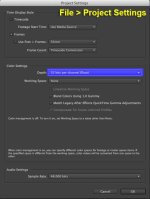
1. Go to File->"Project Settings" and set bit depth to 32 bpc (float).

attachment.php


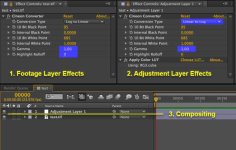
2. Import log footage & add to new composition
3. Apply Effect->Utility->"Cineon Converter" to all log footage
4. Turn "Highlight Rolloff" to 0, and change "Gamma" to 1.0 (leave everything else at default)
5. Create an Adjustment Layer on top of everything
6. Apply Effect->Utility->"Cineon Converter" to the Adjustment Layer
7. Change "Conversion Type" to "Linear to Log" and then "Gamma" to 1.0
8. Apply Effect->Utility->"Apply Color LUT" to the Adjustment Layer (after the "Cineon Converter")
9. Turn off the LUT during export (for log output)
10. Do all compositing below the adjustment layer (in linear space)

attachment.php


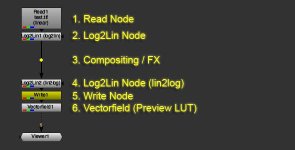
Nuke:
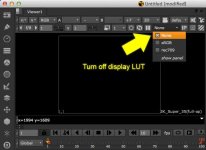
1. Turn off display LUT

attachment.php


2. Import Log footage (make sure colorspace is set correctly in the settings)
3. Add "Log2Lin" node
4. Add another "Log2Lin" node and change the operation to "Lin2Log"
5. Add "Write" node (for exporting out log), (colorspace should be set to linear)
6. Add "Vectorfield (Apply 3D LUT)" node (for previewing log footage on monitor)
7. Do all compositing in-between the two "Log2Lin" nodes

attachment.php


NOTE: You could use the built-in display LUT in Nuke. You'd have to turn off the second Log2Lin node and Vectorfield node, as well as set the write node's colorspace to "Cineon" instead of "Linear".
Also, instead of converting the footage to EXR, you can just import the R3D directly into Nuke or After Effects. The benefits are that you can dynamically change ISO, white balance, etc. on the fly. If you don't have a Red Rocket, it might be a bit slower, but realtime playback isn't as important for VFX (compared to editing / grading). You can always render out a low-rez version to preview the motion.

You can find a couple LUTs here:
RED Gamma 3 (close approximation):http://www.reduser.net/forum/showth...e-one-Graeme&p=1095362&viewfull=1#post1095362
Lustre LUTs:http://www.reduser.net/forum/showth...ion-LUT-Test&p=1146867&viewfull=1#post1146867
 

Attachments

  • log_Nuke_2.jpg
    log_Nuke_2.jpg
    14.6 KB · Views: 0
  • log_Nuke_1.jpg
    log_Nuke_1.jpg
    24.3 KB · Views: 0
  • log_AE_1.jpg
    log_AE_1.jpg
    30.3 KB · Views: 0
  • log_AE_2.jpg
    log_AE_2.jpg
    42.8 KB · Views: 0
Last edited:
Very interesting post. Thanks John! I have three questions:

1) why not just skip the log->linear and linear -> log conversion and do all of your retouching in log and export in log? What's the benefit of going linear in between?

2) we import R3D directly into AE instead of first converting R3D in Redcine X. Do I assume correctly that after importing the R3D files into AE we simply change the gamma curve to RedlogFilm in the interpret settings and then go on with your tutorial?

3) when you export these log files from AE what codec do you recommend? We used to export to ProRes 4444, however, someone mentioned this is not recommended and said we should export to EXR instead. However, EXR files exported from AE look very different when imported into Resolve while the ProRes 4444 files look exactly the same the footage looked in AE (the milky log look).

Any thoughts would be appreciated!

Thanks,

Philipp
 
Here is our workflow at Straightface Studios:

1) Offline Edit in Avid/Premiere/FCP -> EDL
2) Import EDL into REDCine-X and Export Clipped R3Ds with 100 frame handles on each side.
3) Load R3Ds directly into Nuke and if necessary render out DPX (Cineon/Log) or 16bit EXR (linear) files.
4) Comp in Nuke either directly from the R3Ds (This is actually faster than ZIP compressed EXRs most of the time).
5) Export either 16bit linear EXRs or else 10bit DPXs for Grading (w/ timecode).

The reason I recommend not exporting EXRs from REDCine is due to reproducibility. Let's say you render off 300 frames in REDCine and 2 months later production comes rushing back with their head on fire and says "We need another 2 seconds of shot 0030_1080!". There is a very very good chance that the RMD or whatever settings REDCine used are now gone. If your decoding settings are slightly off that can completely break your keys and your paint/roto work. If it's inside of Nuke then you have a complete audit of the debayer settings from start to finish. It also allows you to much more quickly go straight to the R3D if you need to just render off a few frames down the road but don't want to re-render out a long EXR sequence of the footage, you just move the READ pipe from an EXR read to an R3D read and you have the *exact* debayer settings.


1) why not just skip the log->linear and linear -> log conversion and do all of your retouching in log and export in log? What's the benefit of going linear in between?

The advantage of Log is simply data space. You can store in 10bit log pretty much the same thing as 16bit linear. The benefit though of working in Linear is that the world is actually linear. If I apply a gain of 2.0 or 200% on linear footage the footage gets exactly 1 stop brighter. If I apply a gain of 2.0 on Log footage it applies a somewhat arbitrary amount depending on where on the Log curve that tone is.

2) we import R3D directly into AE instead of first converting R3D in Redcine X. Do I assume correctly that after importing the R3D files into AE we simply change the gamma curve to RedlogFilm in the interpret settings and then go on with your tutorial?
Yes. Or you could choose the linear output curve in the R3D settings and skip the Log -> Lin settings entirely. RedLogFilm is just linear + a cineon curve.

3) when you export these log files from AE what codec do you recommend? We used to export to ProRes 4444, however, someone mentioned this is not recommended and said we should export to EXR instead. However, EXR files exported from AE look very different when imported into Resolve while the ProRes 4444 files look exactly the same the footage looked in AE (the milky log look).

You need to apply a log curve to your EXRs imported from AE since they will be in linear color space. I'm guesin you missed the last step of applying a Lin->Log conversion to your comp before writing the EXRs if they're still in linear space.
 
attachment.php


Just a note that this can be greatly simplified.

In the Read node you can choose Colorspace: "Cineon" and that will perform a Log -> Lin transformation.

Conversely in the Write node you can again choose "Cineon" for the output colorspace and it'll perform a lin -> log conversion.

Lastly there is a dropdown in the Vectorfield node for converting gamma spaces before applying the transform. If the vectorfield though is just for monitoring I highly recommend if possible loading it into the viewer as the monitor LUT not a node. It will make your workflow a lot smoother and easier. However I would recommend against the step of disabling the sRGB display LUT. That's far more likely to cause problems than than good if you're comping in linear space and not monitoring with a display lut. If you want to monitor with a FilmLUT you can wrap it into an OCIO config file in the \plugins\OCIO\ folder and use a .cube directly in the viewer without having to unlike/relink your vectorfield node repeatedly.
 
Yes. Or you could choose the linear output curve in the R3D settings and skip the Log -> Lin settings entirely. RedLogFilm is just linear + a cineon curve.

So we could simply choose the linear output curve in the R3D settings and do all of our retouching in linear, export to EXR from AE, import into Resolve and be done with it? No need to do any log stuff at all? Would we need some sort of linear to redgamma3 preview LUTwhile workin in AE or does linear look normal to the eye? Sorry if this is a dumb question but I've never worked in linear directly.

Also besides setting the bit depth to 32 bit (I assume 16bit would be no good with this linear workflow?) do you need to set a color workspace and check the "linear workspace" option in the AE project settings or no need for that?


You need to apply a log curve to your EXRs imported from AE since they will be in linear color space. I'm guesin you missed the last step of applying a Lin->Log conversion to your comp before writing the EXRs if they're still in linear space.

Well the EXR's we currently exported from AE for our test already were in log. We set the R3D settings to log, retouched in log, and then exported to EXR. However they look strange in Resolve because I assume resolve assumes these EXR's are linear when they are not and I don't know how to tell resolve that "hey, these EXR’s actually contain RedlogFilm gamma footage please read it as such".

Thanks for all the insights. Slowly wrapping my head around it.
 
So we could simply choose the linear output curve in the R3D settings and do all of our retouching in linear, export to EXR from AE, import into Resolve and be done with it? No need to do any log stuff at all? Would we need some sort of linear to redgamma3 preview LUTwhile workin in AE or does linear look normal to the eye? Sorry if this is a dumb question but I've never worked in linear directly.

Also besides setting the bit depth to 32 bit (I assume 16bit would be no good with this linear workflow?) do you need to set a color workspace and check the "linear workspace" option in the AE project settings or no need for that?

Yep, just load it up as linear in a 32bit linear workspace, check "Blend in 1.0 gamma" and set your working colorspace (Rec709 etc) and do all of your work in linear and then export linear EXRs. If you choose your working space as Rec709 it will be close enough to REDGamma3 that it should be perfectly functional for VFX work. I often am comping with my gamma cranked up to 3.0+ or down to 0.7 anyway to reveal details in the shadows/highlights when working in Nuke. I wouldn't trust AE's color representation. Adobe has put more pitfalls and boobie traps into AE than any person could ever confidently navigate but it should be more than sufficient to get you into Resolve successfully.


Well the EXR's we currently exported from AE for our test already were in log. We set the R3D settings to log, retouched in log, and then exported to EXR. However they look strange in Resolve because I assume resolve assumes these EXR's are linear when they are not and I don't know how to tell resolve that "hey, these EXR’s actually contain RedlogFilm gamma footage please read it as such".

Thanks for all the insights. Slowly wrapping my head around it.

Yeah, linear gamma is part of the EXR spec. Unlike DPX which has multiple acceptable input gammas and could be rec709, LOG/Cineon or sRGB; EXR is always assumed to be linear. I don't know what Resolve will do to it. You might need a lin to log lut if you want to grade in log space.

Happy to help.
 
Yep, just load it up as linear in a 32bit linear workspace, check "Blend in 1.0 gamma" and set your working colorspace (Rec709 etc) and do all of your work in linear and then export linear EXRs. If you choose your working space as Rec709 it will be close enough to REDGamma3 that it should be perfectly functional for VFX work. I often am comping with my gamma cranked up to 3.0+ or down to 0.7 anyway to reveal details in the shadows/highlights when working in Nuke. I wouldn't trust AE's color representation. Adobe has put more pitfalls and boobie traps into AE than any person could ever confidently navigate but it should be more than sufficient to get you into Resolve successfully.

I did that (see settings screenshot below). However, now my picture is really hard to watch. It's very dark. Do I need a preview LUT? Setting the working space to Rec709 didn't do much to change it. Also, when I export this to EXR and bring it into resolve the picture is now EVEN darker. And no matter what kind of LUT I put on there (Lin ->Rec709, Lin ->Log...) it never looks the same as if I would have brought in Redlogfilm via ProRes 4444 directly.

AE_Workingspaces.jpg


Yeah, linear gamma is part of the EXR spec. Unlike DPX which has multiple acceptable input gammas and could be rec709, LOG/Cineon or sRGB; EXR is always assumed to be linear. I don't know what Resolve will do to it. You might need a lin to log lut if you want to grade in log space.

I am extremely confused by the Linear EXR workflow so I think for this project I will have to stick to the linear workflow until I have a firm grasp of it. However, instead of exporting from AE (RED footage set to redlogfilm gamma) into ProRes 4444 I should probably export to DPX files instead, right? Do you know what the correct settings in the DPX dialog box (screenshot below) is to export the redfilmlog to DPX?

AE_DPX_1.jpg

AE_DPX_2.jpg


The "full range" preset settings have the gamma set to 1 and I'm not sure if that's correct for log. Perhaps it is since I just want to export the current redlogfilm picture without converting to anything else to DPX? Also, do I need to set a color working space? I didn't set a working space when we exported to ProRes 4444 and those came in nicely into Resolve.

I wish this stuff wasn't as confusing.

Thanks,

Philipp
 
Oops missed one step, sorry. In the RAW footage after setting it to "linear" in the R3D meta data settings you also need to set "Preserve RGB (disable color management conversion for this item" to checked in the "Color Management" tab.
 
Back
Top