


Jonathan Pears
Well-known member
- Joined
- Jan 17, 2013
- Messages
- 590
- Reaction score
- 5
- Points
- 18
- Location
- Santa Monica, CA
- Website
- www.backtoawake.com
New to Red from the Alexa world here.... Shooting on Gemini with the Red Touch 7", using the IPP2 pipeline (images attached for monitor and camera settings). I am seeing a pretty huge difference between what the monitor is showing to my eye, and what the histogram is saying. I know that the histogram represents reflected and not incident light, but this is too far apart for that to be playing a part here.
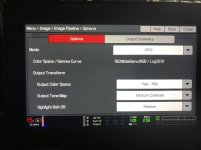
Camera Settings
- Mode: IPP2
- Color Space/Gamma Curve: RedWideGamutRGB/Log3G10
- Output Color Space: Rec709
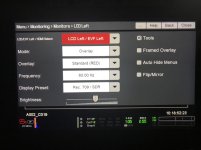
Monitor Settings
- Display Preset: Red709/SDR
- Brightness: Three clicks less than full brightness
The Scene and the Issue
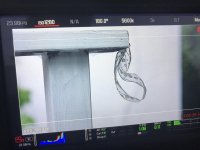
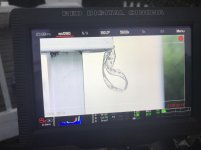
- In the candid images, there is a textured white wall in the background of the image. There is also texture in the wood on the fence.
- One shot, to my eye at the time looking at the monitor, was completely blowing out the wall and wood, yet the histogram is right in the middle whilst trailing darker
- In the other image i had stopped down 1.5 stops to bring out the texture, but the histogram doesn't move much
- In resolve, the images lean towards the darker side, whilst salvageable are not in line with the monitor at all - this is the issue
Now with my ignorance hat on, here are some thoughts...
1. I'm an idiot, this is just how it is, and i need to stop being so sensitive to a bright monitor.... a good possibility, who needs to see an accurate image right.... sigh
2. There is some simple setting i am missing here, and one change of something will solve everything?
3. The image isn't accurate, but the histogram is to the raw data that the camera is aquiring, so only rely on that and ignore the monitor when it starts to give you a sun burn from how bright its getting?
4. I am somehow adding 2 layers of Rec709 onto the image? Unlikely as colors still look accurate elsewhere
5. Something else entirely?
I hooked up an Atomos Shogun to do a side by side, and even at its full 1500nits, the Shogun isn't showing as bright of an image (from an exposure point of view) as the Red Touch. Also yes, i am using the left side monitor connection via wooden camera cable.
Any thoughts on the above from anyone? Many Thanks in advance for any assistance.
Jon
Camera Settings
- Mode: IPP2
- Color Space/Gamma Curve: RedWideGamutRGB/Log3G10
- Output Color Space: Rec709
Monitor Settings
- Display Preset: Red709/SDR
- Brightness: Three clicks less than full brightness
The Scene and the Issue
- In the candid images, there is a textured white wall in the background of the image. There is also texture in the wood on the fence.
- One shot, to my eye at the time looking at the monitor, was completely blowing out the wall and wood, yet the histogram is right in the middle whilst trailing darker
- In the other image i had stopped down 1.5 stops to bring out the texture, but the histogram doesn't move much
- In resolve, the images lean towards the darker side, whilst salvageable are not in line with the monitor at all - this is the issue
Now with my ignorance hat on, here are some thoughts...
1. I'm an idiot, this is just how it is, and i need to stop being so sensitive to a bright monitor.... a good possibility, who needs to see an accurate image right.... sigh
2. There is some simple setting i am missing here, and one change of something will solve everything?
3. The image isn't accurate, but the histogram is to the raw data that the camera is aquiring, so only rely on that and ignore the monitor when it starts to give you a sun burn from how bright its getting?
4. I am somehow adding 2 layers of Rec709 onto the image? Unlikely as colors still look accurate elsewhere
5. Something else entirely?
I hooked up an Atomos Shogun to do a side by side, and even at its full 1500nits, the Shogun isn't showing as bright of an image (from an exposure point of view) as the Red Touch. Also yes, i am using the left side monitor connection via wooden camera cable.
Any thoughts on the above from anyone? Many Thanks in advance for any assistance.
Jon
Attachments
Last edited:
