Welcome to our community

Be a part of something great, join today!

  • Hey all, just changed over the backend after 15 years I figured time to give it a bit of an update, its probably gonna be a bit weird for most of you and i am sure there is a few bugs to work out but it should kinda work the same as before... hopefully :)

RED STATION REDMAG 2.5" & 1,8" workflow

emil tanem

Well-known member
Joined
Sep 15, 2010
Messages
221
Reaction score
0
Points
0
Location
Norway
Website
www.puzzlefilm.no
I'm about to do an interview with the Epic on SSD media (I'm assuming I've got a 256GB SSD to record on atm). After about 35minutes we'll have filled our disk.
So how exactly is the workflow from there on?

As far as I know I have a couple of choices I'd like to go for. Either dump it onto 2,5" harddrives, or (preferably) get everything onto one big 3,5" 2TB drive.

The 3,5" option:
I don't have a macpro available.
- Can I for instance get a 3,5" external harddrive with firewire800 connection and connect it directly to the Red Station?
How then do I know that everything has been copied?
How long will it take?


The 2,5" HDD option:
How do I actually copy from the red ssd drives onto the 2,5"?
How do I know that everything has been copied? Is there a nice little green light on the station or..? :)
How much time will it take?


I won't have much time for testing before the interview, so here's hoping for some help
 
You need R3D Data Manager.
It will tell you when all your media is properly copied and checksummed. It will also manage multiple copies at once without multiple finder actions.

If you want more time on your SSD's and you're just doing interviews I'd suggest shooting at 4KHD as you'll get more time on your SSD and you have a perfect scale down to 1080p. that is of course, if your deliverable is that.

Jason
 
Ok. So even though I control it with a computer, transfering from the 1,8" to the 2,5" is not going through the computer, right?


This only leaves the question of how I alternatively can send it to a 3,5" HDD. Can that also be done directly, or does it have to go through a computer? (which would slow things down)
 
Couple of things:
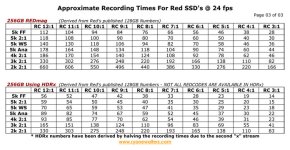
1. A 256GB SSD will give you (up to) a couple of hours of recording, not 35 minutes, unless you are shooting high speed or a very low redcode ratio.

2. All copy processes go through the computer. You mount the drive on the computer and it works like any other hard drive. That's it, there are no direct or automatic ways to transfer data. As suggested, R3D Data Manager is a great way to check the data on the way through.
 
I will be shooting in 5KFF at 8:1. Apparently that is the recommended ratio by Red for visually lossless recording? My subject might not be around in 2-3 years time, hence the choice for maximum resolution.
That should give me about 38mins recording on a 128GB card. I'm opting for 2x128GB disks instead of a single 256GB.
Transfer speed of USB2 (60MB/s) gives a transfer time of 42min for the entire card. (http://adamsworld.name/copy_calc.php?do)
So, looks like I'm good to go then.
 
Please dont use USB2. Though you can transfer footage that way, its waaay too slow. At a minimum use Firewire800. I actually never use Firewire 800- I demand eSATA these days. Its not hard to find eSATA adapters for whatever computer you are using, and its a small price bump in the hard drives - but it will substantially cut your transfer time down.

USB2 is a shared bus remember - so each device you add takes away some bandwidth. If you have both the source and destination on USB, it will cut your throughput in half, so you transfer time will be double.

Id also come into a show with 3 or 4 SSD cards to record onto. Theres no reason to start behind the gun.
 
Back
Top