Welcome to our community

Be a part of something great, join today!

  • Hey all, just changed over the backend after 15 years I figured time to give it a bit of an update, its probably gonna be a bit weird for most of you and i am sure there is a few bugs to work out but it should kinda work the same as before... hopefully :)

Red Scarlet Noise Issue

Vitaly Bokser

Well-known member
Joined
Mar 21, 2011
Messages
62
Reaction score
0
Points
6
Location
NY
Hello All,

I've had the scarlet-x for a month now and have been having some serious noise issues
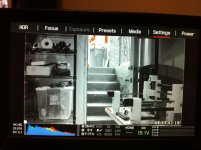
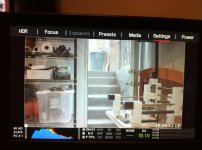
I just did a test today and from the histogram on the bottom right of the lcd it saying i have about 1/4 noise in the image
which makes little sense if its pointing right outside my back door.

here are some frame grabs. let me know if im missing something here, i did black balance, i reset to factory many times
I still have a red one and will perform the same test to see if I get a similar problem.
And on a shoot the issue in darker environments leads to a lot of noise in the image (ill find the frame grab hopefully and post that as well) unlike the red one mx which has nice blacks with much less noise... help please!

and oh yes i just upgraded to the new firmware still same prob.

images
1. reglogfilm, 2. redgamma3, 3. exposure
 

Attachments

  • redlogfilm.jpg
    redlogfilm.jpg
    89.4 KB · Views: 0
  • redgamma3.jpg
    redgamma3.jpg
    86.7 KB · Views: 0
  • exposure.jpg
    exposure.jpg
    88.4 KB · Views: 0
Some Images from Scarlet Shoot of the blue background
the blue background had a lot of noise and it was dancing all over the place... literally the image in my opinion was unusable

1st shot is the blown up view of the noise
2nd shot is the larger1:1 crop of the noise

hope these help get me some more insight...
thanks all.
 

Attachments

  • red scarlet - shoot noise - moving.jpg
    red scarlet - shoot noise - moving.jpg
    7 KB · Views: 0
  • red scarlet noise blown up and MOVING.jpg
    red scarlet noise blown up and MOVING.jpg
    12.7 KB · Views: 0
Hello All,

I've had the scarlet-x for a month now and have been having some serious noise issues
I just did a test today and from the histogram on the bottom right of the lcd it saying i have about 1/4 noise in the image
which makes little sense if its pointing right outside my back door. In False Color you can see that the areas in purple are the areas that are underexposed and will result in noise in those areas.

here are some frame grabs. let me know if im missing something here, i did black balance, i reset to factory many times
I still have a red one and will perform the same test to see if I get a similar problem.
And on a shoot the issue in darker environments leads to a lot of noise in the image (ill find the frame grab hopefully and post that as well) unlike the red one mx which has nice blacks with much less noise... help please!

and oh yes i just upgraded to the new firmware still same prob.

images
1. reglogfilm, 2. redgamma3, 3. exposure
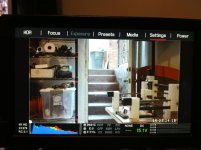


That looks normal. The camera can shoot around 12-13 stops of dynamic range. Your exposing in those shots to protect the highlights as their not clipping. Thus you are giving yourself less exposure on the low end (introducing noise). In exposure mode the purple means underexposure, which equals noise if you try to bring them up in post. If you crush them they will be fine.

Do you have a light meter? if so put it in spot mode, meter the outside, the wall near the door, and the darkest spot of your frame and see how many stops difference they are.

If you were to add some fill lights to the darks and then in post crush them you would get far superior results.

In viewing with REDLOGFILM you are essentially lifting the blacks which will create more visible noise. It is not meant for viewing, but for grading. Stay away from viewing in this mode as it can cause user exposure errors.
 
Some Images from Scarlet Shoot of the blue background
the blue background had a lot of noise and it was dancing all over the place... literally the image in my opinion was unusable

1st shot is the blown up view of the noise
2nd shot is the larger1:1 crop of the noise

hope these help get me some more insight...
thanks all.

Was this with tungsten lighting? Also, can you post some R3D's?

This is obvious, but have you performed a black shade?
 
what ive noticed is that the histogram picks up black objects in the frame and registers them, Basically telling you that 1/4 of the image is at risk for noise. there are dark objects in your frame which makes sense why it says 1/4 blacks on the left. it weirded me out for a few till i got used to it.
 
that above was daylight 5k and yes it was black shaded in a dark room with all lights off and lens cap on.

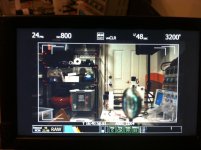
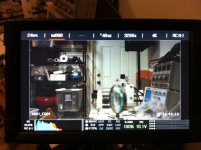
but i just did some more tests. here are both red one and red scarlet-x side by side
under tungston 3200k
same lens 24mm 2.8
same iso 800
24fps
1/48th shutter

red one mx
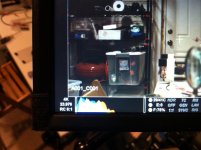
and red scarlet with a cu of the histogram
you can see the histogram for the red scarlet is showing much more noise in the darks...while red one is barely registering anything...

im going through the r3d's now... (and will post soon)
but why would this show up different for the 2 cameras?
 

Attachments

  • red one mx.jpg
    red one mx.jpg
    85.8 KB · Views: 0
  • red scarlet.jpg
    red scarlet.jpg
    86.2 KB · Views: 0
  • red scarlet - cu.jpg
    red scarlet - cu.jpg
    87.8 KB · Views: 0
(n reply to domenic) if thats the case then this feature is useless... red one doesnt show the same behavior for histogram blacks... but just noise... ive uploaded some images maybe you guys can take a gander
 
All of histogram area is left of center. Underexposed overall. You gotta get more photons to the sensor.
 
All of histogram area is left of center. Underexposed overall. You gotta get more photons to the sensor.
yes but why the two different black noise readings for red one mx and red scarlet are not explained by this...
and the images above for daylight were distributed much much better and still this issue????
thanks!
 
So the RED ONE is cleaner? Damn! That would suck for us Scarlet owners....a step back in performance with an upgrade? Don't they have the same sensors? (assuming your R1 is MX)...
 
Well remember, Red One only has REDCOLOR & REDGAMMA, then also RAW for its viewing options. What are you viewing the Scarlet in? You have to take this into account. If your viewing something other than RAW you are effectively adjusting the histogram based on that views curve (Redgamma2, Redgamma3,etc). It looks like your using Redcolor3, Redgamma3 with the Scarlet. That crushes blacks a bit more than Redgamma 2. (Just guessing what your viewing in since that wasn't mentioned in the OP)

Are all settings on both camera's set to factory defaults other than ISO, Color Temp, shutter speed, frame rate?

If you take both files into RedcineX, set them up exactly the same, is the noise similar?
 
Having same problem..Should we expose to blacks instead of worrying about clipping highlights? I'd rather my shots be clean (no grain) and bright then vice versa.

You should be doing both. You typically expose for the highlights, and at the same time bring up the dark areas. Then you can crush or bring them down to taste in post.
 
Well remember, Red One only has REDCOLOR & REDGAMMA, then also RAW for its viewing options. What are you viewing the Scarlet in? You have to take this into account. If your viewing something other than RAW you are effectively adjusting the histogram based on that views curve (Redgamma2, Redgamma3,etc). It looks like your using Redcolor3, Redgamma3 with the Scarlet. That crushes blacks a bit more than Redgamma 2. (Just guessing what your viewing in since that wasn't mentioned in the OP)

Are all settings on both camera's set to factory defaults other than ISO, Color Temp, shutter speed, frame rate?

If you take both files into RedcineX, set them up exactly the same, is the noise similar?

its the same everything except cameras.
Ill double check it all again... but it seems their is either a problem with the scarlet darks...
or its just a histogram software thing that doesnt affect the actual image
the lens was open wide at 2.8 and the lighting conditions didnt change... so technically raw file should be alike whether using redgamma3 or redgamma etc etc

either way its an issue since 1/4 of my image shouldnt be in noise (whether real or histogram)
ill do one more test and make sure its all factory... and ill post up both r3d's and let people check it out... hopefully an answer will develop from this thread...
 
So the RED ONE is cleaner? Damn! That would suck for us Scarlet owners....a step back in performance with an upgrade? Don't they have the same sensors? (assuming your R1 is MX)...

yes its MX. I dont know if its cleaner yet... trying to figure that out...
dont know how i can trust this histogram for the noise level yet when it shows much mor enoise than the R1 MX in the same situation
 
yes its MX. I dont know if its cleaner yet... trying to figure that out...
dont know how i can trust this histogram for the noise level yet when it shows much mor enoise than the R1 MX in the same situation

The camera's meters may be calibrated differently (this is just a guess). The real question is once in RedcineX Pro, do the meters match when you set everything with the same adjustments?
 
The camera's meters may be calibrated differently (this is just a guess). The real question is once in RedcineX Pro, do the meters match when you set everything with the same adjustments?
doing more tests tom and uploading what i have so far... will take a bit and will post when its done uploading.
 
Little love.....if you view the clip at 320 iso in redcineX you can see exactly what the sensor was seeing, its pretty easy to see why your seeing as much noise as you are. This test really impressed me in how much you can starve the MX sensor of light and still get a decent result after processing.
 

Attachments

  • lowLight_test.jpg
    lowLight_test.jpg
    46 KB · Views: 0
  • NativeSensor_redlogfilm.0000000.jpg
    NativeSensor_redlogfilm.0000000.jpg
    33.5 KB · Views: 0
Last edited:
Back
Top