Welcome to our community

Be a part of something great, join today!

  • Hey all, just changed over the backend after 15 years I figured time to give it a bit of an update, its probably gonna be a bit weird for most of you and i am sure there is a few bugs to work out but it should kinda work the same as before... hopefully :)

Red One mx-sensor, cf-card digital drop HELP!

Ken Are Bongo

Member
Joined
Jul 14, 2009
Messages
14
Reaction score
0
Points
0
Location
Kautokeino, Norway
Hi,
We are shooting a film in sweeden, and I have discovered some problems.
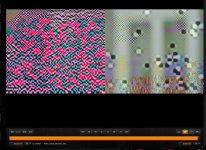
In many of our clips I get thees digital errors. thees clips will not play on my macbook pro, only on my mac pro with RED rocket. (using redcine-x)
We are mostly shooting on RED one-mx, with 16gb cf-cards.
what is wrong?
 
Are they Red's Compact Flash cards or another make (e.g. Lexar or Sandisk).

If they are third party and non Red cards they are probably too slow to record at 4K 16:9.

Paul
 
It is RED 16gb CF-card. I´m using Lexar CF reader with FW800 conection.
We are filming in 4.5K
 

Attachments

  • Skärmavbild 2010-08-11 kl. 14.39.48.jpg
    Skärmavbild 2010-08-11 kl. 14.39.48.jpg
    97.2 KB · Views: 0
I experienced that same problem, pre-MX, on Build 30. Have not seen is since upgrading to MX however.
 
Welcome to the club!
This is a corrupt frame that causes the breakdown of your application. Somehow Redrocket can read those files and transcode them, but you would have to live with the corrupt frames. If you really need that shot you could try just to copy the before frame or interpolate an in between frame, what normally no one in the audience should recognize. To avoid corrupt frames in the future check all your offloading gear. It could be the fire wire 800 cables, ports, CF reader, drives (that's what RED told me) Also if you are offloading a lot of data try to switch out CF card readers from time to time.

Again and I hope that someone at RED reads this...
This issue comes up very often on the board recently.
Can it really be possible, that so many CF readers and Fire wire cables suddenly went bad?
I know there are a lot of people that don't have any issues, but somewhere the has to be another reason. Maby it's a combination of Redcode, Firmware and Clip length. I don't know but I really ask you to take this problem serious.
 
Holly shit...good luck with that.
 
This looks like a corrupt copy off the card. Please check your firewire cable or reader or try another one first.
 
Doesn't help that it is brand new.
It doesn't even help that you have the copy verified (even though it takes the % of problem down a lot)

r3D data manager is better at avoiding this than shotput pro.

As I have said before: I have several times had success with a no-brand USB reader, when the sandisk and lexar FW readers haven't managed.

You have to confirm a copy visually or through transcoding BEFORE erasing the card.

All the instances I have been able to verify after build 21. have been due to copy error. I guess there can be other instances, I just haven't seen them.

RED 16GB seems specially hard to copy "right"

(Incidentially RED has dropped their CF program)
 
Next time, you will not format media untill you have verified the copy... -:)

It's totally anectotal, and not at all representative for working around this issue, but with one card from a car-crash we had to copy it 6 times before we got it right. We could verify that it was not there in camera, and that it played back right from the card. But it wouldn't copy right.

r3d managers Conrad has confirmed that it doesn't pick all of these incidents up.

I guess REDs scrapping of all current media and going SSD and RED Station (with the same CF reader that is in the cam, if my memory serves me well) is a precaution against this issue.

That said, other cameras that use similar recording options/copy schemes have similar problems. It's a data-transfer issue, not a RED issue.
 
An occurrence of this corruption with this same checkered image, has now happened even after the mx upgrade, it is not due to a bad copy. The corrupt frames were there when i played back the media on the card.

This has never happened to me prior to build 30, nor have I seen reports of this on REDUSER before build 30.
 
No bent pins, the equipment (16GB cards, Lexar reader and various external drives) function perfectly 99% of the time. I have now had 3 seemingly random occurrences of this. Once now since MX.
 
Has only happened on three occasions, so it hasn't come up on the couple of times where I have rented additional cards.
 
Would love to see a deeper exploration of this issue though, and why it is a new phenomena.
 
Just trying to figure this out, not denying what you have experienced, but just to be clear:

Could it be a one faulty card, or have you seen it randomly on different cards?
 
closer.

closer.

i had a closer look (in the upper left)...

what do you think about this?
(and what do you think about the left shades of R, G and B?

(notice: the left part of the image was fine, it's intentionally blacked out.)

@*gunleik: we had it random. same card, 1 clip fine, 3 not.

we shot RC36, 4K 16:9, 16GB cards + audio in camera.
i'd like if we'd try to figure out if it's a data-rate issue..RED might not be aware of or is simply ignoring it because it happens
very random and is very rare.

furthermore in our case the corrupt frames "seemed" to have a pattern. they mostly occurr with the camera in motion and
with contrast transistions like from a blurred foreground to a focussed background.
and it happens a lot if you have "problematic" images like full frame computer monitors being almost completely white.
 

Attachments

  • magnified.jpg
    magnified.jpg
    96.4 KB · Views: 0
Last edited:
Back
Top