Welcome to our community

Be a part of something great, join today!

  • Hey all, just changed over the backend after 15 years I figured time to give it a bit of an update, its probably gonna be a bit weird for most of you and i am sure there is a few bugs to work out but it should kinda work the same as before... hopefully :)

Red On Board Meters Not Matching?

Ryan E. Walters

Well-known member
Joined
Sep 13, 2007
Messages
1,213
Reaction score
0
Points
0
Location
Beaverton, Oregon
Website
www.ryanewalters.com
So today I was doing some testing and I noticed that the on board meters to not agree with each other. This really concerns me as I light my scenes by my meter, but I make the final exposure call based off of what the camera is seeing. (Using the meters.)

So my question is this- which meters should I trust?

I thought:
- Exposure mode = Based off of RAW, shows only RED over exposed + Purple under exposed.
- Goal Posts = Based off of RAW (All the time)
- Histogram = Based off of RAW (When in RAW view)
- Barber Pole = Based off of RAW (All the time)

Three of these say there is no clipping, and one shows me that I am clipping ...
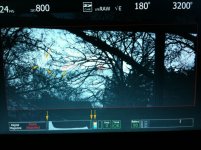
 

Attachments

  • RedMetersNG.jpg
    RedMetersNG.jpg
    94.3 KB · Views: 0
hmm, yeah, with that sky like that shouldnt there be traffic lights on?

EDIT: i notice you're not in normal false color mode
 
Nope not in false color mode. I am in RAW view with the exposure mode on. So I am viewing a RAW picture, and all of the meters are showing the results of the RAW. (Which is why the traffic lights are not there as they only correspond to the "processed" / non-raw metering of Red Color.)

It is the fact that the RAW meters do not all agree that worries me the most ...
 
Interesting. . . because what I find is the opposite problem. . . situations where the exposure false color is showing red from blow in only a few TINY areas of the scene, but the blow goalpost shows, like, maybe 25% blown. I've never been able to figure that out. It seems to me that it ought to show the PERCENTAGE of pixels blowing and that that percentage ought to be identical to the blown (or noisy) area in the scene, but that clearly is not the case. . . at least not on our camera.

Any thoughts here RED?

Stephen
 
The other thing I have noticed is that False Color (Video Mode) does not match with Exposure check either. I can make the sky Red in Exposure check which means blown out, and then switch to False Color (Video Mode) and the sky is only yellow, which in that mode is not blown out ... However, that issue is not a big deal to me as I only use the meters that relate to the RAW image. (Which Video mode does not.)
 
The other thing I have noticed is that False Color (Video Mode) does not match with Exposure check either. I can make the sky Red in Exposure check which means blown out, and then switch to False Color (Video Mode) and the sky is only yellow, which in that mode is not blown out ... However, that issue is not a big deal to me as I only use the meters that relate to the RAW image. (Which Video mode does not.)

This has to do with FLUT and how it's affecting the RGB output. Stuart can elaborate a bit on this subject.
 
At some point it was said that the barber's pole is reliable raw metering, and the upmost red is lit, when 2% of the pixels clip. Perhaps in your case you are still under this 2%. Another issue is what Steve says; some of the meters go through the RGB channel even in the raw view. Graeme explained that a plain raw view would be akward to monitor so a mild gamma curve is applied.
 
Yep - I understand about the RGB meters- and I am not worried about that, as I do not use them. What does worry me is the fact that the RAW meters do not agree with each other. As they are RAW I would think that they would all agree with each other - not show me different results. Now I need to figure out / need to know which RAW meter I would really be trusting ....
 
Meters

Meters

Can you open up the iris so a few more pixels show red ? I think you will then see the RAW meters agreeing. It's probably that the traffic lights use an approximate 2% threshold as Steve suggested.
 
Do you know if there will be an option to view it awkwardly?

May I suggest standing on one foot (preferably the left), bending half way at the waist, closing the eye opposite the foot you are standing on and jumping up and down in time to your favorite Beatle's tune. I am sure that will be VERY awkward!! :001_tongue:

(Couldn't resist. I loved the irony in your comment and thought it deserved a suitably tongue-in-cheek retort!)
 
Can you open up the iris so a few more pixels show red ? I think you will then see the RAW meters agreeing. It's probably that the traffic lights use an approximate 2% threshold as Steve suggested.

I'll test that out and see what happens. But just to be clear, I am not talking about the traffic lights. It is my understanding that the traffic lights relate to the RGB path, not the RAW. What I want is for all of the RAW meters to agree with each other, and what I'm not understanding is why they do not line up. Which ones should I trust?

Right now, from what I can tell the barber pole and the goal posts agree, but the Exposure check does not. So if I go with the odds, then I should not trust exposure check as it looses 2:1 ...
 
I'll test that out and see what happens. But just to be clear, I am not talking about the traffic lights. It is my understanding that the traffic lights relate to the RGB path, not the RAW. What I want is for all of the RAW meters to agree with each other, and what I'm not understanding is why they do not line up. Which ones should I trust?

Right now, from what I can tell the barber pole and the goal posts agree, but the Exposure check does not. So if I go with the odds, then I should not trust exposure check as it looses 2:1 ...

Ryan, the traffic lights should be referring to the RAW signal. They are unaffected by ISO or any other metadata.

The RAW level meter is obviously RAW based as well.

The goalposts are indicators of a certain percentage of the area that is at risk of overexposure or underexposure.

False Color mode however refers to the RGB signal and based on FLUT will not show clipping in the same way. Hence why you can't get it to clip even though you may have a RAW indicator saying it should be clipping.

So, I guess what you are really wondering is what is the threshold to have the red clipping indicator in Exposure mode line up with the RAW level meter/traffic light. I will try to test this out next time I have the camera booted up.
 
Interesting- from what I remember, the Traffic lights were only RGB. But looking at the manual, it appears that they are RAW which only adds to my question / problem of the RAW meters (Specifically the Exposure check) not agreeing with each other. I guess since that one is the only one that does not agree, Exposure check cannot be trusted when using the on board meters.

According to the manual:
PAGE 52 / 55: False Color meters only RGB. (Which I knew. And I do not use as I care about the RAW information. I still think it is interesting that it does not show clipping when the RAW meters do ...)

PAGE 52-53: Exposure Check is RAW for Red & Purple, and the gray areas are effected by the ISO selected.

PAGE 56: Histogram in RAW view is showing only the RAW information, not RGB.

PAGE 56: RAW Level meter (Barber Pole) is only showing RAW information all of the time.

PAGE 57: RAW Clip Meter (Traffic Lights) is only showing RAW information all the time.

PAGE 57: Noise & Clip Bar (Goal Posts) is only showing RAW information.


So I guess the answer to my question is that I cannot trust Exposure Check view as much as I thought that I could. The RAW histogram, The Barber Pole, The Goal Posts, and the Traffic Lights all agree that nothing is clipping. It is only in Exposure Check (which is supposed to be RAW) that I get a different reading.

I guess what Exposure Check CAN be useful for, is showing me where the image will clip if I open up the exposure any more. Which is still helpful to me - but just not as trustworthy as I thought that it was ...
 
Exposure Check

Exposure Check

The RAW histogram, The Barber Pole, The Goal Posts, and the Traffic Lights all agree that nothing is clipping. It is only in Exposure Check (which is supposed to be RAW) that I get a different reading.

No. They do all agree. The difference is the RAW check is showing you what is happening at pixel level. As you don't want all of the meters to fire off when only one pixel clips, we look for a minimum number of clipping pixels - that's what you are seeing.
 
I find Stuart's explanation very unsatisfying. Here's why:

Take your camera. Point it at a dark surface with one clipping light bulb, which should cover at most 3% of the screen. Now look at the meters. If you are using my camera, your clipping goal post should show 3% of your pixels clipping. But that's not what you'll see. Indeed, you'll see something like 80 to 90% of your pixels are clipping according to the goal post metric! How can that be if that meter is doing what you are saying it is doing?

Stephen
 
Have to agree with Stephen Pruitt. I was working as 2nd AC on shoot with a DP and Focus Puller who knew very little about Red cameras, so I was constantly looking at the RAW meters and Exposure Check when I could!

The goalposts, while indicating there is some clipping, do not appear to be showing the percentage of total recorded area clipped pixels as I saw at least one shot where the white clip goalpost was about 2/3 of the way up, when there was way less than half of the picture at or near peak white. Obviously the goalposts, being very short, are very coarse, so even if 10% of the image pixels were clipping, it wouldn't show much on the goalpost if they were linear meters. So I'm guessing they are just very non-linear in some way? If they are, then we need to know what the scale is.

Similarly the RAW Level Meter barber pole - I'd like to know what each of the bar levels actually indicates exactly.
 
Back
Top