Welcome to our community

Be a part of something great, join today!

  • Hey all, just changed over the backend after 15 years I figured time to give it a bit of an update, its probably gonna be a bit weird for most of you and i am sure there is a few bugs to work out but it should kinda work the same as before... hopefully :)

Red DIT shopping list..?

1x17' Flanders Scientific LED HD 1770 Monitor

How do you like the Flanders monitor? I was looking at that one as my first broadcast monitor. Way cheaper than the sony bvm's and such, and people are saying it looks as good as a CRT (I've never seen an LCD that looks as good as a CRT yet).
 
My DIT kit isn't nearly as extensive as Jay's, but it works well for most of the low-budget stuff here in Arizona...

2008 Mac Pro 2.8GHz 8-core (for on-set ingest and dailies rendering)
  • 16GB of RAM
  • AJA Kona3 card
  • 4TB of internal RAID-0 storage
  • 8TB of external RAID-5 storage over two eSATA enclosures
  • APC UPS
  • RED software
  • R3D Data Manager
  • Clipfinder
  • MacDrive
  • Final Cut Studio 3
  • Avid MC 5
  • Photoshop, Premiere and After Effects CS5

Next toy on my list for the above is a RED Rocket card, when funds permit.

2008 MacBook Pro 2.6GHz (for field work - ingest only; also used for secondary ingest on time-sensitive shoots)
  • 4GB of RAM
  • CalDigit eSATA ExpressCard/34 adapter
  • 2x G-RAID 2TB FW800/eSATA drives
  • Portable APC UPS
  • RED software
  • R3D Data Manager
  • Clipfinder
  • MacDrive
  • Final Cut Studio 3
  • Avid MC 5
  • Photoshop, Premiere and After Effects CS5

Both machines dual-boot Mac OS 10.6.4 and Windows 7 to accommodate differing workflows.

I'm probably leaving stuff out here, but that should give you an idea. I've built this kit up over a couple of years and while (like I've said), it isn't as extensive as Jay Gannon's, it tends to suit the lower-budget stuff that shoots out here decently. I haven't lost data in 2 years of DIT'ing RED shoots, so I must be doing something right. I usually make 3 backups on every shoot, sometimes more, if the budget permits.
 
If your budget is really really tight then go for :

1x 15" Macbook Pro
1x ExpressCard eSATA adaptor
3x G-Tech RAID Drives @ 1tb each

R3D Data Manager.
RedCine for One Light.
CS5/FCP for on set throwing into a timeline.

anything more than that and the laptop won't be up to it so no need for clipfinder etc as the laptop won't be up to rendering dailies etc


As far as I am aware, Apple did away with the Express34 slot on the 15" and gave the new ones a SD cardreader instead. Ditto on the 13". The only one left with the Express34 is the 17".

Also, another thing to consider is if you get one you may want to opt for the anti-glare screen upgrade. I got the anti-glare and I don't regret it at all. Outdoors it makes a HUGE difference.
 
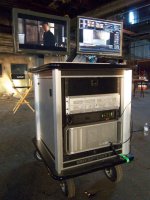
I just finished a feature last week, multiple locations, and the cart I used was created by Michael Cioni of LightIron Digital Post. It is a ROCK solid production machine.

Starts with a Big Foot Cart created by Doug Solis, Pimped MacPro 8 Core RED Rocket, with all the Bling, Maxx Digital Evo 4K 16TB SAS RAID, APC-UPS, Dell 24" for fun, Eizo 232W for the REAL true picture.

There's not much I can't do with this system.

Von
 

Attachments

  • LightIron_RED_Cart.jpg
    LightIron_RED_Cart.jpg
    85.6 KB · Views: 0
Last edited:
I forgot to mention, I also had a 15" MBP, and networked when needed to push more content to the RAID.

I was also on set DJ, with the little sweet music coming off the cart during appropriate times. Crew love it!
 
I've had raid 0's fail, I've had multiple raid 5's fail, I've had one raid 6 fail
Do you mean, you've had one drive in a RAID 5 fail, or 2 in a RAID 6, (which is not a big deal, you can even keep working while you pop a new one(s) in and rebuild), or the whole thing fail? Was it the controller, or the drives?
 
Back
Top