Welcome to our community

Be a part of something great, join today!

  • Hey all, just changed over the backend after 15 years I figured time to give it a bit of an update, its probably gonna be a bit weird for most of you and i am sure there is a few bugs to work out but it should kinda work the same as before... hopefully :)

RED cameras vs others: General questions

Jonathan Yonkers

Well-known member
Joined
Apr 29, 2010
Messages
109
Reaction score
0
Points
0
Location
San Jose, Costa Rica
Hi All, I am a huge RED fan that does not yet own a RED cam. I have a few questions I would love help with so I can better understand. Thank you for your time:

  1. Does Arri Alexa shoot uncompressed raw files or is it compressed?
  2. Does RED cams have the option to shoot uncompressed raw?
  3. Can you playback DNG raw files from other cameras like the Black Magic makes, or you can only view them on the software?
  4. How similar or different is between R3D and cinema DNG?
  5. R3D vs prores: if R3D are btter quality that proress at much lower file sizes, why do people even want to convert to proress. Can you not edit R3Ds like you can edit prores?
  6. H.265 how far are we from having H.265 be as popular as H.264, realistically? Would this be a threat to codecs like R3d?
  7. If prores is so heavy but not so efficient, why is it still relevant?

I know these may be stupid questions to most of you, But I honestly find no better place to ask than here.
Thank you for your time.
 
I'll see if I can answer most of your questions:

1: Alexa can shoot uncompressed raw to it's "sold separatly" codex recorder.
2: Red does not shoot any uncompressed raw, however the 3:1 - 5:1 compression will give you visually lossless (in my opinion) files that are much smaller and very easy to work with.
3: DNG raw can be played back in many editors but in my opinion is not nearly as friendly a RAW workflow as R3D.
4: Similar in that they are both Raw formats, very different in that Red is proprietary and made specifically to work with Red cameras, whereas DNG is an open format, without a lot of support and produces very hard to edit files.
5: Good questions. ProRes4:4:4 4K files are huge and very hard to edit with. ProRes4:2:2 1080p is much easier and is a standard among the industry, but at big loss of Raw data and resolution. Really depends on the what the final intent is.
6: R3D is a raw container and an acquisition format. H.265 is a playback format. While it can be used for capture, it is still highly compressed and that comes with it's own downfalls.
7: Because people hate change, and ProRes works almost anywhere. It's universally accepted. However, things are changing in the editing world, and more and more codecs are coming down the line which far exceed ProRes's capabilities.
 
1. Uncompressed
2. No, minimal compression is 2:1
3. Not sure where do you want to playback cinemaDNG, in a RED camera? That's not possible. Red files are played back without an issue on RED cameras, there's a separate menu for that.
4. CinemaDNG is an uncompressed format, each frame is stored as a single file, RED RAW is a compressed format, each take is stored as a single file.
5. You can edit R3D easily, but you'll need a powerful computer. Prores is less demanding in terms of hardware.
6. R3D is a raw codec, H.265 is a RGB codec, there's no way it's ever going to be a threat to R3D. More - while R3D is an acquisition codec, H.265 is a distribution one.
7. It's a nice balance between weight and quality, plus it's kind of an industry standard. Well, one of them.
 
Hey Jonathan, I hope these answers give you some guidance regarding your decision. I've been working with RED cameras for a little while and I know what it feels like to be on the outside looking in, trying to figure it all out. One thing I hope you discover is that the RED community will always have each other's back.

Does Arri Alexa shoot uncompressed raw files or is it compressed?

Arri Alexa, when equipped with a Codex device, or the XR capture module, can record Arriraw. Arriraw is 12bit uncompressed, and when recording in 3.2K Open Gate, its data rate is 972.5 gigabytes per hour at 24fps. When recording Dragon 6K at 5:1 compression, which many assert is visually lossless, the data rate is 499 gigabytes per hour at 24fps.

Does RED cams have the option to shoot uncompressed raw?

They do not. The lowest available option is 2:1. According to RED's overview of the REDCODE RAW format, just below 3:1 is mathematically lossless, and anywhere from 5:1 to 8:1 is accepted on most productions. The Hobbit was shot at 5:1, TV shows usually shoot at 8:1, and some web series will go up to 10 or even 11:1, especially if it's mastered in 1080.

There is a mountain of information available on the benefits of compressed wavelet raw recording, but for the sake of brevity, i'll just say that i've been shooting REDCODE RAW for over 4 years, and it's by far my preferred format of acquisition.

Can you playback DNG raw files from other cameras like the Black Magic makes, or can you only view them on the software?


If I interpret this question as "can you playback the files you record in camera?" then yes, All RED cameras include playback, where you can review footage, change ISO, white balance, and other color metadata, etc. In addition, you can view .r3d files on your computer with the free REDCINE X and RED PLAYER apps.

If I interpret this question as "can you playback Cinema DNG files recorded from a Black Magic Design camera" then the answer is no, you are unable to view files from another camera in a RED camera.

How similar or different is between R3D and cinema DNG?

The quick answer: R3D is compressed wavelet raw recording. It takes lots of processing power to encode and decode, but you save considerable storage space. You also have the flexibility of being able to decide on-the-fly whether you want to debayer the entire 4K resolution, or half, quarter, eighth, or one-sixteenth resolution. This allows you to play with RED footage even with underpowered computers, or slow data transfer speeds. With Cinema DNG, you are viewing the entire file or nothing at all. Not quite as flexible.

R3D vs prores: if R3D are better quality than prores at much lower file sizes, why do people even want to convert to prores? Can you not edit R3Ds like you can edit prores?


Legacy compatibility. Industry professionals are familiar with it, and if you're just shooting 1080p for a project that doesn't require raw control, then yes, ProRes can save you a lot data space. However, once you scale up to larger resolutions, REDCODE RAW actually ends up being more data efficient than ProRes, plus you get the benefit of raw control. I can edit R3D files easier than I can edit PR 4444 files because I can lower the debayer settings while I'm composing my rough cut. Then when it comes time to export, I can take advantage of the full 4K data.

H.265 how far are we from having H.265 be as popular as H.264, realistically? Would this be a threat to codecs like R3d?

I'm not the best person to answer this particular question, but from what I understand, H.265 is still a delivery codec, not an acquisition codec. I do not envision a world where h.265 takes over the acquisition world. And, even if that happens, REDCODE RAW will still be a powerful RAW codec, regardless of what comes out 10 years from now.

If prores is so heavy but not so efficient, why is it still relevant?

It's good for what it was designed for, but once you scale up to 4K and beyond, it becomes prohibitively cumbersome to acquire footage with that codec. However, there is this long-standing (false) belief that while RED makes beautiful images, its workflow is difficult and hard to accommodate. Which is absolutely not true. RED has been as easy as HD since 2010.

If there's anything else you need some clarity on, you're in the right place. No one is happier to REDucate a prospective RED owner than a REDuser.

EDIT: See? Two guys already beat me to it!
 
5 Prores and DNx are frequently used as editorial formats when you go back online to RAW or develop an uncompressed gradeable for colorgrading. For some workflows a prores log 444 will get you very far, and for quick turnaround, prores can imho be a beter alternative than RAW. For feature work, RAW is usually a better option than prores. Adding prores in-camera makes the camera more relevant for more production-types.
 
Last edited:
H.265 will not be replacing H.264 in cameras for at least several years. H.265 is only efficient at resolutions above HD/Full-HD and that efficiency requires a lot of processing power, which means bigger batteries, better cooling, and so on and so forth. Encoders for H.265 are still cooking for the most part, though production solutions are available. Once we see more GPUs with stacked memory, you'll see significant increases in video encoder performance, which means H.265 will become more accessible and therefore easier to deal with.
 
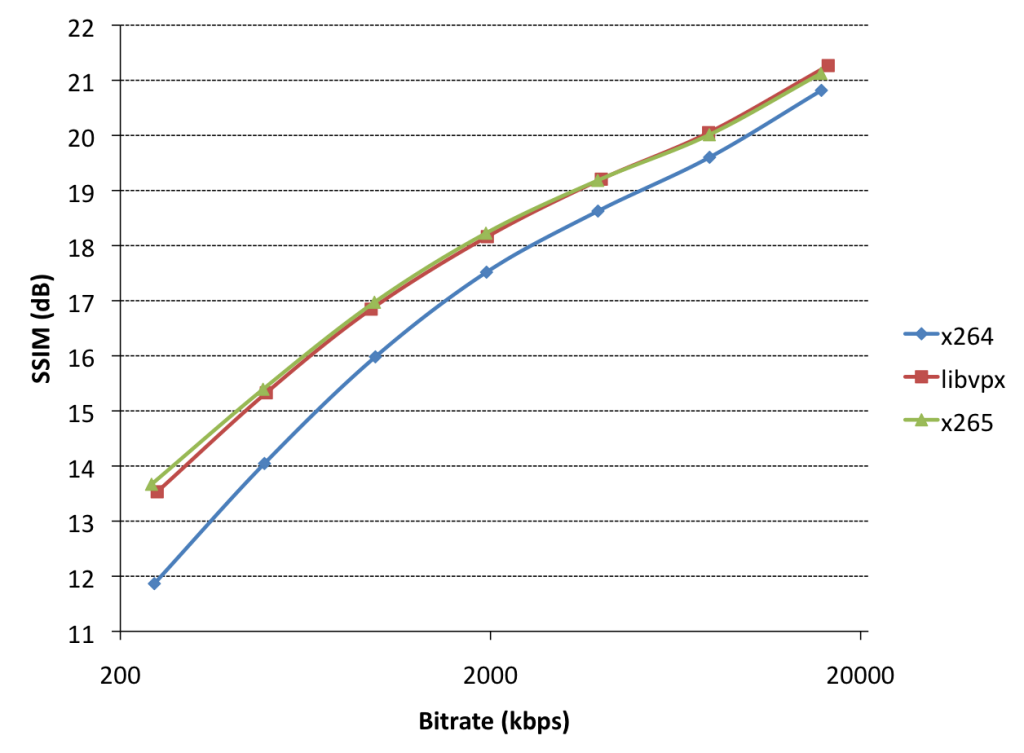
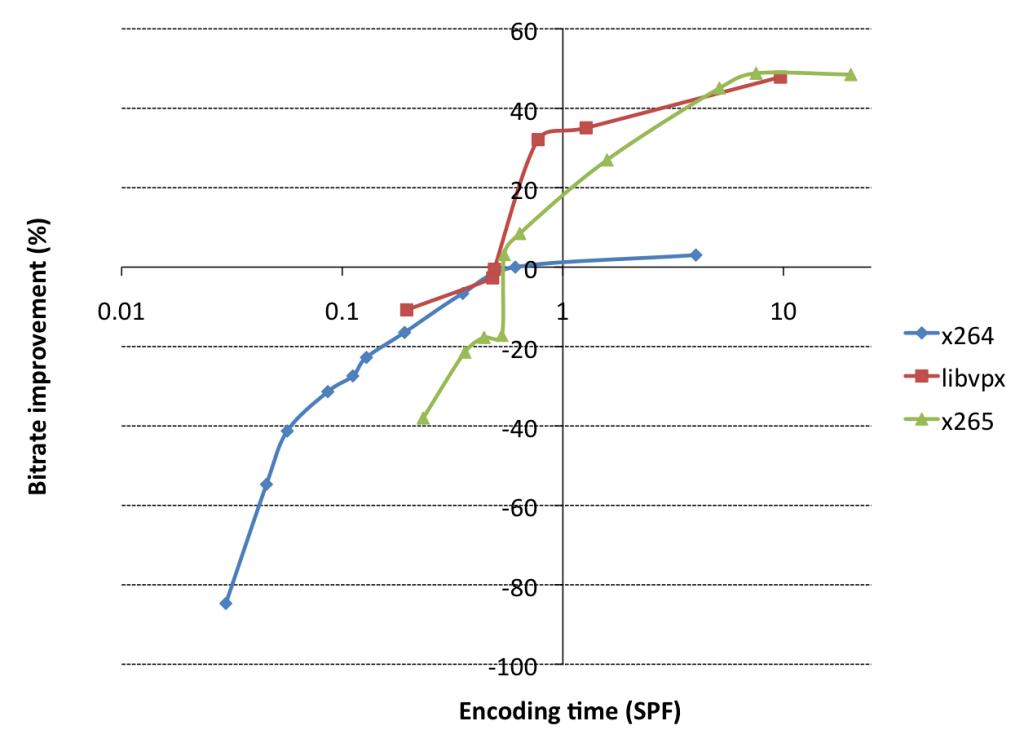
The effectiveness of a codec is highly dependent on the specific encoder implementation

A big reason why H.264 is popular is due to the success of the open source x264 encoder.
The x265 encoder still lacks many features and optimizations sucks as perceptual tuning.
At high bitrates x265 has less artifacts, but looks noticeably softer than x264.

The licening issues have also delayed H.265 adoption. There are currently three (!) patent pools for it,
each with their own licensing fees. On of the pools called HEVC Advance wanted 0.5% of the revenues from content creators.
This has lead to creation of the Alliance for Open Media with the aim of developing a royalty free codec,
taking elements from Cisco's Thor, Mozilla's Daala and Google's VP10.

HEVC has since backtracked.

-------------------------------------------------------------------------------------

For a multitude of reasons, post-production codecs use "intra" codecs, i.e. each frame is encoded as a separate still.
.red uses a variant of the JPEG2000, which the main benefit of easily outputting fractional resolutions.
It is hard to do better than JPEG in stills. As Daala's lead researcher Tim Terriberry likes to say, "JPEG is alien technology from the future".
It's an example of the kind of implausibly good performance that results from getting the minute details of a standard just right.

vp9-x264-x265-encoding-quality-1024x753.png

vp9-x264-x265-encoding-speed-1024x752.png
 
ProRes4:4:4 4K files are huge and very hard to edit with. ProRes4:2:2 1080p is much easier and is a standard among the industry, but at big loss of Raw data and resolution. Really depends on the what the final intent is.
I would disagree with only this point that actually, ProRes 444 4K is not that hard to deal with at all. I'm using it right now on a post project, and we're chugging right along. I have no problem editing or doing any color-correction in real time. Anything with noise reduction does slow down, but not gigantically.

The worst format for editing to me are H.264 files, at least the long-GOP formats, which have a tremendous amount of overhead involved in decoding. Those are pretty nasty. DNxHD 444 and ProRes 444 are fine. An hour of ProRes 444 4K is 326.4GB; an hour of Red Epic 4:1 is 229.9GB -- not a tremendous difference. If anything, the ProRes files are easier to playback on Mac OSX because they don't have to be debayered. I absolutely agree that the Raw files are better in terms of "tweakability" in post, and that would be my preference if there are no issues with money or hardware.
 
I would disagree with only this point that actually, ProRes 444 4K is not that hard to deal with at all. I'm using it right now on a post project, and we're chugging right along. I have no problem editing or doing any color-correction in real time. Anything with noise reduction does slow down, but not gigantically.

The worst format for editing to me are H.264 files, at least the long-GOP formats, which have a tremendous amount of overhead involved in decoding. Those are pretty nasty. DNxHD 444 and ProRes 444 are fine. An hour of ProRes 444 4K is 326.4GB; an hour of Red Epic 4:1 is 229.9GB -- not a tremendous difference. If anything, the ProRes files are easier to playback on Mac OSX because they don't have to be debayered. I absolutely agree that the Raw files are better in terms of "tweakability" in post, and that would be my preference if there are no issues with money or hardware.

It's very interesting, being on a PC, I have found that editing R3D files can be played back with realtime color correction much easier than 4K ProRes4:4:4. The proRes files bog down on me quite a bit. I guess then it depends on what your system is optimized for. With Cuda support, R3D files are a snap to work with.
 
Marc Wielage;1550670 If anything said:
MArc, what do you mean?
The playback of ProRes on OSX and PC should be the same. or am I wrong?
 
Does Arri Alexa shoot uncompressed raw files or is it compressed?
Uncompressed RAW with the RAW module, or to a Codex on older unupgraded Alexas. There are many Alexas now (like 4-5 I believe)

Does RED cams have the option to shoot uncompressed raw?
Technically no, but 2:1/3:1 is effectively uncompressed.

Can you playback DNG raw files from other cameras like the Black Magic makes, or you can only view them on the software?
Yes, many editing applications including Adobe (who created the DNG spec) playback DNG.

How similar or different is between R3D and cinema DNG?
DNG is (usually, although not necessarily) uncompressed and is a generic open standard. R3D is a closed proprietary standard based on JPEG2000. R3D includes enough metadata so that its color is tuned specifically for RED's sensors while DNG is a bit more of a free for all since an editor's software may or may not respect the proper color matrix defined by the manufacturer. The downside is that with DNG you can always playback a DNG, with RED you have to wait for the software to update to the latest R3D SDK which supports your sensor/desired color settings.

R3D vs prores: if R3D are btter quality that proress at much lower file sizes, why do people even want to convert to proress. Can you not edit R3Ds like you can edit prores?
Because at 1080p it's still a smaller file than 6k RAW. R3D is difficult to process so there can be some lag. For instance scrubbing quickly backwards and forwards can be stuttery in raw in Premiere but smooth as silk in ProRes because the frame doesn't have to go through so many steps to be decoded. ProRes was designed from the ground up to be extremely smooth in an editor. R3D was designed to handle giant high quality frames. R3D is getting better and better and the SDK is improving but it's like 90% smooth vs 100% smooth when scrubbing fast back and forth. Another advantage is consistency. If you bake it out to RGB you can be pretty certain of the white balance, ISO etc. If you send someone RAW files and they don't load the R3D meta data or change the meta data themselves it will look different. This can be problematic for VFX for instance if you get an R3D decode it with REDColor3 because that's the newest color science in Nuke and then the colorist wants to work from DragonColor2 and you have to go back to the original comp and redo a bunch of matchgrades in the CG to mach the new color space for the place. If you use DPX or ProRes from the R3D then you know everybody who works on that shot will definitely be starting from the same settings.

Also you can use ProRes LT if you just want to record off a cheap shoot that doesn't really need super high production value.

H.265 how far are we from having H.265 be as popular as H.264, realistically? Would this be a threat to codecs like R3d?
As long as it takes for people to buy new computers, phones and tablets. All 2nd half of 2015 processors and GPUs pretty much support h265. Will it be a threat? No. RED could just update the SDK behind the scenes to use Intraframe 16bit H265 and Adobe would update to support the new SDK and presto zamo you're still editing R3D but based on H265 instead of JPEG2000. R3D can be thought of as a container more than an intrinsic codec, just like you could have an H265 Quicktime you could also have an H265 instead of JP2K R3D. RED would undoubtedly tweak it anyway just like they did with JPEG2000 to be optimized for RAW. Personally I think they *should* move to H265 and it would help. I would love to have hardware R3D decoding built into every device.

If prores is so heavy but not so efficient, why is it still relevant?
See R3D vs ProRes.
 
It's very interesting, being on a PC, I have found that editing R3D files can be played back with realtime color correction much easier than 4K ProRes4:4:4. The proRes files bog down on me quite a bit. I guess then it depends on what your system is optimized for. With Cuda support, R3D files are a snap to work with.
Yes, ProRes is definitely not optimal for Windows. There, I'd lean towards DNxHD 444 or DNxHR 444 files, and I think those will work fairly well. There are always pros and cons to different workflows. Given lots of horsepower, there's a lot to be said for going all uncompressed DPX or EXR.

Does RED cams have the option to shoot uncompressed raw?
Technically no, but 2:1/3:1 is effectively uncompressed.
There's a big raging argument right now on the LiftGammaGain discussion group as to whether Red 3:1 or 4:1 counts as "uncompressed raw," and a lot of people taking stances as to what's really Raw vs. what's sorta/kinda raw. To me, it doesn't matter as long as it looks good. I completely agree with Gavin in that anything from about 5:1 and below are so mildly compressed, they're effectively and visibly lossless for our purposes. On the rare occasions I've seen visible artifacts in R3D footage, it's when they've gone much higher, like 8:1 or 10:1.

MArc, what do you mean? The playback of ProRes on OSX and PC should be the same. or am I wrong?
ProRes is generally easier to playback on Mac OSX than R3D, assuming the same hardware and resolution. Windows may or may not be a different situation depending on hardware. Lots of problems can be solved given enough money and hardware.
 
H.265 will not be replacing H.264 in cameras for at least several years. H.265 is only efficient at resolutions above HD/Full-HD and that efficiency requires a lot of processing power, which means bigger batteries, better cooling, and so on and so forth. Encoders for H.265 are still cooking for the most part, though production solutions are available. Once we see more GPUs with stacked memory, you'll see significant increases in video encoder performance, which means H.265 will become more accessible and therefore easier to deal with.

Samsung NX1 and NX500 already record H.265 internally. And Adobe and others are also already supporting in for editing with.
 
Back
Top