Welcome to our community

Be a part of something great, join today!

  • Hey all, just changed over the backend after 15 years I figured time to give it a bit of an update, its probably gonna be a bit weird for most of you and i am sure there is a few bugs to work out but it should kinda work the same as before... hopefully :)

Red Automator actions

... My next action can export stand alone Quicktime files from R3D files. This enables you to batch convert all your files to another format without entering Redcine...

Anders,

Any update on the second action (stand alone QT to another format without using RedCine)?
 
automator for dummies

automator for dummies

hello Anders and Deanan,

is it possible to explain step by step approach for us "dummies" which are not familiar with automator. please if possible - in a few easy steps :)) i promise will start to learn automator this afternoon, but in the mean time...

i mean, i understand the process - what this application is for, but when opening automator - cannot do much. even interface looks bit different (no these two icons on the left upper side of the automator window). maybe i am using older version of automator?

i know that i need to learn little bit to do something, but simple step by step process/explanation will be highly appreciated.

thank you,

filip kovcin
 
You may not see the two columns of icons on the left if the library is hidden.

Automator lets you build a little custom workflow based on the building blocks. If you look at the screenshot i posted earlier, it takes file or folder, then goes through all the sub folders, then filters for the first file in an r3d sequence and then puts it into redrender. You could do the same with REDcsv to make a database you could open in excel or use REDwrapper or REDale to remake the QT wrappers in bulk.
 
I've tried to use the Automator actions (redrender) with little success. At first I could only get it to execute the action if I had the r3d on my desktop and set the output to the desktop. I then discovered to get it to render to an xsan volume you have to set output to a folder that's name has no spaces or odd characters (not even underscores). I finally got it to render DPX files, however it stops at frame 177 out of 1,600. Automator shows it rendering but looking at the destination folder no DXP files are written after 177. I tried the same batch of r3d files to uncompressed QT and same thing, automator keeps rendering but when I check the QT in the destination folder it stops gaining size after a few GB. Which tells me redline is failing at some part of the process. Any ideas?
 
See post #33 above. Automator has a bug where it times out. A workaround is in place but not released yet in REDrender.

Automator uses redline to render which doesn't seem to be passing the filename to REDline properly for strange pathnames. We're looking for a workaround for that now.
 
Query XML in Automator - FREE

Cocoatron is a collection of Automator Actions that allows you to visually create XML Processing Pipelines.

Implemented using libxml2, libxslt, libexslt, and NSXML, Cocoatron suppors XSLT 1.0, XQuery, XInclude, and validation against DTD, W3C XML Schema, RELAX NG.

Cocoatron consists of six Automator Actions (pipeline stages):
- Load XML Documents
- Process XIncludes of XML Documents
- Validate XML Documents (DTD, XSD, RNG)
- Transform XML Documents (XSLT)
- Query XML Documents (XQuery)
- Serialize XML Documents

And one custom Automator data type which is used to pass XML documents between Cocoatron Actions: XMLInfoset

http://automatoractions.com/files/cocoatron1.0.html
 
Trying to get this Automator Action to work, but it doesn't for me. It didn't even install as described when I double clicked it. But, things have progressed in 2 years, so maybe that old script is no longer valid for OS X 10.5.8.
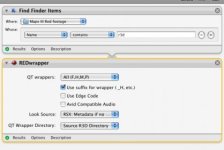
So, I tried building my own Automator Workflow and can't get it to work either. Any suggestions? I've attached a pic of my workflow.
Thanks.
 

Attachments

  • Picture 2.jpg
    Picture 2.jpg
    19.1 KB · Views: 0
Trying to get this Automator Action to work, but it doesn't for me. It didn't even install as described when I double clicked it. But, things have progressed in 2 years, so maybe that old script is no longer valid for OS X 10.5.8.
So, I tried building my own Automator Workflow and can't get it to work either. Any suggestions? I've attached a pic of my workflow.
Thanks.

Okay, starting to get things to work. Here's what I did to make it happen. I found an "Import Action" function in Automator. Pointed it to my desktop where the Action was, imported it. Put it under the "Find Finder Items" just as pictured in previous post, then it ran. Thanks Anders!
 
Quick question...

Are these Automator scripts still supported in the latest REDline build? Are they "safe" to use?

Also, does anyone still have the original automator scripts on hand?

Thanks in advance...

Chris!
 
Back
Top