Michael McLaughlin
Well-known member
Maybe this will be helpfull.
I have noticed my new 16GB cards really only let me access them when
connected to my old Dell XP system.
I use a sony CF card reader that has been flawless with my 8GB and 16GB cards on my xp system.
But last week I tried it on a host of different mac systems and some pcs and could not get the 16GB cards to read (on some the card could be seen thru utilities tools but thats all, no mounting).
Today I am on my friends brand new Imac with the most current osX, same thing; 8GB no problem, but 16GB no way (turned off, switched cables etc, etc.).
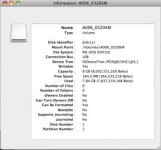
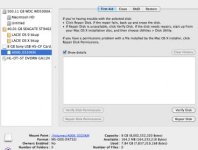
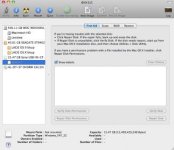
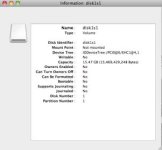
What I did notice is this... the systems sees the 8GB as a "file system" (MS-DOS (FAT32)) and for the 16GB... it DOESN'T even see a file system, only a "Partition Type" (Windows_FAT_32). This I found interesting... "MS-Dos" for the 8GB card, "Windows" for the 16GB. Maybe nothing, maybe something.
I have attached screenshots of the pop-up windows.
Maybe a firmware update on the 16GB could help the problems people are having (MS-DOS as opposed to Windows, if we choose).
I just don't have the $500 for the RED CF reader (need base, that's were I get the $500 I assume) in the near future, some slight unemployment economic problems.
I have noticed my new 16GB cards really only let me access them when
connected to my old Dell XP system.
I use a sony CF card reader that has been flawless with my 8GB and 16GB cards on my xp system.
But last week I tried it on a host of different mac systems and some pcs and could not get the 16GB cards to read (on some the card could be seen thru utilities tools but thats all, no mounting).
Today I am on my friends brand new Imac with the most current osX, same thing; 8GB no problem, but 16GB no way (turned off, switched cables etc, etc.).
What I did notice is this... the systems sees the 8GB as a "file system" (MS-DOS (FAT32)) and for the 16GB... it DOESN'T even see a file system, only a "Partition Type" (Windows_FAT_32). This I found interesting... "MS-Dos" for the 8GB card, "Windows" for the 16GB. Maybe nothing, maybe something.
I have attached screenshots of the pop-up windows.
Maybe a firmware update on the 16GB could help the problems people are having (MS-DOS as opposed to Windows, if we choose).
I just don't have the $500 for the RED CF reader (need base, that's were I get the $500 I assume) in the near future, some slight unemployment economic problems.