Brian Ferguson
Story Teller
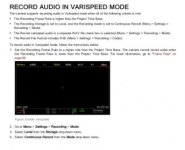
So I happened across this in the Helium Ops Manual, I assume it is in other RED models. RECORD AUDIO IN VARISPEED MODE
I did a test and it works great. I shot a clip at 48 fps in a 24 project (23.98) and the audio is a wav file separate form the R3D files.
It was half as long as the R3D files but that is what I expected. We do a lot of shooting at athletic events and the editors are always wanting some ambient sound of crowds etc. With almost all of the cameras shooting slo-mo there is no audio unless we put a little Zoom or Tascam recorder at the venue. This will work even if we just use the built in Helium front mics we will have something - and not have to search a second source. It will be a wav file inside the RDM folder, pretty cool.

I did a test and it works great. I shot a clip at 48 fps in a 24 project (23.98) and the audio is a wav file separate form the R3D files.
It was half as long as the R3D files but that is what I expected. We do a lot of shooting at athletic events and the editors are always wanting some ambient sound of crowds etc. With almost all of the cameras shooting slo-mo there is no audio unless we put a little Zoom or Tascam recorder at the venue. This will work even if we just use the built in Helium front mics we will have something - and not have to search a second source. It will be a wav file inside the RDM folder, pretty cool.