Welcome to our community

Be a part of something great, join today!

  • Hey all, just changed over the backend after 15 years I figured time to give it a bit of an update, its probably gonna be a bit weird for most of you and i am sure there is a few bugs to work out but it should kinda work the same as before... hopefully :)

Really bad artifacting HELP

Andy Best

Well-known member
Joined
Sep 9, 2010
Messages
56
Reaction score
0
Points
0
Location
Portland
Website
www.andyshootsred.com
Hello All,

I am a new RED user and I am shooting on 16g CF cards. Lately I have been having issues with artifacting in my footage. I am shooting 3k and never see a problem until I bring it into REDCine and that's when I see glitches, clicks, and pops. Is this a common rookie mistake, if so, what can I do?

Thank you

Andy
 
It might be useful to post examples or links to footage for a bit of group diagnosis.
 
Try a forum search with the keyword "corrupt"
Maybe that matches your issue
 
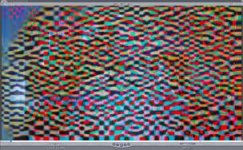
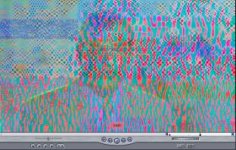
Here are some examples of what is happening with my red footage. These are only about a frame long but I am not sure what is happening.

Thanks in advance for your help.
 

Attachments

  • Screen shot 2010-09-24 at 3.10.37 PM.jpg
    Screen shot 2010-09-24 at 3.10.37 PM.jpg
    21.7 KB · Views: 0
  • Screen shot 2010-09-24 at 1.31.44 PM.jpg
    Screen shot 2010-09-24 at 1.31.44 PM.jpg
    20.4 KB · Views: 0
Here are some examples of what is happening with my red footage. These are only about a frame long but I am not sure what is happening.

Thanks in advance for your help.

Typical case of corrupted footage. Most of the time it happens during offloading. If you still have your Cf cards with the material on it you are safe. Otherwise it is a matter of repair in post/skip/double frame. It can show up like this or like half frames or green frames. No real solution, but next time you have to check your CF card reader, The only way to check if there are corrupt frames is transcoding them with a red rocket card, a frame like this will give an error. For the 104 days production I am doing right now, we bought an extra set of 12 16GB cards. We only erase them teh next day when the Post house has downconverted the material for editing and when there are no errors. Adobe Premiere will also give an error on transcoding, but for me, it takes too long to transcode to be a good alternative.
 
Could be your reader is getting hot, try rotating readers to keep them cool. I use 4 on most projects to insure reliability.
 
Thank you all very much. This is all very valuable information. I appreciate it.

I only have one reader and six cards right now. From the sounds of it I need to get a little more of everything. The reader I am using is a Lexar. Have you heard of it, and is it good? If not, do you recommend a reader?

Thank you again.

Best
 
Back
Top